
The popular advice is simple: automate everything, run the suite everywhere, and let the tools handle the rest. That approach sounds efficient, but it often creates a larger problem. A mobile test suite can execute quickly and still provide weak release confidence if it runs on the wrong devices, fails for unclear reasons, or covers low-value scenarios while missing the journeys customers depend on.
A practical mobile app testing automation strategy starts with economics and risk, not tool popularity. Teams need to decide which checks should run repeatedly, where real devices add signal, how much flakiness the pipeline can tolerate, and who will maintain the system as the product changes. The strongest programs usually automate fewer critical journeys first, then expand only when the results are stable, diagnosable, and useful to developers.
Table of Contents
- The Reality of Mobile Test Coverage
- Mapping Critical User Journeys for Automation
- Navigating Device Farms and Emulator Trade-offs
- Engineering Resilience Against Test Flakiness
- Integrating Mobile Suites into CI/CD Pipelines
- Scaling Automation with a System-Based Approach
The Reality of Mobile Test Coverage
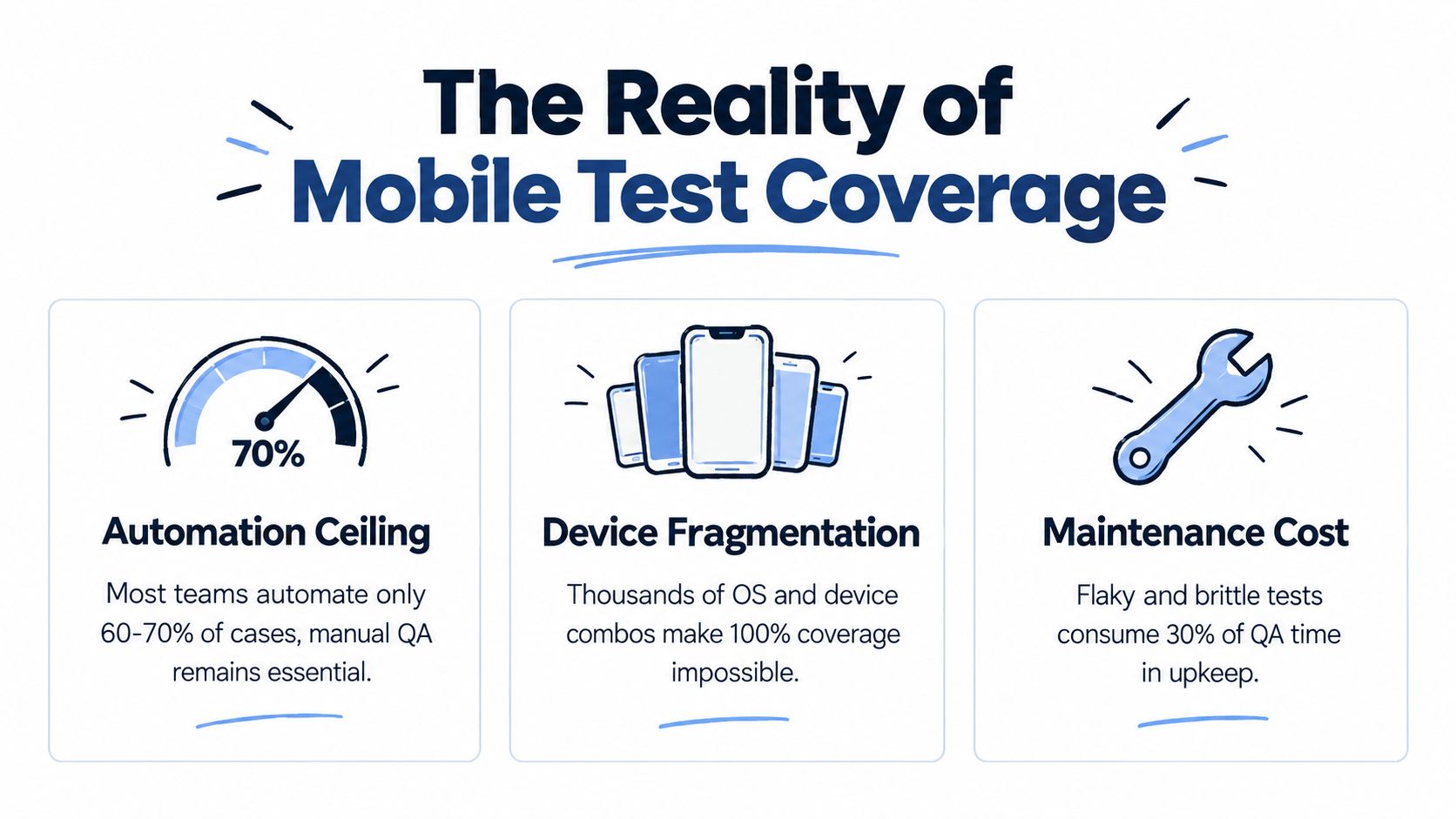
More automated tests do not automatically improve release quality. A large suite earns its cost only when failures are trustworthy and its coverage reflects product risk. Otherwise, engineers spend time investigating timing issues, stale locators, test-data collisions, and device-specific noise instead of fixing defects.
A 2024 mobile delivery and test automation survey found that many organizations still needed 3–5 days to execute manual tests, while automated tests could finish in hours. Yet a majority of respondents had automated less than 24% of their tests, and 47% still executed at least 100 manual test cases for each application release. Automation reduces repetition for some teams, but it does not remove manual validation or create broad coverage by default.
That gap reflects a practical constraint: mobile automation becomes expensive when every added test expands device-farm usage, failure triage, and maintenance work. A smaller suite of stable, high-value journeys can provide better release evidence than hundreds of scripts that fail for reasons unrelated to the application.
Why 100% coverage is usually the wrong target
A mobile application spans operating systems, device capabilities, screen dimensions, permissions, network conditions, and lifecycle behaviors. A passing result on one environment cannot prove that the same interaction works across all others. Chasing every combination produces a suite that costs more to run and becomes harder to interpret.
Target high-signal coverage instead. Automate flows that are stable, repeated often, and expensive to validate manually. Reserve exploratory testing, subjective usability checks, rapidly changing screens, and unusual edge conditions for human investigation. This division keeps automation focused on evidence that can support a release decision.
Practical rule: A test earns its place when its failure can change a release decision or expose a regression that matters to users.
Measure useful coverage, not script volume
Engineering leaders should measure whether automation shortens feedback time and protects important user journeys. Useful indicators include:
- Critical-flow coverage: Can users sign in, complete the primary transaction, and use the product's central feature?
- Failure clarity: Does a failed run identify an application defect, environment problem, test issue, or data conflict?
- Repeatability: Does the same test produce a consistent result under the same conditions?
- Maintenance demand: Can the team update the suite without turning each UI change into a repair project?
The market's scale confirms strong demand for mobile testing services. It was estimated at $7.70 billion in 2025 and projected to reach $19.84 billion by 2031, with a 17.09% CAGR from 2026 to 2031. Automated testing represented 46.05% of that market in 2025, according to market data summarized by GetPanto. That spending reflects strategic demand, but it does not solve prioritization. When teams automate low-value checks, device-farm costs and flakiness triage rise without delivering comparable release confidence.
Mapping Critical User Journeys for Automation
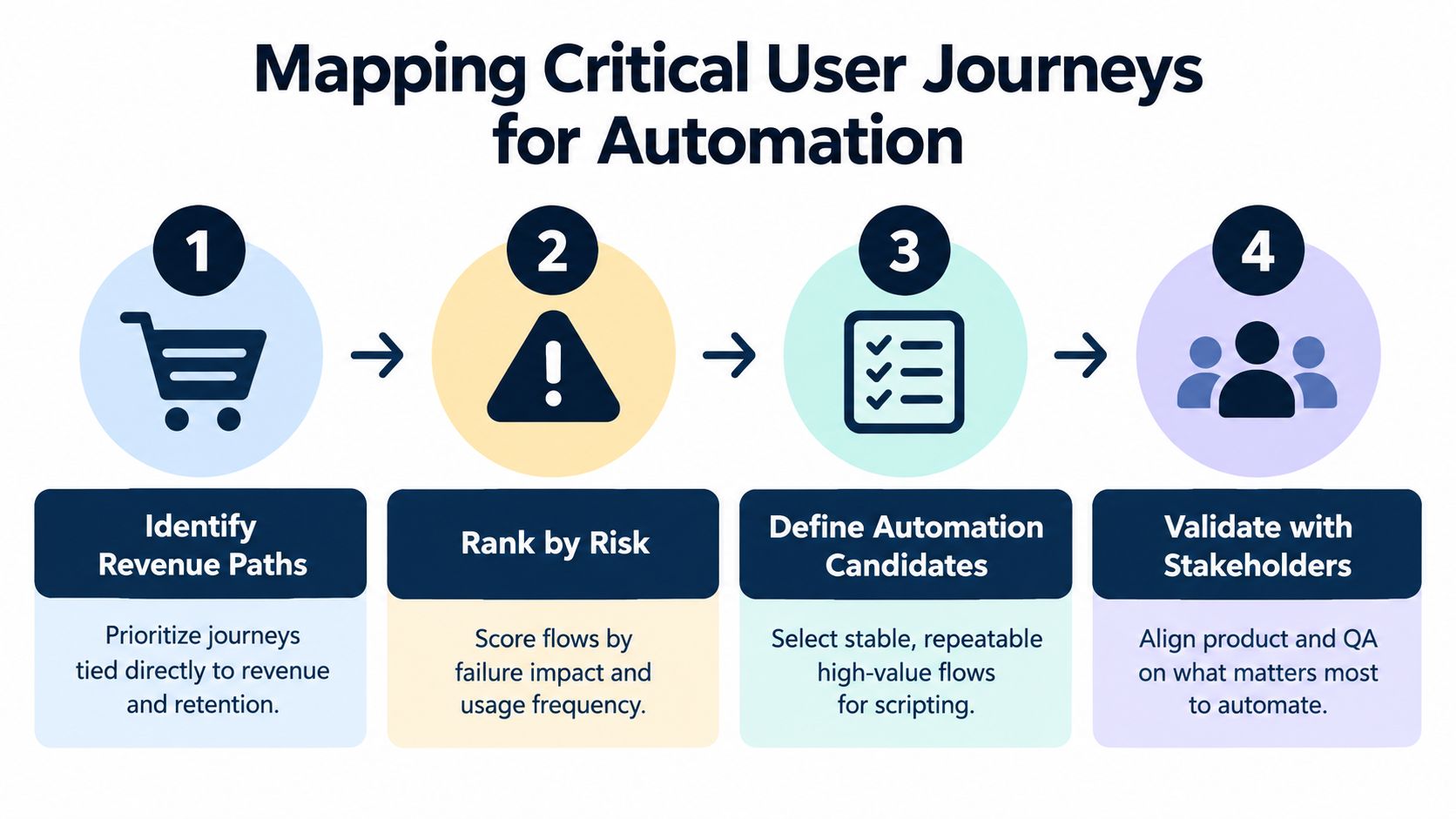
Before writing test code, map the paths that keep the product valuable. Product managers, engineers, support teams, and QA should identify where a failure would interrupt revenue, retention, activation, or a core customer promise. For an ecommerce app, that may include sign-in, product discovery, checkout, payment confirmation, and order history. For a collaboration product, it may be onboarding, workspace access, invitation, messaging, and notification handling.
Start with a journey map rather than a test-case list. Each journey should show its entry conditions, major user actions, service dependencies, expected outcome, and failure impact. This gives the team a shared view of what the test must prove.
A risk-first selection method
Use four filters to decide whether a journey belongs in the first automation wave:
- Business consequence: Would failure prevent a customer from completing an important action?
- Usage frequency: Do customers exercise the flow regularly enough to justify repeated checking?
- Regression exposure: Does the journey touch services, permissions, integrations, or shared components that change often?
- Test stability: Can the team create deterministic data and reliable assertions for the flow?
The first automation candidates usually combine high business consequence with repeatable behavior. Avoid starting with a feature that changes every sprint, depends on unstable third-party content, or requires a tester to make a subjective judgment.
A useful journey definition is concrete: “An existing user signs in, opens the primary workspace, creates a record, saves it, and sees the record in the list.” That is stronger than “test the dashboard.” The former describes a customer outcome, while the latter describes a screen.
Separate the stable core from the flexible edge
Automate the stable core aggressively enough to protect releases. Leave the flexible edge to exploratory testing until the product behavior settles. Manual testing still matters for visual hierarchy, confusing interactions, accessibility observations, unusual interruptions, and behaviors that require context rather than a fixed assertion.
For each automated journey, define:
- Starting state: account type, feature flags, permissions, and required data.
- Business action: the behavior the customer performs.
- Observable result: a meaningful state change, confirmation, or persisted record.
- Platform variation: what differs between Android and iOS.
- Evidence on failure: screenshots, logs, device details, network information, and test data identifiers.
Teams that need broader guidance can pair this process with functional automation testing, especially when mobile flows depend on backend and API behavior.
A short demonstration can help stakeholders see why journey selection matters before the suite expands.
Stakeholder validation prevents QA from optimizing for the wrong risk. Product confirms business importance, engineering confirms technical feasibility, and QA confirms that the journey can produce a reliable signal.
Navigating Device Farms and Emulator Trade-offs
Device strategy determines both the cost and the credibility of mobile app testing automation. Emulators and simulators provide fast feedback and broad repeatability, but they don't reproduce every hardware, OS, permission, performance, or manufacturer condition. Real devices provide stronger production realism, but access, concurrency, maintenance, and debugging make them more expensive to operate.
A sensible strategy uses layers instead of choosing one environment for every test. Run fast checks on local or CI-managed virtual devices, then reserve real-device execution for the journeys and environments where physical behavior can change the result.
| Infrastructure Type | Best Use Case | Cost Profile | Execution Speed |
|---|---|---|---|
| Local emulator or simulator | Developer feedback, smoke tests, stable in-app flows | Lower infrastructure cost, but requires local maintenance | Fast |
| CI-hosted emulator or simulator | Pull request validation and repeatable regression checks | Infrastructure cost grows with concurrency and retention needs | Fast to moderate |
| Local real-device lab | Frequently used devices and controlled hardware checks | Hardware acquisition and upkeep create ongoing operational work | Moderate |
| Cloud device farm | Device-specific validation, release gates, and broader OS coverage | Usage and parallel execution can become a significant recurring expense | Moderate to fast, depending on queue and concurrency |
What virtual devices catch well
Virtual environments work well for logic and interface checks that don't depend heavily on physical hardware. They're useful for:
- Authentication and onboarding paths
- Navigation and form validation
- Stable core workflows
- Build health and smoke checks
- Repeatable regression checks during development
They also make CI execution easier because teams can create predictable environments, reset state, and run tests without sharing a physical handset. That speed supports earlier feedback, particularly when developers need an answer on a pull request.
Where real devices earn their cost
Physical devices matter when the risk involves hardware or operating-system behavior. Examples include camera access, push notifications, background execution, biometrics, memory pressure, screen rendering, network transitions, battery-sensitive behavior, and manufacturer-specific Android changes.
A cloud farm can expand access without requiring the team to maintain every device internally, but it introduces its own operating model. Test selection must be deliberate, or teams will pay to repeat low-value checks across environments that add little new information. Failures also need artifacts that make remote debugging possible, including video, screenshots, device logs, application logs, and the exact build and configuration used.
Build a tiered device matrix
Start with devices and OS versions represented in your actual customer base, product analytics, support history, and release risk. Don't confuse a large matrix with meaningful coverage. A smaller, risk-based matrix that runs consistently can protect the product better than a sprawling matrix that produces unresolved failures.
Run the same critical journey at different layers:
- Every pull request: virtual devices, fast smoke flows, and focused platform checks.
- Merge or candidate build: broader virtual coverage plus selected real-device checks.
- Release validation: critical journeys on prioritized real devices and OS versions.
- Investigation: targeted device runs for failures linked to hardware, OS, or lifecycle behavior.
The goal isn't to test everywhere at once. It's to place each test where its result is most trustworthy and its cost is justified.
Engineering Resilience Against Test Flakiness
Flaky tests are not harmless noise. They weaken developer trust, consume triage time, and can hide real regressions when teams start rerunning failures without understanding them. An empirical Android study found that roughly 1.5% of all test runs produced flaky results, while about 16% of tests showed some flakiness. The study identified concurrency, dependencies, program logic, network conditions, and UI instability among the major causes in its empirical analysis of flaky Android tests.
Replace arbitrary waits with observable states
The common response to instability is to add longer sleeps. That usually slows execution without solving the race. A better test waits for a meaningful condition, such as a loading indicator disappearing, a specific screen state becoming available, an event being emitted, or a server response reaching the expected state.
Black-box tools often need more deliberate synchronization because they observe the application from outside its process. Native gray-box approaches can provide stronger lifecycle awareness for in-app flows, while black-box testing remains valuable for permissions, notifications, and cross-app behavior. The framework choice should follow the boundary the test needs to cross, not the popularity of the tool.
Use stable accessibility identifiers and test-facing selectors rather than text that changes with localization or content. Keep assertions tied to business outcomes, not incidental layout details. A checkout test should verify that the order reaches the expected state, not rely on a fragile visual position for every button.
Isolate sources of nondeterminism
Network instability deserves architectural treatment. Separate service contract checks from end-to-end mobile journeys, stub responses where the goal is UI behavior, and keep a smaller set of real integration flows for validating system connections. This prevents a temporary backend or third-party outage from making every client-side test meaningless.
Concurrency can create hidden collisions when tests share accounts, records, files, or server-side state. Give parallel tests isolated data, deterministic identifiers, and explicit cleanup. If cleanup fails, the next run shouldn't inherit an unexplained condition.
A failure policy should distinguish between rerunning a test for diagnosis and accepting a rerun as proof of success. Capture the first failure, preserve artifacts, classify the cause, and assign ownership. Track recurring patterns by device, OS, feature, network condition, and test component.
A retry can help confirm instability. It can't turn an unexplained failure into a trustworthy pass.
When a suite remains difficult to interpret, review the framework architecture rather than adding more retries. This guide to choosing a test automation framework is useful when teams need to assess synchronization, platform scope, reporting, and maintenance boundaries together.
Integrating Mobile Suites into CI/CD Pipelines
A mobile suite belongs in the delivery system only when it produces feedback at the speed and level of confidence developers need. Running every test after every change sounds rigorous, but it can create queues, delay merges, and bury an important failure beneath low-value results.
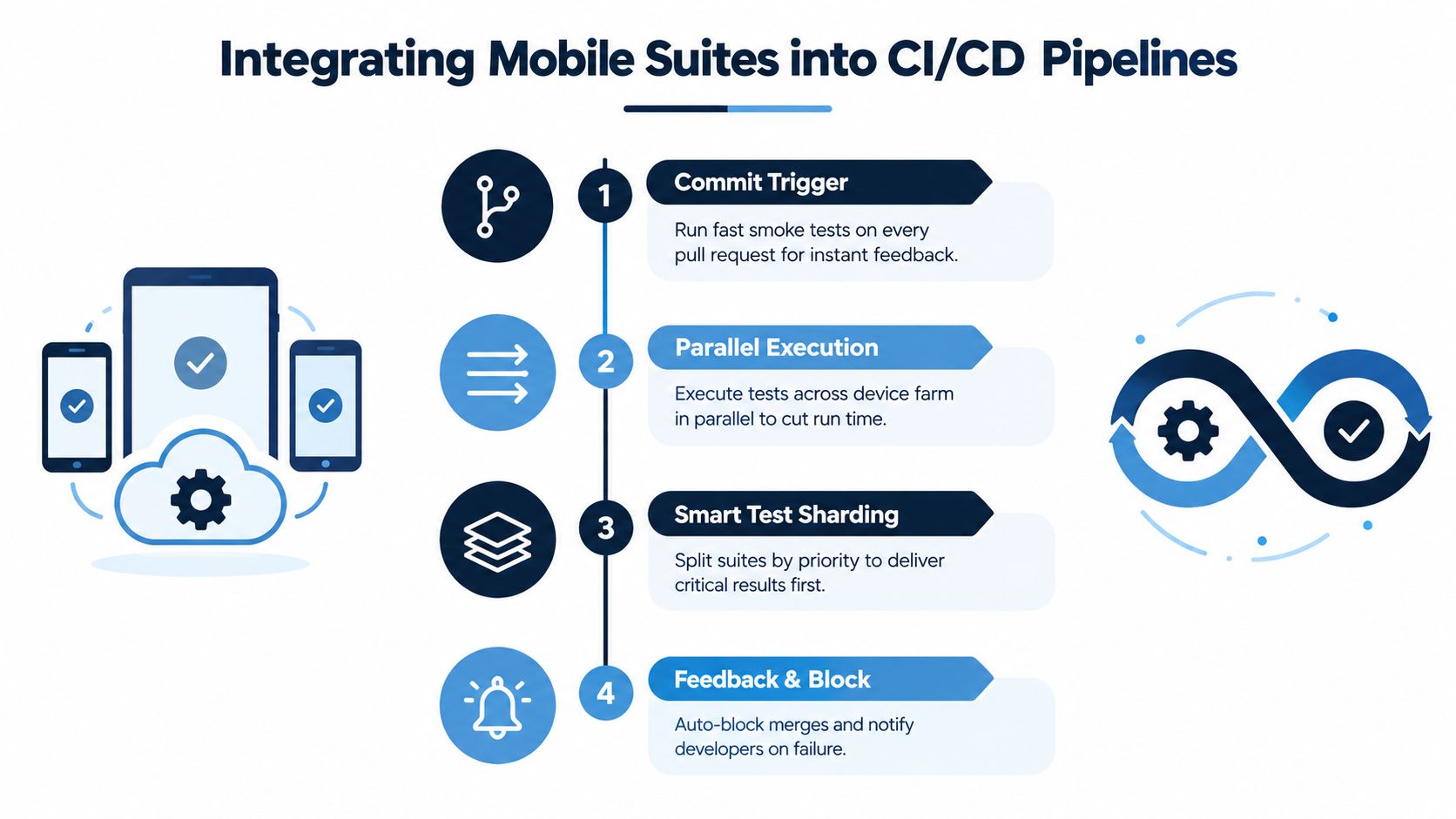
Split execution by decision purpose. Pull request checks should answer whether the change is safe enough for continued integration. Release checks should answer whether the candidate build behaves correctly across the selected device and platform risk surface.
Design the pipeline around feedback tiers
A practical pipeline can use these execution layers:
- Pull request smoke: Launch, authentication, the primary workflow, and a small set of high-risk checks on predictable environments.
- Post-merge validation: Run a wider selection in parallel, with results attached to the build and ownership assigned for failures.
- Nightly regression: Exercise broader journeys, integrations, and device combinations that don't belong on every pull request.
- Release gate: Run the curated real-device set and require explicit review of unresolved failures.
Parallel execution reduces elapsed time, but it also increases pressure on device capacity, test data, and service dependencies. Sharding should divide suites by stable workload and risk, not split files alphabetically. Critical results should return first so teams can act before the rest of the suite finishes.
Make test data a pipeline concern
A test that depends on a manually prepared account won't remain reliable in CI. Create data through controlled APIs or fixtures, use unique records for parallel workers, and reset state deliberately. Secrets, environment configuration, feature flags, and device capabilities should come from managed pipeline inputs rather than hard-coded values.
Reports need more than pass and fail totals. Include the application build, platform, device, OS version, test duration, screenshots, video where useful, logs, and failure classification. A release dashboard should show which business journeys passed, which failed, and whether the failure is product, environment, data, or automation related.
Teams that want to understand why delivery still feels uncertain can also review why releases feel risky. The pipeline should reduce uncertainty by presenting evidence, not by producing a larger pile of test output.
Scaling Automation with a System-Based Approach
Scaling mobile automation is an economics problem before it is a tooling problem. A sustainable program combines framework architecture, test ownership, device policy, CI/CD integration, test data, and failure governance. One capable QA engineer may start the work, but cannot indefinitely design the framework, build critical journeys, maintain device access, investigate infrastructure failures, and absorb every product change.
Organize the work into parallel responsibilities. One role defines architecture and conventions. Another builds high-value journeys. A third connects execution with CI/CD, reporting, device access, and test data. This structure reduces the risk of a single owner becoming the bottleneck, while keeping technical decisions visible across the team.
Build the framework for change
Separate business intent from platform mechanics. A journey should describe what the user accomplishes. Platform adapters should handle Android and iOS selectors, permissions, navigation differences, and lifecycle behavior. Shared concepts remain reusable without assuming that both platforms behave identically.
A maintainable framework needs:
- Reusable actions: Sign-in, navigation, setup, and cleanup should use consistent interfaces.
- Stable selectors: Developers should expose automation-friendly identifiers during feature delivery.
- Environment controls: Device, OS, backend, feature flag, and data settings should be explicit.
- Failure artifacts: Failed runs should include enough evidence for reproduction or classification.
- Ownership rules: Someone must decide whether a failure belongs to the product, test, device environment, or pipeline.
The goal is not the largest possible suite. A smaller set of reliable, high-risk journeys usually gives release decisions more useful evidence than a broad collection that requires constant triage.
Treat maintenance as planned engineering
Automation produces value across repeated releases, but maintenance is part of its operating cost. Adoption does not prove maturity. Teams should review the suite after meaningful product, platform, and production changes, retire tests that no longer protect a real risk, and split tests that validate unrelated outcomes.
Recurring production failures deserve focused regression checks. That does not mean converting every historical defect into a permanent end-to-end journey. Each added test consumes device time, pipeline capacity, and investigation effort, so its protected risk should be clear.
AskYourQA designs and implements QA automation systems covering mobile, frontend, backend, API, CI/CD, reporting, and framework architecture. The relevant decision is whether the team needs additional system design and implementation capacity to produce reliable release feedback without growing a brittle suite.
The strongest operating model keeps people responsible for risk decisions and uses automation for repeatable evidence. Developers receive faster signals, QA retains time for exploratory investigation, and engineering leaders gain a clearer basis for release decisions.
If mobile releases are slowed by manual regression, device fragmentation, or flaky CI results, AskYourQA can map critical journeys, design a maintainable mobile automation framework, and integrate focused smoke and regression suites into the pipeline. The practical starting point is deciding which tests should run first and where real-device coverage will provide the strongest return.