
A CI/CD pipeline is an automated sequence of steps that builds, tests, and deploys code changes to production, providing fast feedback on quality and risk before every release. In a mature pipeline, source control, build automation, testing, deployment, security checks, and monitoring work together as one release system.
You may recognize the situation. A release is planned for Friday, but one environment has a different configuration, a regression test was skipped, and nobody is certain which build is running in staging. The team gathers in a video call, follows a deployment checklist, waits for manual verification, and hopes production behaves as expected.
That process can work for a small application with infrequent changes. It becomes fragile as teams add services, contributors, environments, cloud resources, and AI-generated code. A CI/CD pipeline replaces much of that uncertainty with repeatable automation. Think of it as an assembly line for software, where each change passes through inspection before it reaches customers.
The important distinction is that a pipeline isn't merely a build script. It is a feedback control system. Code enters the system, automated checks measure its quality and risk, deployment moves an approved artifact forward, and monitoring reports what happened after release. The next decision is based on that feedback.
Table of Contents
- Understanding the CI/CD Pipeline
- Core Components and How Pipelines Work
- Measuring Pipeline Performance with DORA Metrics
- Integrating Test Automation into CI/CD
- CI/CD Patterns for Delivery and Deployment
- Overcoming CI/CD Implementation Challenges
- Next Steps for Building a Robust Pipeline
Understanding the CI/CD Pipeline
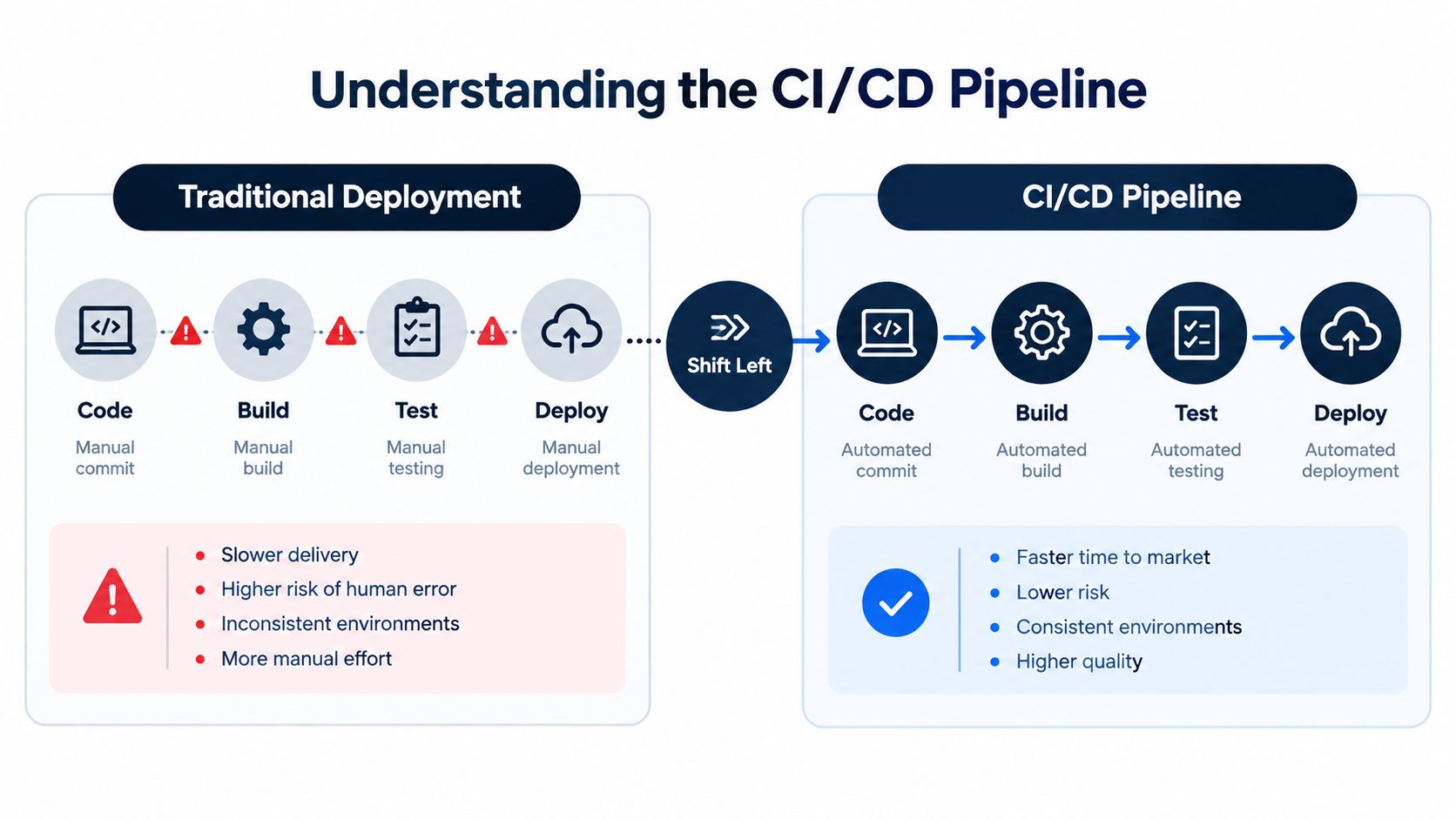
Traditional software delivery often moves in a straight, manual sequence: a developer finishes code, another person builds it, QA tests it later, and an operations engineer deploys it during a scheduled release. Each handoff creates delay and creates an opportunity for information to get lost. If testing discovers a defect near the end, the team may need to reconstruct which change caused it and whether the deployment environment matches the test environment.
A CI/CD pipeline changes the timing of those checks. A commit can trigger a build, create a versioned artifact, run automated tests, scan for security issues, and deploy to a controlled environment without requiring someone to copy files or follow a long checklist. The team still makes decisions, but the pipeline performs repeatable work consistently.
The terminology developed over time. A 2018 academic survey of continuous integration, continuous delivery, and continuous deployment traces continuous delivery as a published concept to 2010 and describes the distinction between the practices:
- Continuous integration means developers commit frequently to a shared mainline, with automated builds and tests checking whether changes work together.
- Continuous delivery keeps each validated build ready for release, usually with a human deciding when production deployment should happen.
- Continuous deployment extends the automation by sending approved changes to production automatically.
Jenkins community reporting from that period illustrates how pipelines became operationally important. 87% of organizations practicing continuous delivery used Jenkins Pipeline to define delivery workflows, and reported pipeline jobs increased 308% in a single year, reaching 4,645,982 jobs among installations reporting usage, as documented in the same survey reference.
The practical lesson is simple: a pipeline turns a code change into a controlled sequence of evidence. It tells the team what was built, which tests passed, what security checks ran, where the artifact was deployed, and whether the running system remains healthy.
Core Components and How Pipelines Work
A pipeline usually starts with an event in a source repository. A pull request, merge, tag, or push to a protected branch can trigger the workflow. The stages then pass a versioned artifact and its test results forward, while failures stop promotion until someone investigates.
Source and build
Source control provides the starting point. Git records the change, the branch, the author, and the commit history. The pipeline should build the exact revision that was reviewed, not an ambiguous working directory that may have changed since review.
The build stage converts source code into something deployable. It may compile application code, resolve dependencies, create a container image, package frontend assets, or produce a mobile build. A reproducible build gives the team a known artifact that can move from development to staging and production without being rebuilt differently at each step.
Test and deploy
The test stage checks the artifact at several levels. Unit tests examine small pieces of logic, integration tests verify interactions between components, end-to-end tests exercise user journeys, and security checks look for vulnerabilities or unsafe configuration. Parallel execution can shorten feedback time, but only if the tests provide useful signals and fail for meaningful reasons.
The deploy stage promotes the artifact to an environment. That might mean a development namespace, a review environment, staging, or production. Deployment strategies such as blue-green releases, canary releases, or controlled environment promotion can limit exposure when a change carries higher risk.
Monitor and learn
The monitor stage closes the loop. It observes application health, logs, traces, infrastructure signals, and business-critical behavior after deployment. A smoke check that confirms a user can sign in or complete a transaction is often more valuable than a generic “deployment succeeded” message.
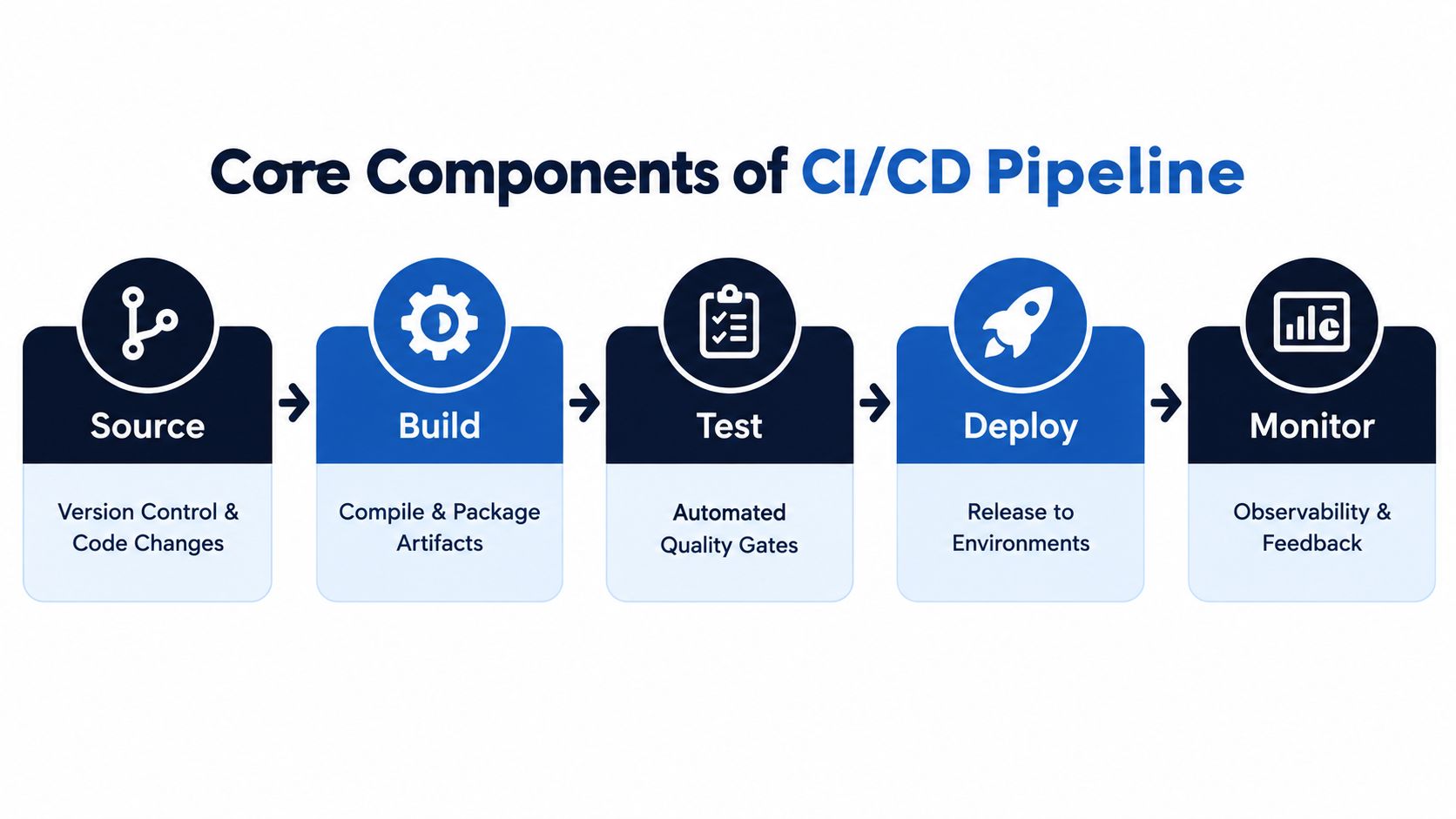
For QA and platform leaders, testing is the control mechanism between code introduction and release. Fast, parallelized checks detect defects earlier, while post-deployment validation confirms that the deployed system behaves correctly in its real environment. The CI/CD pipeline guide from Microsoft describes this flow as an automated sequence covering source, build, test, deployment, and monitoring.
The stages form a loop rather than a one-way conveyor belt. Monitoring can trigger an alert, a rollback can restore a previous artifact, and the resulting incident can lead to a new test that prevents the same failure.
Measuring Pipeline Performance with DORA Metrics
A pipeline can be busy and still be ineffective. Frequent deployments don't prove that customers receive value safely, and a green build doesn't tell you how long recovery takes after a failed release. Engineering leaders need measures that connect delivery activity to speed, stability, and operational risk.
DORA metrics provide that vocabulary:
| Metric | What it measures | Why leaders use it |
|---|---|---|
| Lead time for changes | The time from code committed to code running in production | Shows how quickly the organization turns validated work into released value |
| Deployment frequency | How often the team deploys successfully | Indicates whether the delivery process supports small, regular releases |
| Change failure rate | The proportion of deployments that require remediation, rollback, or another corrective response | Exposes the risk associated with shipping changes |
| Time to restore service | How quickly the team recovers after a production problem | Measures resilience and the quality of rollback and incident processes |
These metrics should be read together. A team that deploys often but spends a long time restoring service may be optimizing throughput while ignoring reliability. A team with a low change failure rate but very long lead times may have strong controls that create excessive queues and manual waiting.
The AWS CI/CD guidance recommends tracking lead time for changes, deployment frequency, MTBF, and MTTR, with practical lead-time targets ranging from about 1 hour to 1 day and deployment patterns ranging from multiple deployments per day to twice per week, depending on the use case. Complementary guidance in the same reference describes mature-team benchmarks such as daily or hourly deployment, lead time under 1 day, MTTR under 1 hour, and change failure rate below 15%.
Those figures aren't a universal grading system. A regulated financial platform and a low-risk internal dashboard may need different release controls. Use the metrics to identify bottlenecks, then ask which constraint is responsible. Is the build slow, are tests flaky, does security review happen outside the pipeline, or does production approval wait for a meeting?
The Continuous Delivery Foundation's 2024 report links CI/CD tool usage with better performance across all DORA metrics, with the strongest effect when teams use both managed and self-hosted tools. That association supports a broader point: automation matters because it improves the feedback and recovery system, not because a team owns a particular CI product.
Integrating Test Automation into CI/CD
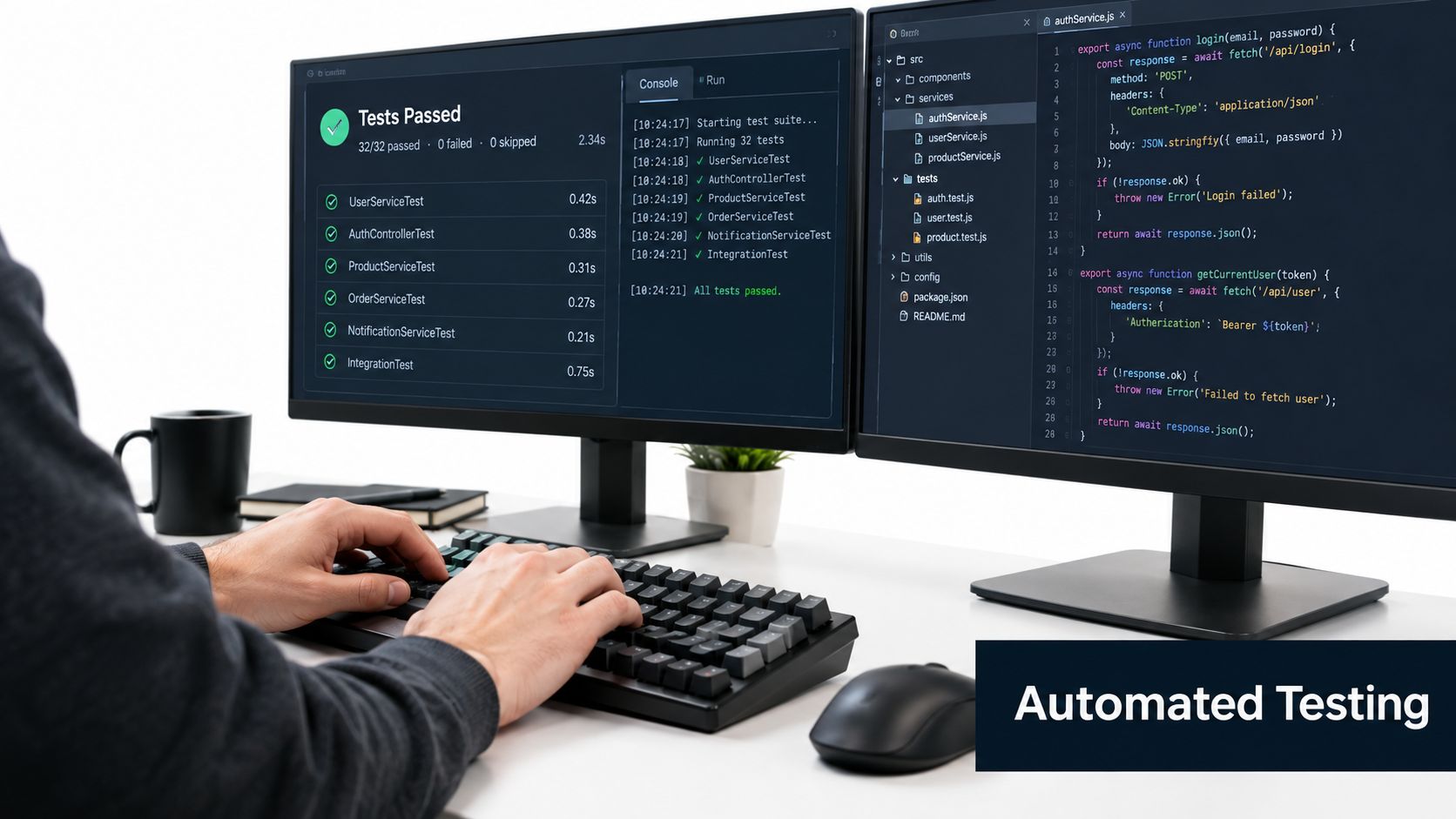
Test automation is the pipeline's control system. It doesn't just block a release. It measures whether a change behaves within defined limits and sends actionable feedback to the people who need to respond.
A useful test strategy assigns each check to the moment where it provides the most value. A pull request should receive fast, high-signal feedback. A merge can trigger broader integration and regression coverage. A release can add environment validation, security checks, and business-critical smoke tests. This structure prevents every change from waiting for the slowest test in the organization.
Build a signal hierarchy
Start with tests that answer immediate questions:
- Can the service start? Run health checks and basic smoke tests.
- Can core APIs respond correctly? Validate authentication, permissions, data contracts, and error handling.
- Can a customer complete a critical journey? Exercise flows such as registration, checkout, search, or document submission.
- Does the change create a known security risk? Add dependency, code, secrets, and application-level security checks where they fit the release path.
- Does the system remain responsive under expected demand? Schedule performance testing for suitable environments and release events rather than forcing every load test into every pull request.
A smaller suite with reliable assertions can guide a release better than a large collection of brittle tests. When a test fails, the developer should know what behavior broke, which build introduced it, and whether the failure indicates a product defect, environment issue, or test problem.
Connect QA evidence to release decisions
Teams often create a bottleneck by treating QA as a final department rather than a set of controls distributed through the pipeline. A pull-request suite can catch contract and smoke failures early. A merge suite can verify cross-service behavior. A post-deployment suite can confirm that the live environment supports the customer journeys that matter most.
For products that use large language models or autonomous agents, the same principle applies with different checks. Tests can validate output structure, policy adherence, tool use, refusal behavior, and safety boundaries. These tests shouldn't promise deterministic answers where the product is probabilistic. They should define acceptable behavior and flag meaningful deviations.
Choosing a framework is part of the design, not the starting point. Teams evaluating maintainability, language support, reporting, parallel execution, and CI integration can use this guide on how to choose a test automation framework. The framework should serve the feedback model, rather than forcing the pipeline to accommodate an unsuitable test suite.
Google's 2022 DORA reporting found that 63% of respondents said application-level security scanning in CI/CD systems for production releases was “very” or “completely” established, as reported in the DORA research coverage. Security hooks belong beside functional checks because a release can pass user-flow tests and still expose a vulnerable dependency or unsafe application behavior.
Practical rule: Every automated check should have an owner, a failure policy, and a clear next action.
CI/CD Patterns for Delivery and Deployment
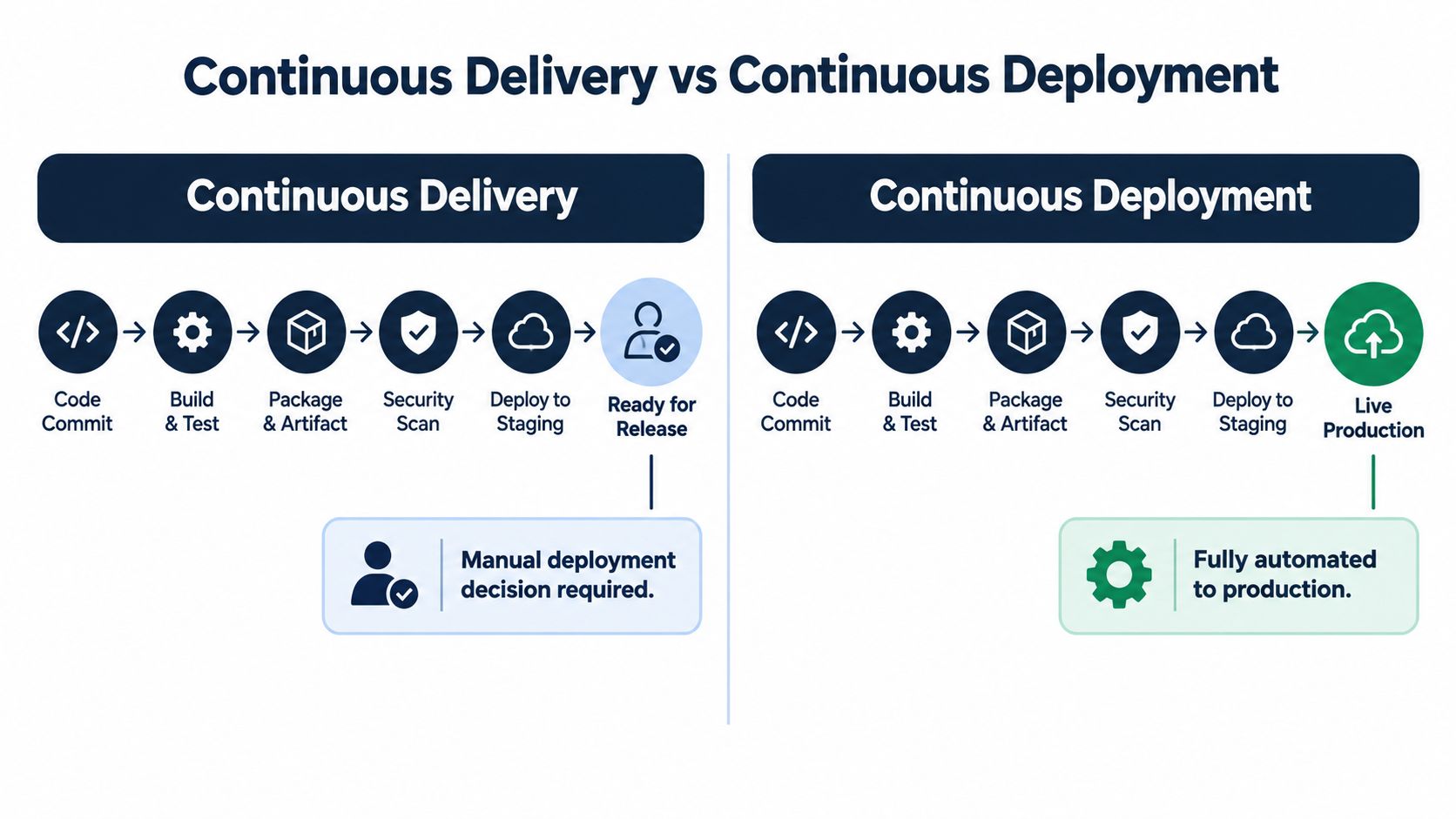
Continuous delivery and continuous deployment share the same pipeline foundation, but they differ at the production decision point.
| Pattern | Final step | Suitable when |
|---|---|---|
| Continuous delivery | The artifact reaches a release-ready state, then a person approves production deployment | The team needs business, regulatory, operational, or coordinated release approval |
| Continuous deployment | The pipeline deploys automatically after all defined controls pass | The team can manage risk through automated validation, observability, rollback, and well-defined change boundaries |
Consider an online subscription service. Under continuous delivery, a merged change may build, pass tests, deploy to staging, complete security checks, and wait for a product or operations approval before production. The build remains ready, but the organization retains a deliberate release decision.
Under continuous deployment, the same change moves to production automatically after passing the required gates. Monitoring and rollback become especially important because the system must detect and respond to problems without relying on a person to watch every release.
Neither pattern is automatically more mature. A team may choose continuous delivery because it operates in a regulated setting or coordinates releases across dependent systems. Another team may choose continuous deployment for isolated services with strong automated coverage and safe rollback.
The wrong question is, “Which pattern is more modern?” The better question is, “Which decision can our evidence support?” If the pipeline can't show test results, artifact provenance, security status, deployment health, and recovery readiness, removing the approval gate may only hide risk rather than reduce it.
Overcoming CI/CD Implementation Challenges
Pipeline adoption becomes harder as the system grows. Teams must connect new services to legacy applications, manage credentials across environments, satisfy data-sovereignty requirements, and coordinate changes across cloud providers. In AI-heavy delivery environments, higher code and commit volume can increase pressure on build capacity, review quality, test coverage, and rollback procedures.
Recent research on advanced automation identifies integration complexity at 63%, reliability concerns at 64.2%, and legacy-integration issues at 62.1% among organizations implementing that automation, according to the GJETA study on CI/CD challenges. These figures show why a pipeline project is also a governance and change-management project.
Security controls need to run inside the workflow, but they shouldn't become unexplained obstacles. Define which findings block a pull request, which require review, and which can be recorded for later remediation. Protect production environments, limit permissions, manage secrets carefully, and preserve enough logs to explain what the pipeline did.
Adoption of advanced pipeline capabilities is uneven. The same GJETA source reports 23% adoption of cost estimation in pipelines and 47% adoption of ephemeral pull-request environments. Teams should treat these capabilities as design decisions rather than assume that a standard template solves every operational concern.
A recent paper on intelligent CI/CD pipelines also highlights limited observability across pipeline components. Without visibility from commit through runtime, leaders can't reliably connect automation to lead time, reliability, or incident reduction. For a practical view of why uncertainty accumulates around releases, see why releases feel risky.
Next Steps for Building a Robust Pipeline
A reliable pipeline starts with release risk, not tool selection. Before comparing Jenkins, GitHub Actions, GitLab CI/CD, CircleCI, or another platform, identify the behavior the system must protect and the evidence required before production.
Map the critical journeys
List the user journeys that would cause immediate customer or business damage if they failed. For a SaaS product, that might include account creation, authentication, billing, permissions, and a core workflow. For a mobile application, include installation, upgrade, offline recovery, and the most valuable in-app action.
Turn each journey into a testable risk statement:
- User action: What does the customer do?
- System behavior: Which services, APIs, queues, or databases participate?
- Failure impact: What would the customer or business experience?
- Pipeline location: Should the check run on a pull request, merge, release, or schedule?
- Recovery response: What should happen if the check fails after deployment?
This mapping prevents teams from measuring test volume instead of meaningful protection.
Design the feedback path
Create a small first slice of the pipeline that proves the end-to-end path. A commit should build a versioned artifact, run a focused smoke suite, perform relevant security checks, deploy to a representative environment, and execute a post-deployment validation. Once that path is trustworthy, add broader regression, performance, and specialized testing.
The AskYourQA case studies illustrate the type of system-level work a QA automation consultancy can support, including critical-flow mapping, framework development, and pipeline integration. AskYourQA works across functional, API, AI, security, and performance testing, with automated smoke and regression execution connected to delivery workflows.
Make failures useful
A failed pipeline should answer three questions quickly: what changed, what behavior failed, and who owns the next action. Track flaky tests separately from product failures, quarantine unstable checks only with an explicit owner, and review recurring failures as engineering work rather than accepting them as normal pipeline noise.
Finally, connect pipeline metrics to service outcomes. Review lead time, deployment frequency, change failure rate, and time to restore service alongside customer-impacting incidents and release readiness. The pipeline is doing its job when it gives leaders credible evidence to ship, pause, investigate, or roll back.
AskYourQA designs and implements test automation systems that map critical user journeys, build maintainable frameworks, and connect high-signal functional, API, AI, security, and performance checks to CI/CD pipelines. Visit AskYourQA to discuss how your team can turn release automation into a dependable feedback and reliability system.