
Your team is ready to release, but someone still needs to check login, search, and checkout by hand. A developer fixes a last-minute issue, which means checking those flows again. Meanwhile, the product manager wants a release date, and nobody wants to approve a change that might stop customers from paying.
The benefits of automated testing start with removing that repeated checking from people's calendars. However, the key payoff isn't a larger test suite. It's a smaller gap between making a risky change and finding out about it, provided the tests are stable, relevant, and maintained.
Table of Contents
- Six Benefits of Automated Testing at a Glance
- Faster Feedback Shortens Every Release Cycle
- Finding Defects Early Costs Far Less
- Reliability and Regression Protection in Practice
- Automation as the Engine of CI/CD Pipelines
- Automate Where the Returns Hold
Six Benefits of Automated Testing at a Glance
An automated test is like a smoke alarm that checks for a specific danger without someone walking through every room. It doesn't prove the whole house is safe, and an alarm that sounds for no reason soon gets ignored.
In software, a test runs predefined actions and compares the result with what should happen. For checkout, it might add a product, apply a discount, submit a payment through a test service, and confirm that an order exists.
Core benefits of automated testing at a glance
| Benefit | What it means in practice | Supporting evidence |
|---|---|---|
| Speed | Repeatable checks run without waiting for someone to click through them | Delivery surveys associate faster releases with mature testing and delivery practices |
| Reliability | The same defined steps run on every build | Controlled inputs and environments make results repeatable |
| Faster feedback | Developers learn about a broken change while they still understand its context | Prioritized execution can bring failing tests forward |
| Reduced regression risk | Existing features are checked when relevant code changes | Reproducible regression tests can help locate an introducing change |
| CI/CD enablement | Tests become automatic checkpoints on merges and releases | Automated testing supports continuous delivery alongside version control and deployment automation |
| Lower cost of defects | Teams can fix problems before customers and dependent systems encounter them | Earlier identification can reduce downstream correction and disruption |
The delivery context matters. In mabl's 2025 State of Testing in DevOps Report, 40% of software teams reported deploying code at least 50% faster than the previous year. That's evidence of accelerating delivery, not proof that installing a testing tool creates the same result.
Every benefit needs an owner
Someone must decide what matters, write meaningful checks, investigate failures, and update tests when intended behavior changes. Automation removes repeated execution, not engineering responsibility.
If you're building that capability internally, GENTY recruitment QA automation hiring provides context for the specialist role. Look for test design, debugging, and pipeline skills, not just familiarity with Selenium or Playwright.
Practical rule: Automate a check because its result helps someone make a release decision, not because the tool makes it easy to count.
Manual exploration still matters. People notice confusing instructions, unexpected behavior, and missing requirements that a scripted check wasn't designed to recognize.
Faster Feedback Shortens Every Release Cycle
A spell checker flags a typo while you're typing. A proofreader reviewing the document much later may find the same mistake, but you'll have to reopen the document, recover your train of thought, and check whether the correction affects anything else.
Software feedback works similarly. When a developer learns about a failure immediately after a change, the relevant decisions are still fresh. When the failure arrives after unrelated work has accumulated, diagnosis starts with reconstructing what happened.
Why manual queues encourage bigger releases
Suppose each release needs a person to verify the application. Developers finish changes faster than that person can check them, so completed work waits in a queue.
To avoid repeating the verification effort, the team combines changes into a larger release. If checkout then breaks, several unrelated changes become possible suspects, and more people need to help investigate.
Automated checks let the team validate smaller batches without scheduling a complete manual pass each time. The useful saving is often less waiting and less context switching, rather than faster clicking.
In DORA's 2017 State of DevOps report, high performers automated 27% more of their testing, and the studied continuous-delivery practices had a significant predictive relationship with lower deployment pain and lower change-failure rates. Those practices worked together, so the finding shouldn't be read as a guarantee from automation alone.
What safer acceleration looks like
Consider a hypothetical team moving from a weekly release to smaller releases throughout the week. Before changing the schedule, developers add calculation checks for pricing, API checks for order creation, and a browser check for successful checkout.
Each layer answers a different question:
- Unit checks: Does an individual rule, such as discount eligibility, produce the expected result?
- API checks: Can the application create and retrieve the right order?
- Browser checks: Can a customer complete the journey through the interface?
The hidden cost is keeping this feedback short and understandable. If developers wait through unrelated browser tests or receive an unexplained failure, they still lose time.
Judge progress using lead time, deployment frequency, restoration time, and change-failure rate, rather than release frequency alone. Also ask developers how long they wait for a result they can act on.
A faster pipeline isn't automatically a better delivery system. Speed without a trusted signal only helps bad changes reach users sooner.
Finding Defects Early Costs Far Less
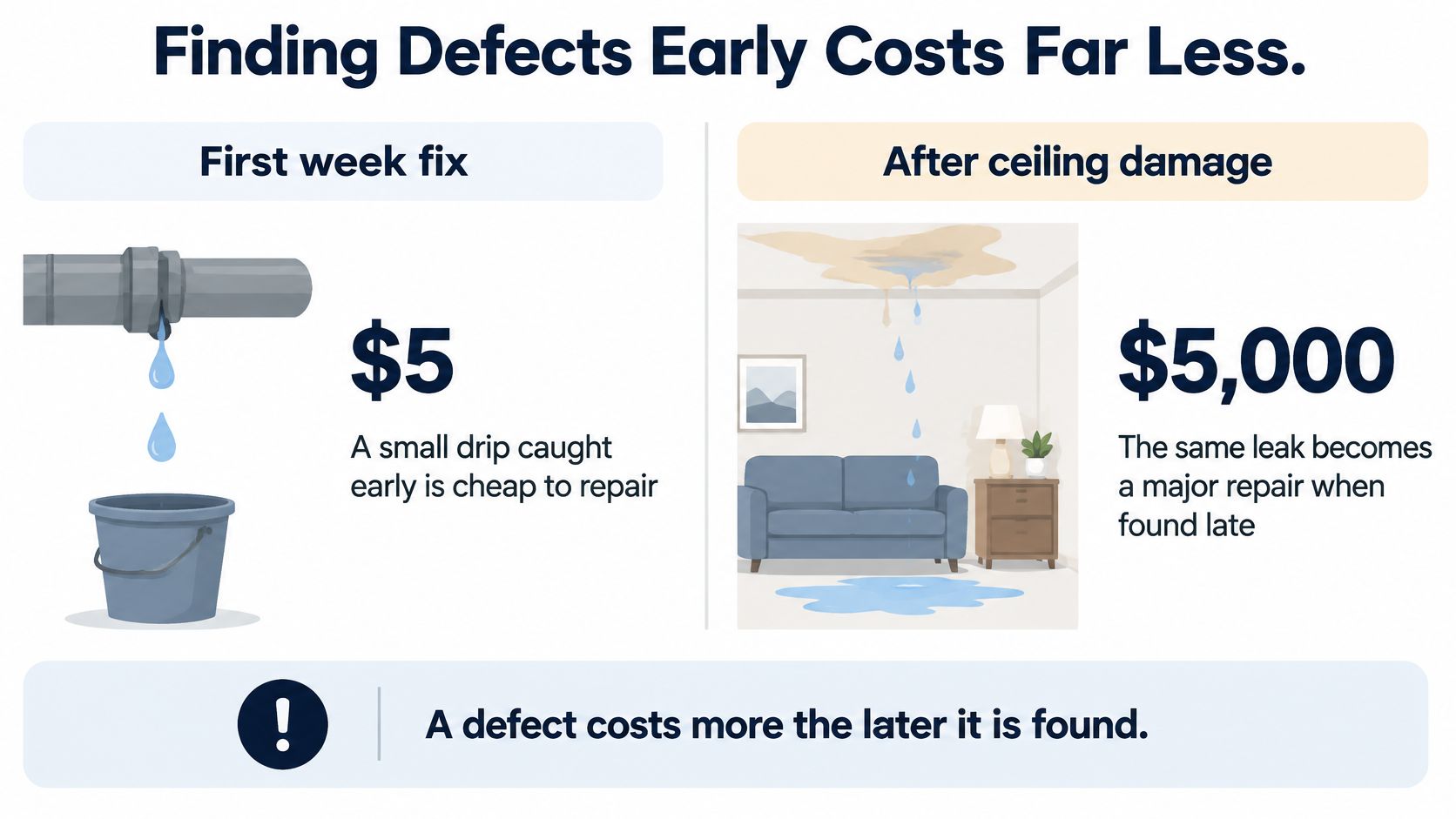
A dripping pipe is easier to address before it damages the ceiling. Once water has spread, the repair includes finding the leak, replacing damaged materials, and coordinating work that wasn't needed at the start.
Software defects create a similar chain of extra work. Other developers build on the faulty behavior, support staff investigate customer complaints, and operations teams may need to restore service.
The illustration below uses hypothetical household repair amounts to show that relationship, not measured software defect costs.
The economic case for earlier detection
A NIST-sponsored study published in 2002 estimated that inadequate software-testing infrastructure cost the US economy approximately $59.5 billion annually, with approximately $22.2 billion potentially avoidable through improved testing infrastructure.
These are historical economy-wide estimates, not a forecast for your company or a savings promise for automated testing. The study predates modern cloud and AI systems, but its underlying mechanism is recognizable: late discovery adds correction, coordination, and disruption.
For example, imagine an incorrect tax calculation. Found during development, it may require a code correction and an added test. Found after customers receive invoices, it may also require recalculation, customer communication, accounting adjustments, and an explanation of what went wrong.
Move the right questions earlier
Shift-left testing means checking risks earlier in development instead of waiting for a final verification phase. Our explanation of what shift-left testing involves connects that approach to requirements, development, and integration.
Start with questions that have clear answers before a full application is deployed:
- Business rules: Are totals, permissions, and eligibility decisions correct?
- Service agreements: Does an API return the fields and errors its consumers expect?
- Failure handling: What happens when a payment is declined or a dependency is unavailable?
The hidden cost is preparation. Teams need testable requirements, accessible components, and dependable setup data before those checks can run usefully.
The business case isn't just manual hours saved. It's expensive downstream work that nobody has to perform.
To estimate your own opportunity, review a recent late defect. Include investigation, repair, support, recovery, and interrupted work, then identify the earliest practical check that could have exposed it.
That gives you a more useful investment decision than applying a national savings estimate to your engineering budget.
Reliability and Regression Protection in Practice
Say a payment team changes discount-code logic. A standard purchase still works, but an existing subscriber can no longer complete checkout when using account credit.
That's a regression: a change breaks behavior that previously worked. It doesn't have to be an old bug returning, and the broken behavior may sit outside the feature the developer intended to change.
Reviewing the affected code together can help the team understand the unexpected interaction.

Repeatable checks can also explain failures
A useful regression test would create a subscriber with known account credit, apply the discount, complete checkout, and verify the resulting balance and order. It checks an outcome that matters, rather than merely confirming that a button can be clicked.
A 2024 empirical study of regression tests and historical code snapshots demonstrated that reproducible tests could help identify the change that introduced a defect when executed across repository versions.
In practice, the team can compare a working revision with a failing revision and narrow the investigation. That's more helpful than a report saying only that checkout failed somewhere in a long browser session.
The trade-off is reproducibility work. Tests need controlled accounts, independently executable setup, compatible environments, and useful records of what happened.
Build checks that survive investigation
For the checkout scenario, review the suite against this checklist:
- Critical path: Confirm the completed order and financial outcome, not just the confirmation screen.
- Changed behavior: Cover the discount rule and the customer groups it affects.
- Integration boundary: Check how account credit and payment authorization interact.
- Failure evidence: Preserve the request, response, trace, and relevant application logs.
Keep time, randomness, and shared state under control. A test shouldn't pass only because another test happened to create its account first.
The video provides an additional resource for discussing automated testing with the team.
Maintenance problems should enter the engineering backlog rather than remain invisible QA chores. Server Scheduler's guidance on how to prioritize technical debt across DevOps workflows is a useful resource for organizing that work.
Broad coverage isn't enough. A regression suite earns trust when a failure points developers toward a specific broken behavior and gives them enough evidence to reproduce it.
Automation as the Engine of CI/CD Pipelines
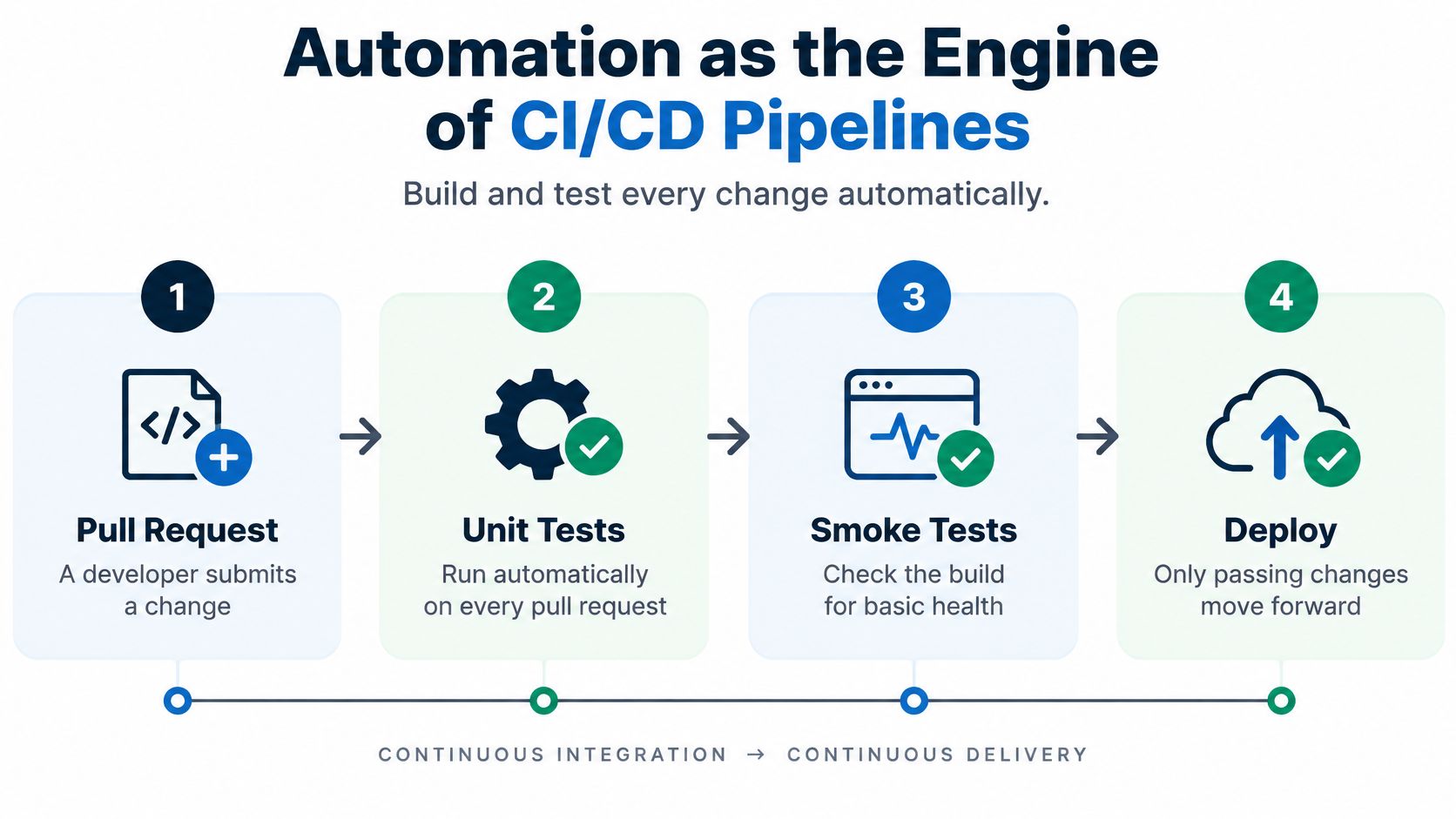
A delivery pipeline works like a set of inspection stations. Each check should catch a different kind of problem, with quick checks first and broader tests later. That ordering helps a team get feedback while a change is still easy to fix.
Continuous integration and continuous delivery, or CI/CD, automate building, checking, and preparing changes for release. Passing tests can move a change forward, while teams may keep approval gates for higher-risk deployments.
Give each stage a specific job
Run checks where their results can guide a decision. The times below are feedback goals, not measured benchmarks; teams should measure their own suites before setting execution budgets.
What runs at each stage of a CI/CD pipeline
| Pipeline stage | What runs | Feedback goal | What it protects |
|---|---|---|---|
| Pull request | Unit tests and smoke checks | Finish within a few minutes so developers can act before switching tasks | Blocks obvious breaks before review |
| Merge to main | API and key integration tests | Finish in time to inform the next integration step | Confirms services still work together |
| Before release | Critical end-to-end user journeys | Finish before the release decision | Protects revenue and login flows |
| Nightly or per release | Full regression and performance checks | Run in a scheduled window outside the immediate review loop | Checks broader interactions and behavior under load |
A unit test checks one isolated rule. A smoke test checks basic application health, such as whether the application starts and a user can authenticate. Integration tests examine connected components; end-to-end tests follow complete user journeys. The guide to CI/CD integration testing explains how these checks fit into delivery workflows.
Order tests for useful information
A Linux kernel study comparing test-prioritization techniques found that similarity-based prioritization achieved a mean Average Percentage of Faults Detected of 0.7583 while requiring significantly less time. The study also found 29.9% to 63.5% reductions in mean and median prioritization effectiveness for affected techniques when flaky tests were present.
APFD describes how early failing tests appear in an execution order. It does not measure the share of all product defects a suite catches. In practice, prioritize tests for changed behavior and business-critical journeys, then schedule broader checks where they will not hold up immediate feedback.
- Isolate execution: Prevent parallel tests from changing the same account or record.
- Capture telemetry: Retain logs and traces when a failure first occurs.
- Protect credentials: Give test jobs only the permissions and secrets they need.
Pipeline security matters because test jobs execute code and may access sensitive environments. Foo Guard's GitHub Actions hardening guide offers guidance for reviewing workflow permissions and boundaries.
The hidden cost is ongoing ownership: someone must maintain runners, environments, data, and failure routing. A red build should prompt investigation, not repeated reruns until it turns green. Otherwise, the pipeline delays delivery instead of helping the team make a reliable release decision.
Automate Where the Returns Hold
More automated tests don't automatically mean better quality. A garden that's planted but never weeded can become harder to manage than the harvest justifies.
Test suites need similar care. Each added check creates another piece of software to maintain, another result to interpret, and another possible dependency on data or infrastructure.
In a 2025 survey of 2,751 QA professionals, developers, and engineering leaders, 45% identified maintaining stable, low-maintenance tests as their biggest automation challenge. The management question is therefore not how much can be automated, but whether another check provides enough risk reduction to justify owning it.
Returns are possible, but they aren't universal. According to Katalon's summary of its 2025 State of Quality findings, 36% of surveyed QA professionals reported positive ROI from test automation projects, including 21% reporting significant ROI.
Choose business journeys before choosing tools
Begin with the journeys your business depends on. At AskYourQA, our first step is mapping those journeys, not just finding flows that are easy to test.
List access, revenue, and core data operations, such as sign-up, login, checkout, subscription renewal, and saving customer work. Then assess the candidates using the same criteria.
Criteria for choosing which journeys to automate first
| Criterion | Automate first when | Wait or skip when |
|---|---|---|
| Business impact | Failure would stop payments, sign-ups, or logins | The feature is rarely used and low-value |
| Change frequency | Relevant code changes regularly | The screen is about to be redesigned |
| Stability | Intended behavior is established | Requirements are still being decided |
| Run time | The check fits the relevant feedback window | It needs long waits or slow setup |
| Data needs | Test data can be reset and reused reliably | Data is hard to isolate or clean up |
| Flake risk | The environment is stable and isolated | It depends on third-party systems with no stubs |
Don't treat this as a reason to ignore important but difficult journeys. Instead, separate the business risk from the implementation problem.
For example, a slow external payment sandbox may make a browser check unreliable. Test your payment-handling rules with controlled responses, then keep a separate integration check for the provider boundary.
Our guide to what to automate in testing can help turn those trade-offs into a practical backlog.
Use a disciplined selection and ownership process
- Map critical journeys. Ask product, support, and engineering what failure would prevent customers from paying, accessing the product, or keeping their work.
- Assess each candidate. Record impact, frequency of change, setup difficulty, and the outcome the test must verify.
- Start with stable, valuable behavior. Prefer focused unit and API checks where they answer the question, then add end-to-end coverage for the complete journey.
- Quarantine and repair flaky checks. Assign an owner and preserve another way to check the exposed risk while the automated gate is unavailable.
- Measure delivery outcomes. Review escaped defects, feedback time, reruns, and investigation effort before expanding the suite.
Quarantine isn't deletion or success. It's a temporary admission that a test can't currently support a reliable release decision.
Investment test: Would you still pay to maintain this check if nobody reported the total number of automated tests?
Measure what managers actually need to know
Escaped defects show where protection failed. Feedback time shows how long developers wait for actionable results.
Rerun rates expose unstable execution, while investigation hours reveal the human cost hidden behind seemingly automatic checks. Review these alongside infrastructure and maintenance effort, not just the time saved from manual execution.
Keep exploratory testing for new behavior and uncertain requirements. A passing script confirms its defined assertions, not that the entire customer experience makes sense.
Your first milestone should be a small, trusted set of checks mapped to release risks and pipeline stages. Agree on ownership with the team, demonstrate useful feedback, and expand only where the next test earns its place.
AskYourQA offers a free 20-minute call to map your critical flows, review your current testing process, and show how fast an automation framework can be up and running. Visit AskYourQA to discuss a focused testing system that protects the journeys your business depends on without building a noisy maintenance burden.