
Your pipeline is green, or green enough after two reruns, and checkout still breaks in production. Developers have stopped reading failure reports because half of them mean nothing. QA is asking for more time, product is asking for faster releases, and nobody can agree on whether you need more tests or fewer, better ones.
That standoff is normal when a team has scripts but no test automation strategy. The fix isn't another tool purchase. It's a short, written plan that ties every automated test to a user journey, a pipeline stage, and a delivery outcome you can measure.
Table of Contents
- What a Test Automation Strategy Actually Covers
- Why Delivery Speed and Stability Both Depend on It
- Choosing What to Automate First
- Picking Frameworks and Tools for Web, API and AI
- Running the Right Tests at Each Pipeline Stage
- KPIs Engineering Leaders Should Track
- Four-Phase Rollout Starting This Week
What a Test Automation Strategy Actually Covers
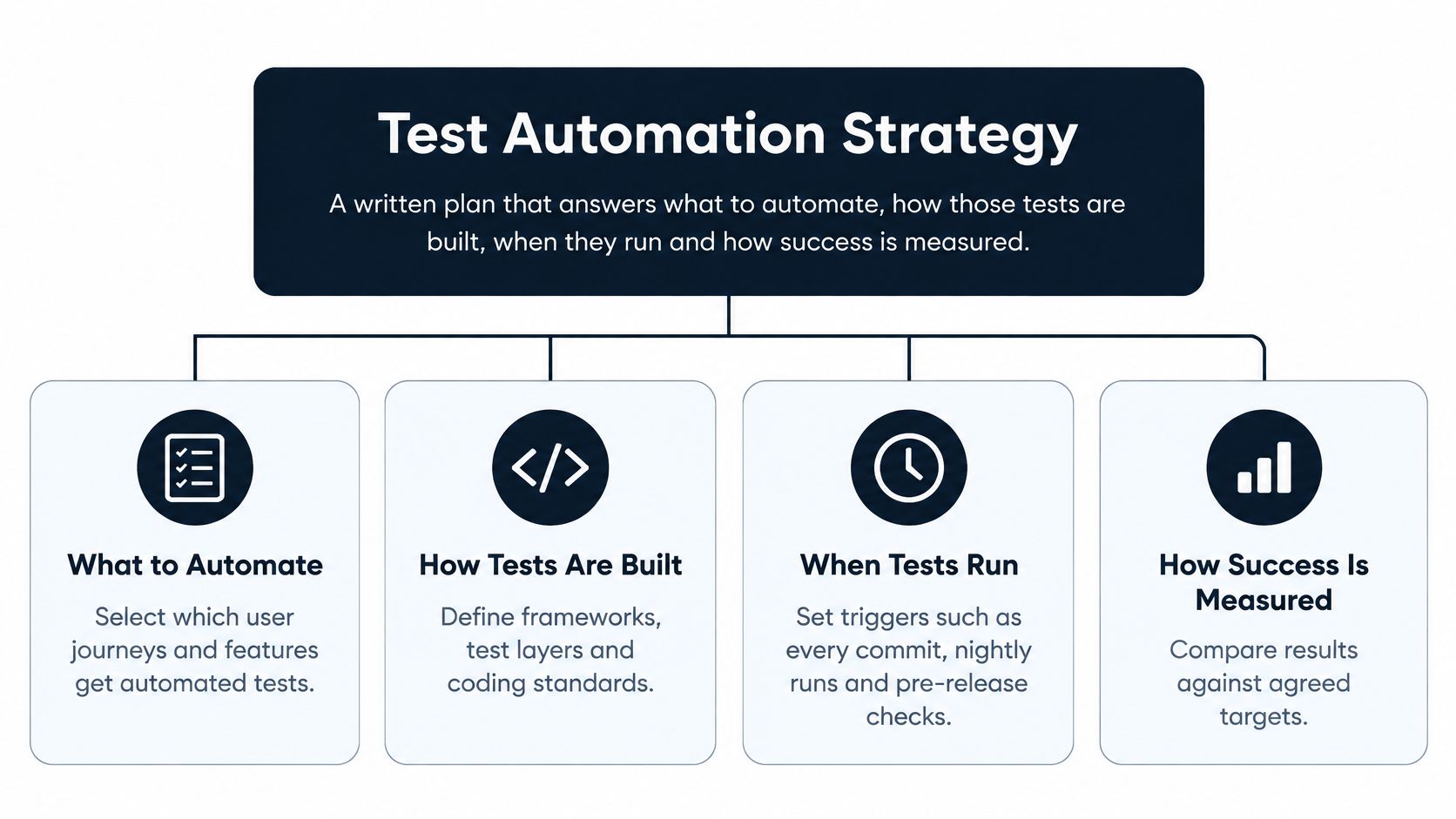
A test automation strategy defines what to automate, how to build the tests, when to run them, and how to measure their results. Those four questions describe the decisions a strategy must make. They fit into five connected components: scope, risk-based prioritization, frameworks, CI/CD integration, and metrics.
For example, a team may have 3,000 automated tests and a three-hour pipeline, yet still ship releases that break. Test count alone cannot show whether the checks cover the journeys most likely to fail, run early enough to guide a fix, or help the team recover when something slips through. The strategy sets those priorities and defines how failures are handled.
A fire safety plan assigns equipment, inspections, and responsibilities. A test automation strategy does the same for checks across development and delivery.
Five components, three substitutes to reject
A usable strategy sets scope, identifying what is in and out; risk-based prioritization, ranking user journeys by risk; frameworks, defining how tests are built; CI/CD integration, setting triggers and release gates; and metrics, showing whether feedback is timely, defects escape, and recovery improves. Together, these components turn the four questions into practical decisions.
Three things can look like a strategy without providing that direction. A test count measures volume, not whether checks protect important journeys. A tool list records purchases, not how tests should support delivery. One tester's personal checklist leaves gaps when that person is unavailable.
The mabl's Testing in DevOps Report discusses organizations with unified or partially unified end-to-end testing strategies. Regardless of how a team describes its approach, write down the five components and assign clear ownership. Unwritten decisions are harder to apply consistently when a release fails.
If the team can't say where each test runs and why it exists, it has scripts, not a strategy.
Why Delivery Speed and Stability Both Depend on It
That 3,000 test team learned about failures only after merge. Developers had moved on to new work, so they reran the suite or ignored red builds. Meanwhile a broken checkout reached customers every second release. Speed and stability failed together, not separately.

Two requirements fix this. First, tests must return fast enough that a developer can act while the change is still fresh in memory. Late feedback becomes archaeology, and archaeology gets postponed.
Second, tests must be trusted enough to block a bad change. If a failure usually means a flaky locator or stale data, engineers will bypass the gate. Slow or noisy suites get rerun, quarantined, or skipped, and a suite nobody obeys has no preventive value.
This is why delivery has two halves. Throughput is how quickly and often you ship. Stability is how rarely shipping hurts users and how quickly you recover when it does. A good strategy improves both at once because it puts fast checks early and reserves release gates for journeys that actually predict production failures.
Apply this test after a quarter of new automation. Are releases getting faster and safer, or are your suites only getting bigger? If you can't answer with delivery data, the automation isn't connected to outcomes yet.
Choosing What to Automate First
A checkout can pass every review and still fail when a service call returns an unexpected response. Reviews, requirements analysis, and static checks catch different problems from automated tests. Use them together: reviews examine decisions and code, while automation repeatedly checks important behavior as the product changes. The goal is not to replace one method with another. It is to catch failures early, limit escaped defects, and make recovery easier when a check misses something.
Score every journey before you write a script
Start with a list of user journeys, then score each from 1 to 5 against five criteria. Automate the journeys with the strongest combined case first. This gives the team a concrete basis for deciding what to automate in testing.
- Business impact: What happens to revenue, trust, or safety if this journey breaks?
- Defect discovery value: Has the journey exposed bugs before, or does it exercise complex logic?
- Change likelihood: How often does its underlying code change? Stable code usually needs less regression protection.
- Execution cost: How long does the check take, and how much maintenance does it require?
- Diagnostic quality: Does a failure point to the broken behavior, or only report a timeout?
Do not rank journeys by code coverage alone. Coverage shows which lines ran, not whether a customer-critical flow is protected. A settings page might have full line coverage while payment processing has no end-to-end check. Prioritize the failure a customer would notice, not the percentage that looks good on a dashboard.
Three risk tiers
| Risk Tier | Typical Journeys | Test Types | Coverage Depth |
|---|---|---|---|
| Tier 1, revenue or safety critical | Sign-in, checkout, payments, data deletion | End to end plus API checks | Every key path tested on each release |
| Tier 2, core but recoverable | Search, profile edits, notifications | API and integration tests | Representative cases, edge cases added after bugs |
| Tier 3, low impact, stable | Static pages, cosmetic UI, rarely changed settings | Unit tests or manual spot checks | Sampled or left untested |
Keep Tier 1 focused. For a mid-size product, 5 to 10 journeys is a useful starting example, not a universal limit. A short list is easier to maintain, runs faster, and gives release gates a clear purpose. If every flow blocks a release, the pipeline grows slow and teams start treating failures as noise.
Match test depth to risk. A low-risk screen that changes every sprint may not need browser tests. Check its behavior at the API level when that gives stable coverage without tying tests to a shifting layout. A Tier 1 journey needs more than a happy-path functional check: before major releases, add load and security checks where relevant. A checkout that works for one user but fails under traffic is still a delivery failure.
Treat the tiers as working priorities, not a fixed inventory. Review them each quarter, promote journeys after incidents, and demote flows that no longer change or matter. For AI features, apply the same risk logic: identify the user journeys where an incorrect output or unsafe action causes harm, then add evaluation cases for those failures and review them as the feature changes. The useful measure is whether checks shorten feedback, prevent defects from reaching users, and help the team recover when a gap remains.
Picking Frameworks and Tools for Web, API and AI
A checkout test that takes minutes to run and fails intermittently gives a team less useful release control than a fast, reliable API check. Choose tools by how quickly they provide trustworthy feedback, how well they expose defects, and how easy it is to recover when a test or release fails. Start with criteria you can defend in a budget meeting: does the framework use the language your developers already write? Can more than one person maintain it? Does it support parallel runs, produce clear reports, and integrate with your CI system? Do you have the skills on the team now, or does the choice depend on a future hire?
A tool that works well for browser journeys may be a poor fit for contract testing. Select tools by test type, then keep each layer consistent so engineers do not have to learn several frameworks for the same job.
| Test Type | Common Options | Best Fit | Watch Out For |
|---|---|---|---|
| Unit | JUnit, pytest, Jest | Logic checked on every commit | Mocks can hide integration bugs |
| API and contract | Postman with Newman, REST Assured, Pact | Service boundaries and shared contracts | Contract versions drifting apart |
| Web end to end | Playwright, Cypress, Selenium | Tier 1 user journeys | Timing flakiness and slow runs |
| Mobile | Appium, Espresso, XCUITest | Native and hybrid apps | Device lab cost and maintenance |
| Performance | k6, JMeter, Gatling | Load, stress and response time limits | Unrealistic test data and environments |
| AI features | Custom evaluation harness with rubrics | LLM outputs, safety and agent flows | Judge model blind spots and drift |
Keep ordinary checks at the unit and API layers, where failures are faster to diagnose. Use browser and device tests where an end-to-end interface check gives necessary evidence about a critical journey. Moving a check down a layer often shortens feedback, but a unit test cannot prove that the full user flow works.
The AI special case
AI features do not have one deterministic answer to assert against, and an automated judge can also be wrong. Build an evaluation approach that checks distinct risks instead of treating one score as proof of quality.
The 2025 ASTRAL study evaluated an automated, black-box method for safety testing language models. Under the study's tested setup, its approach found more unsafe behaviors than static datasets given the same number of test inputs. The ASTRAL safety testing study reports that result within the scope of its evaluation. It is evidence for testing with generated inputs alongside static datasets, not a guarantee that the method will find the same issues in every product.
Build AI validation in layers. Use deterministic checks for requirements such as output format, required fields, forbidden content, and tool calls. Add rubric-based grading for quality judgments that exact matching cannot handle. Have people review a sample, then measure how often the automated judge agrees with those reviewers. Include adversarial inputs that probe safety boundaries, as well as routine prompts.
Set release-blocking conditions before the checks run. Unsafe output and broken invariants should block a release; a small difference in phrasing usually should not. Version regression datasets and refresh them when prompts, retrieval sources, tools, or model versions change. Otherwise, a previously passing set can stop reflecting the system you are shipping.
Running the Right Tests at Each Pipeline Stage
Speed of feedback is the design target. DORA reports that high performing teams seek test feedback in under 10 minutes, while continuously reviewing suites to improve defect detection and control complexity, in its continuous delivery capability guidance. Ten minutes isn't magic. It's roughly the window where a developer still remembers why they wrote the code.
That mechanism matters more than the number. Short, trustworthy loops let developers fix a regression immediately. Slow or noisy suites get rerun, quarantined, or bypassed, and once bypassing becomes normal, the suite stops preventing anything. The practical goal is signal per pipeline minute.
A layered trigger model
Understanding what a CI/CD pipeline is helps here, because each stage answers a different question. Early stages ask whether this change broke logic. Later stages ask whether the whole release is safe.
| Trigger | Suite | Target Duration | Blocks Merge? |
|---|---|---|---|
| Every commit | Unit and fast contract tests | Under 5 minutes | Yes |
| Pull request | Smoke tests plus affected API tests | Under 10 minutes | Yes |
| Merge to main | Tier 1 end to end regression | 15 to 30 minutes | Yes, for tier 1 only |
| Nightly | Full regression and performance baseline | 1 to 2 hours | No, alerts owners |
| Pre-release | Load, security and release smoke | Within the release window | Yes, as a release gate |
Run affected tests on pull requests rather than everything. If a change touches the payments service, run payments contracts and API checks plus a thin smoke set. Save the full regression for nightly runs where nobody is waiting on it.
Working within a fixed budget
Pipeline minutes are finite, so spend them by risk. Run tier 1 journeys exhaustively at their gate. Sample lower risk paths on rotation, and cover the rest nightly. When only a sample runs, say so plainly in the release report and name the residual risk. A green pipeline after a sample isn't proof the product is safe. It's evidence about the paths you checked.
Practical rule: A flaky test may be quarantined only with a named owner and an expiry date. No owner and no date means fix it or delete it.
Quarantine isn't a parking lot. When the expiry date arrives, the owner either fixes the test, moves the check to a lower layer, or deletes it and accepts the risk in writing. What you can't do is let quarantined tests accumulate until your tier 1 gate is mostly decoration.
KPIs Engineering Leaders Should Track
Test count and code coverage are poor leadership KPIs because both can rise while releases get riskier. A team can add hundreds of shallow tests, watch coverage climb, and still ship a broken payment flow. Leaders need metrics that connect automation to production outcomes.
DORA frames delivery with throughput measures, deployment frequency and change lead time, and instability measures, change failure rate and recovery time, as set out in the DORA metrics guide. Treat those four as the outcomes your test strategy exists to improve. Then pair each one with a suite health metric that explains movement in the outcome.
Good reporting makes that pairing visible, which is why choosing the right test automation reporting tools matters less for pretty charts and more for showing failures by layer, service, journey, and release stage.
| KPI | How to Calculate It | Healthy Signal | Owner |
|---|---|---|---|
| Change lead time | Time from commit to production | Trending down | VP of Engineering |
| Deployment frequency | Production deployments per week | Stable or rising | Engineering manager |
| Change failure rate | Failed deployments divided by total deployments | Trending down | Head of QA |
| Mean time to recovery | Median time to restore service after a failure | Trending down | SRE or platform lead |
| Pipeline feedback time | Median time from push to test result | Under 10 minutes on pull requests | Head of QA |
| Real defect failure share | Failures caused by product bugs divided by all failures | Rising over time | QA lead |
| Escaped defects | Production bugs reported by users per release | Trending down | Product lead |
| Flaky test rate | Flaky tests divided by total tests | Low single digits | QA lead |
Reading rules that turn numbers into action
Metrics without a response rule become dashboard decoration. Use these three.
First, when a regression escapes to production repeatedly, add the lowest cost test that would have caught it. That's usually a unit, contract, or API test. Resist the reflex to add another browser scenario, which is the most expensive and brittle place to catch most defects.
Second, if end to end failures on a journey correlate with failed deployments, that journey is earning its keep. Keep it as a release gate even if it's slow, and invest in making it faster rather than removing it.
Third, if failures are mostly infrastructure noise, stop adding coverage. Fix test isolation, data management, observability, and retry policy first. Expanding a noisy suite only manufactures more noise.
Watch combinations, not single numbers. Deployment frequency rising while change failure rate also rises means you're shipping faster into trouble, and your release gates have gaps. Pipeline feedback time creeping up while flaky test rate climbs means throughput trouble is coming, even if this month's releases look fine.
Review the full set quarterly with engineering, QA, and product in the room. Baseline all four delivery metrics before you change the strategy, so you can prove later whether automation investment bought speed, stability, or neither.
Four-Phase Rollout Starting This Week
Start this week with three actions, in one working session. List every user journey. Score each on the five criteria. Name the top three tier 1 journeys. Then write down their current pipeline time and flaky test count as your baseline, and name one pilot owner. Without that baseline, you'll never prove the rollout worked.
The sequence below shows how those first actions expand into a governed program.
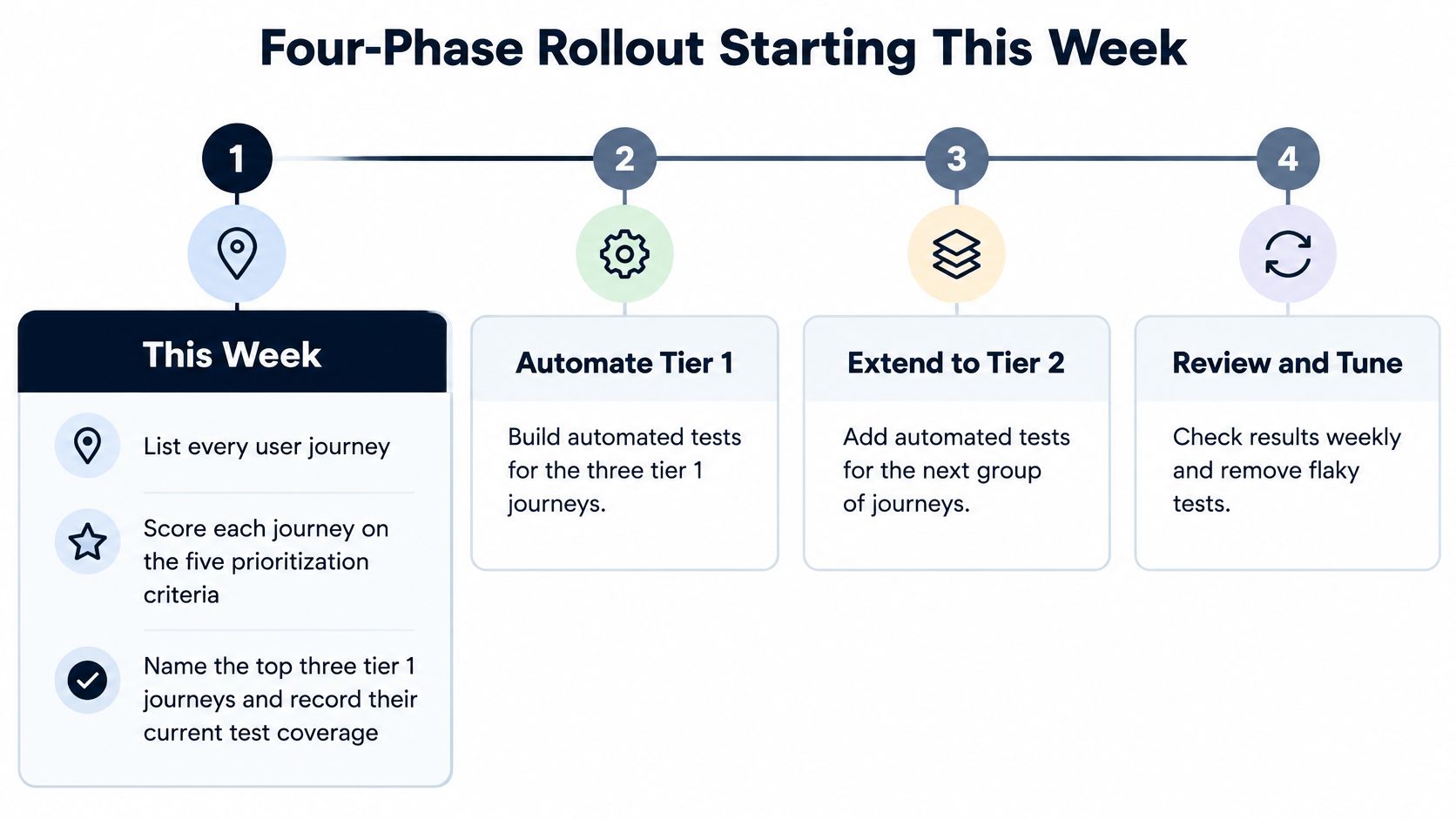
Phase 1 Baseline in weeks 1 to 2
Record the four DORA metrics for your current process, however rough the data is. Count your existing suites and where they run. Measure median pipeline time and flaky test rate. Interview developers about which failures they ignore and why.
The common slip is skipping this because it feels like paperwork. It isn't. It's the only way to answer a CFO who asks what the automation budget bought.
Phase 2 Pilot in weeks 3 to 6
Automate two or three tier 1 journeys at the API and end to end layers. Wire them into the pull request pipeline. Exit this phase only when feedback lands under 10 minutes and the suite is stable across five consecutive runs.
The common slip is expanding to every journey mid pilot because early results look good. Don't. You are proving the pattern, including reporting, ownership, and failure triage, not just writing scripts. A small suite the team trusts beats broad coverage nobody believes.
This walkthrough shows what a staged rollout looks like when the phases run in order.
Phase 3 Gate in months 2 to 3
Make the tier 1 smoke suite a real merge gate. Add the nightly full regression and performance baseline. Adopt the quarantine policy with owners and expiry dates, and publish failure reports where developers already work.
The common slip is treating the gate as optional during crunch weeks. The first approved bypass teaches everyone the gate is negotiable. If an emergency truly requires bypass, log it and review it the next day.
Phase 4 Scale and govern ongoing
Extend coverage by risk tier, not by team enthusiasm. Review suite health monthly. Retire tests that never catch defects, and revisit the tier list quarterly as the product changes. Add performance, security, and AI evaluation checks to tier 1 journeys at pre release rather than bolting them on after incidents.
Governance sounds heavy. In practice it's one monthly review of flaky rate, real defect share, and escaped defects, plus a quarterly tier review. That's enough to keep the suite lean.
Finish with the document itself. Write a one page plan covering scope, prioritization, frameworks, CI/CD integration, and metrics. Keep it where engineers look, review it quarterly, and change it in the open. A short plan the team follows will outperform a forty page strategy nobody reads, every time.
If your suites are slow, noisy, or disconnected from release decisions, AskYourQA can help you map your business critical journeys, build a scalable automation framework, and wire high signal tests into your CI/CD pipeline, including functional, API, performance, security, and AI testing. Visit AskYourQA to talk through your tier 1 journeys and what a practical rollout would look like for your team.