
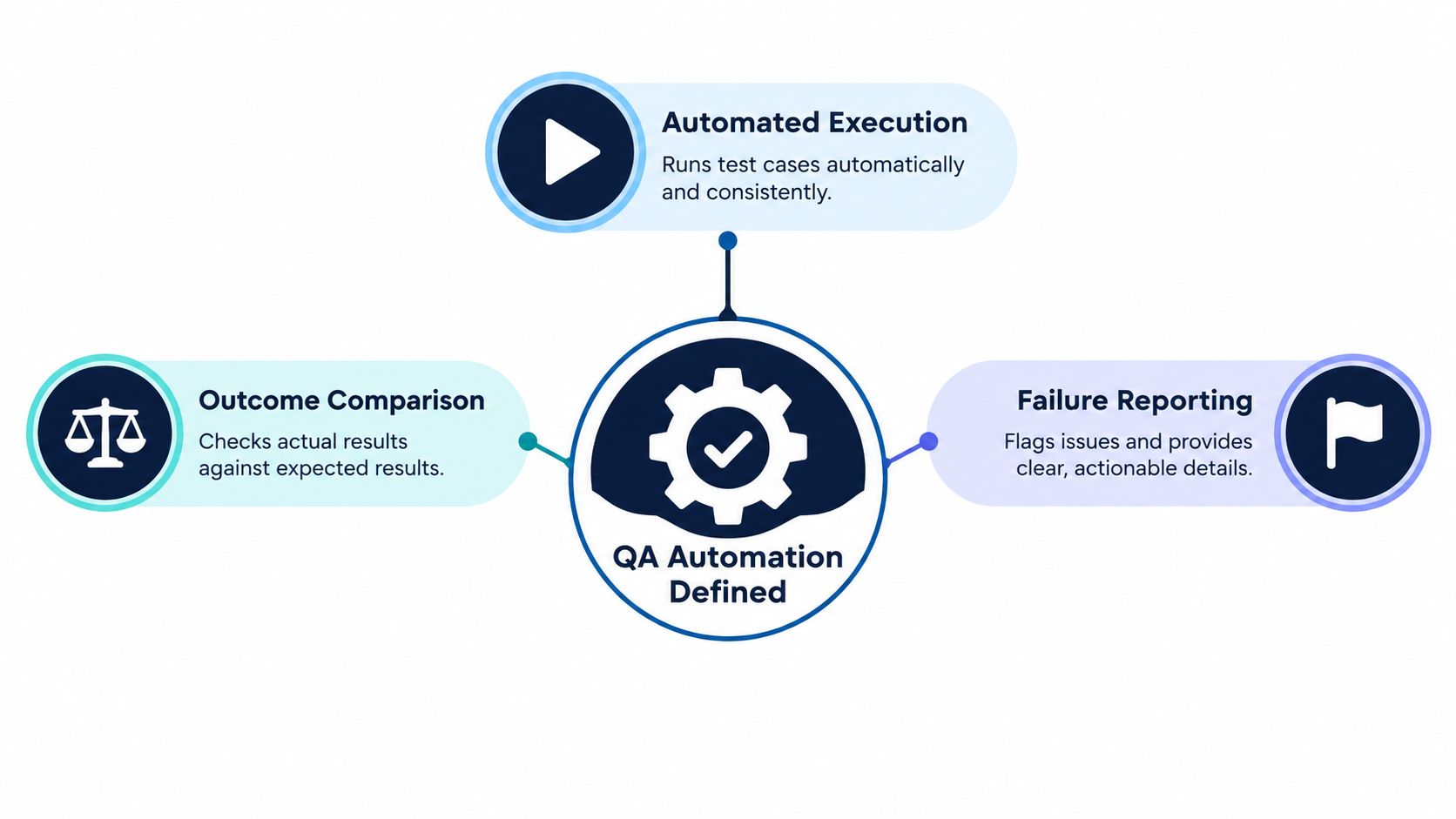
QA automation uses software to run repeatable checks, compare actual results with expected results, and report failures with minimal manual intervention. It can cover everything from code and APIs to user journeys, security controls, and performance thresholds.
A release is waiting on the same manual checks the team ran last time. While testers work through account creation, checkout, and payment confirmation, developers have already moved on to the next change. The question “what is QA automation?” matters because teams need a dependable way to check important behavior whenever code changes, not just at the end of a release.
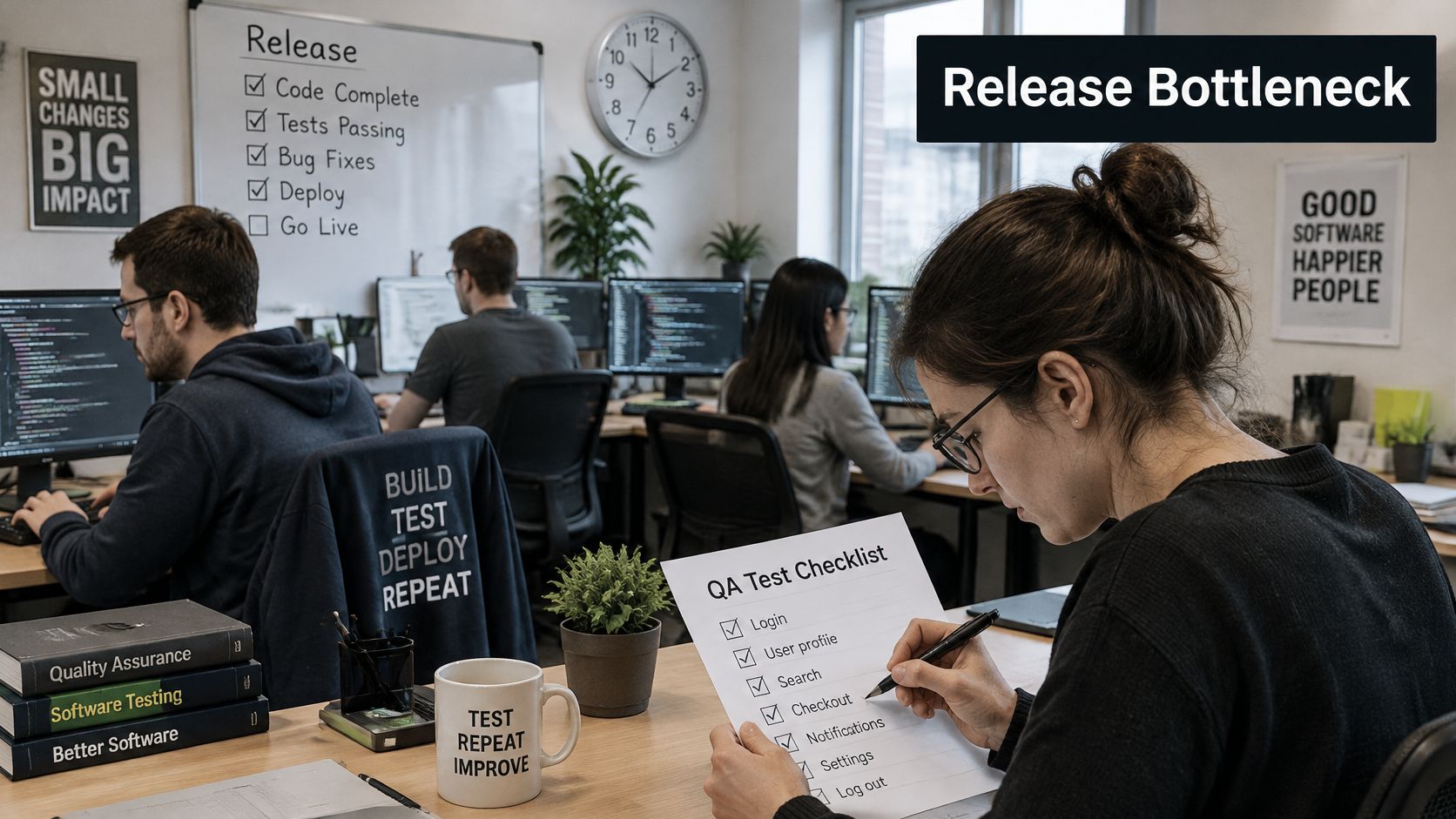
Table of Contents
- Why Teams Are Turning to QA Automation
- Understanding What QA Automation Means
- How the QA Automation System Works
- Choosing the Right Test Types
- A Critical User Journey Through CI/CD
- Measuring the Business Value of QA Automation
- Avoiding Noisy and Fragile Automation
- Deciding When to Engage a QA Consultancy
Why Teams Are Turning to QA Automation
Manual verification has a natural limit. A person can carefully repeat a sequence of checks, but the work takes time, competes with other testing responsibilities, and must be repeated as the product changes. When releases come frequently, waiting until the end to verify familiar behavior can leave a team choosing between delaying delivery and accepting uncertainty.
QA automation moves repeatable checks closer to the code changes that could affect them. A team can run selected checks when a developer opens a pull request, run a broader set after a merge, and schedule other checks for builds or releases. The result is a recurring quality-control signal: did important behavior still work after this change?
That signal is useful only if it's trustworthy. A large collection of scripts isn't automatically a good automation system. Tests that regularly fail for reasons unrelated to the product can slow down releases and lead developers to disregard failures. A smaller set of stable checks for critical user journeys can offer more value because the team can understand and act on the results.
NIST's guidance explains why automation becomes important at scale: when thousands of tests need to be performed accurately and their results checked precisely, the work must be automated. It also describes a simple version of automation: rerun analysis or execute a program against defined inputs, capture the results, and compare them with expected outcomes. NIST's guidance on software verification recommends consistent test execution and accurate result checking, with less reliance on human effort and expertise.
The practical goal isn't to remove people from quality work. It's to let software repeat known checks while people investigate risk, explore unfamiliar behavior, and make judgments that a fixed test can't.
Understanding What QA Automation Means
QA automation is a way to perform defined verification work consistently. A test describes a condition, provides or establishes the inputs, runs a check, compares what happened with what should happen, and reports any mismatch. Once created, that check can run again when a relevant change occurs.
Think of a checkpoint on a production line. It checks the same important property each time an item passes through. In software, the item is a code change or a running application, and the checkpoint might confirm that an API returns the expected response or that a customer can complete checkout. The check doesn't decide whether the entire product is good. It gives the team repeatable evidence about a specific behavior.
Automation extends beyond browser scripts
Browser automation is one visible form of QA automation, but it's only part of the picture. Automated verification can include:
- Static analysis, which checks code for defined patterns or problems without running the application.
- Unit and integration checks, which examine individual components and how connected parts behave together.
- API and protocol tests, which verify requests and responses between services.
- User-interface workflows, which check whether a person can complete a task through the application.
- Security controls and performance thresholds, which examine risks and behavior under defined conditions.
- Regression scenarios, which rerun checks for behavior that worked before and must continue to work.
A test is not the same thing as a verdict on every aspect of quality. A passing checkout test can show that a defined purchase path completed under the test's conditions. It can't establish that the checkout is easy to understand, that an unusual customer need is handled well, or that every possible payment failure is covered.
People remain essential. Testers and engineers use exploratory testing to investigate behavior that wasn't specified in advance, apply risk analysis to decide what deserves attention, and use judgment to assess usability or ambiguous failures. Automation repeats clear checks; people interpret context and search for what the checks don't yet describe.
How the QA Automation System Works
A useful automation system connects tests to the conditions, execution points, and reporting that make their results actionable. Buying a test tool alone doesn't provide that system. Teams also need to decide what to check, where those checks run, what data they use, and who responds to the results.
Framework, organization, and conditions
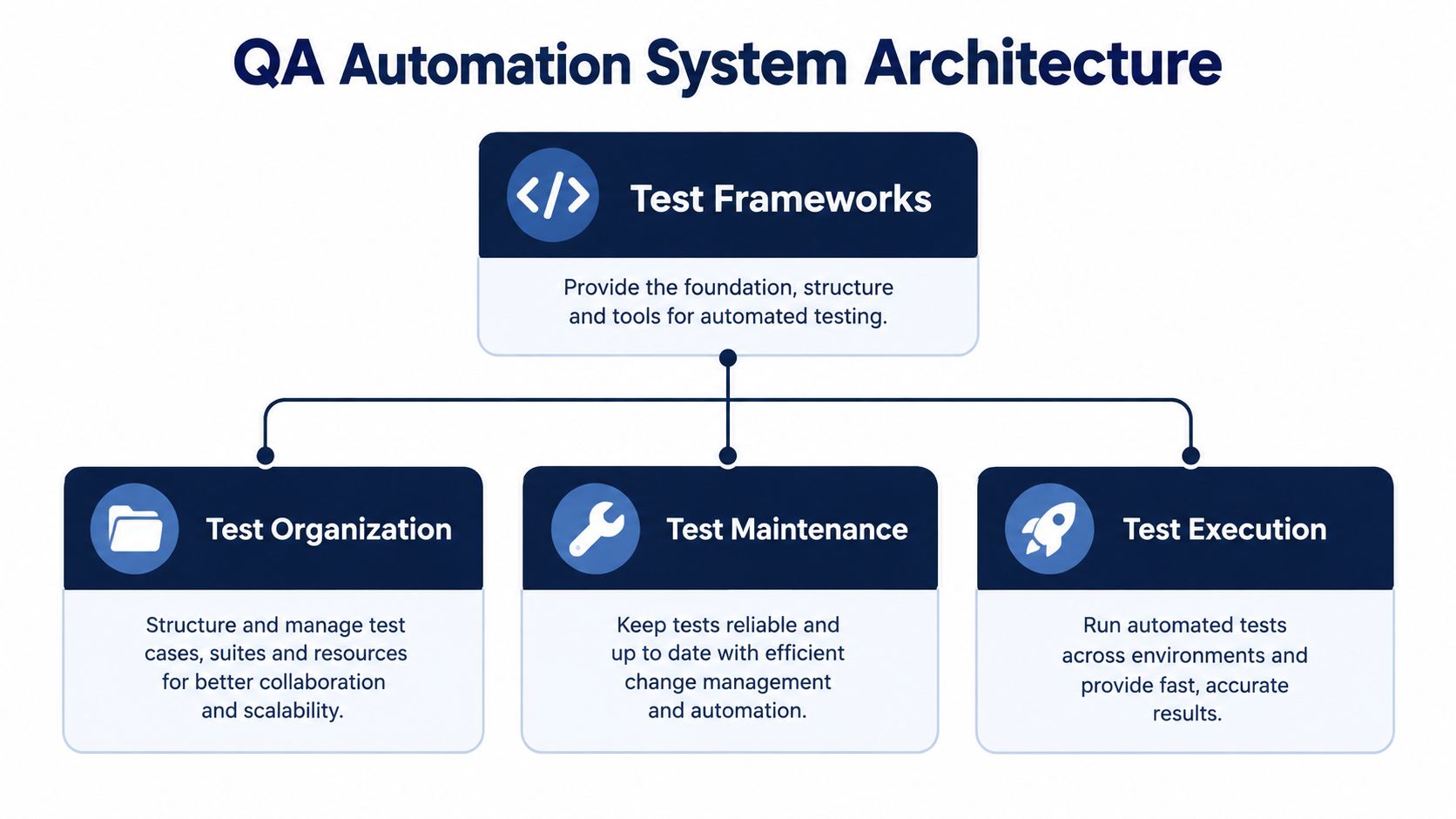
A test framework provides structure for creating and running checks. It can establish conventions for setup, assertions, reusable actions, and reporting. Whether a team uses a code-based framework such as Playwright or another approach, the design should make tests understandable and maintainable. A guide to test automation framework architecture can help teams think through how those components fit together.
Test organization gives people a way to select the right checks for a particular purpose. A fast group might run on every pull request, while broader regression or performance checks run at a different point. Clear naming and ownership also help someone trace a failure to the relevant feature or team.
Tests need controlled data and environments. If multiple runs modify the same account or depend on an unstable service, a test can fail even when the product works as intended. Teams can reduce that ambiguity by creating predictable test data, isolating test runs where practical, and documenting environmental dependencies.
Execution, feedback, and review
The execution layers should match the risks being checked. Code-level checks can catch certain issues early; API tests examine service behavior; interface tests verify user-facing workflows; and security or performance checks address other quality concerns. No single layer replaces the rest.
CI/CD integration determines when checks run. A team might start a smoke subset on pull requests, run more coverage after merges, and schedule or trigger additional suites for nightly builds or releases. The right schedule balances fast feedback against the cost and duration of each check.
Reporting makes the results useful. A simple pass or fail is a start, but teams also need context: which test failed, what evidence was captured, whether similar failures recur, and whether the issue appears to be in the product, test, or environment. Engineers then review the evidence, investigate ambiguous cases, and decide whether to fix code, repair the test, or address the environment.
The framework, test data, execution schedule, and reporting should work together as one feedback loop. If any part is unreliable, the team may receive results that are difficult to trust or act on.
Choosing the Right Test Types
QA automation is a portfolio of checks, not a decision to automate every test in the same way. The mix should reflect the application's architecture, the user journeys that matter to the business, and the risks of a failure. Fast checks can provide early feedback, while broader checks can verify behavior across connected systems.
| Test Type | Primary Purpose | Typical Execution Point | Key Limitation |
|---|---|---|---|
| Static analysis | Identify defined code patterns and potential issues without running the application | During development or in CI | Can't confirm that an end-to-end user journey works |
| Unit | Verify a small piece of code in isolation | On local changes and pull requests | Doesn't prove that connected components work together |
| Integration | Check interactions between components or services | On pull requests or after merges | Can depend on external services, configuration, or data |
| API and protocol | Verify service behavior, responses, and contracts | During CI or service-level regression runs | Doesn't fully represent what a user sees in the interface |
| End-to-end | Verify a complete workflow across application layers | On pull requests for selected smoke checks, or in broader regression runs | Can be slower and more sensitive to environment or data problems |
| Security | Check defined security controls and risk areas | During development and release readiness | Automated checks don't replace broader security assessment |
| Performance | Measure behavior against defined performance expectations | In scheduled runs or before relevant releases | Results depend on test conditions and may not represent every real workload |
| AI evaluation | Assess output quality, safety, and behavior across defined prompts or journeys | When prompts, models, or related application behavior change | Variable outputs make a single exact expected answer insufficient |
The table isn't a prescription to run every type on every change. For example, a focused smoke test might check that a customer can submit an order, while API checks examine the service behavior supporting that workflow. A broader regression run can cover more paths after changes are integrated. A performance check may belong at a different execution point because it needs distinct conditions.
AI-powered features require particular care. Their responses may vary with context, so a test strategy can combine output validation, safety checks, adversarial prompts, and human review rather than comparing every response with one fixed sentence. Teams can define expected qualities and boundaries even when there's no single correct wording.
Prioritize by consequence and coverage, not by how impressive the test count looks. A guide to choosing what to automate in testing can support that prioritization: identify repeated, important behaviors first, then choose the least fragile test layer that verifies them.
A Critical User Journey Through CI/CD
Consider an online checkout. The team doesn't begin by automating every button or possible screen state. It maps the business-critical path: a customer selects an item, provides delivery details, submits payment, and receives confirmation. That path becomes the basis for deciding which checks should run automatically and where people should explore edge cases.
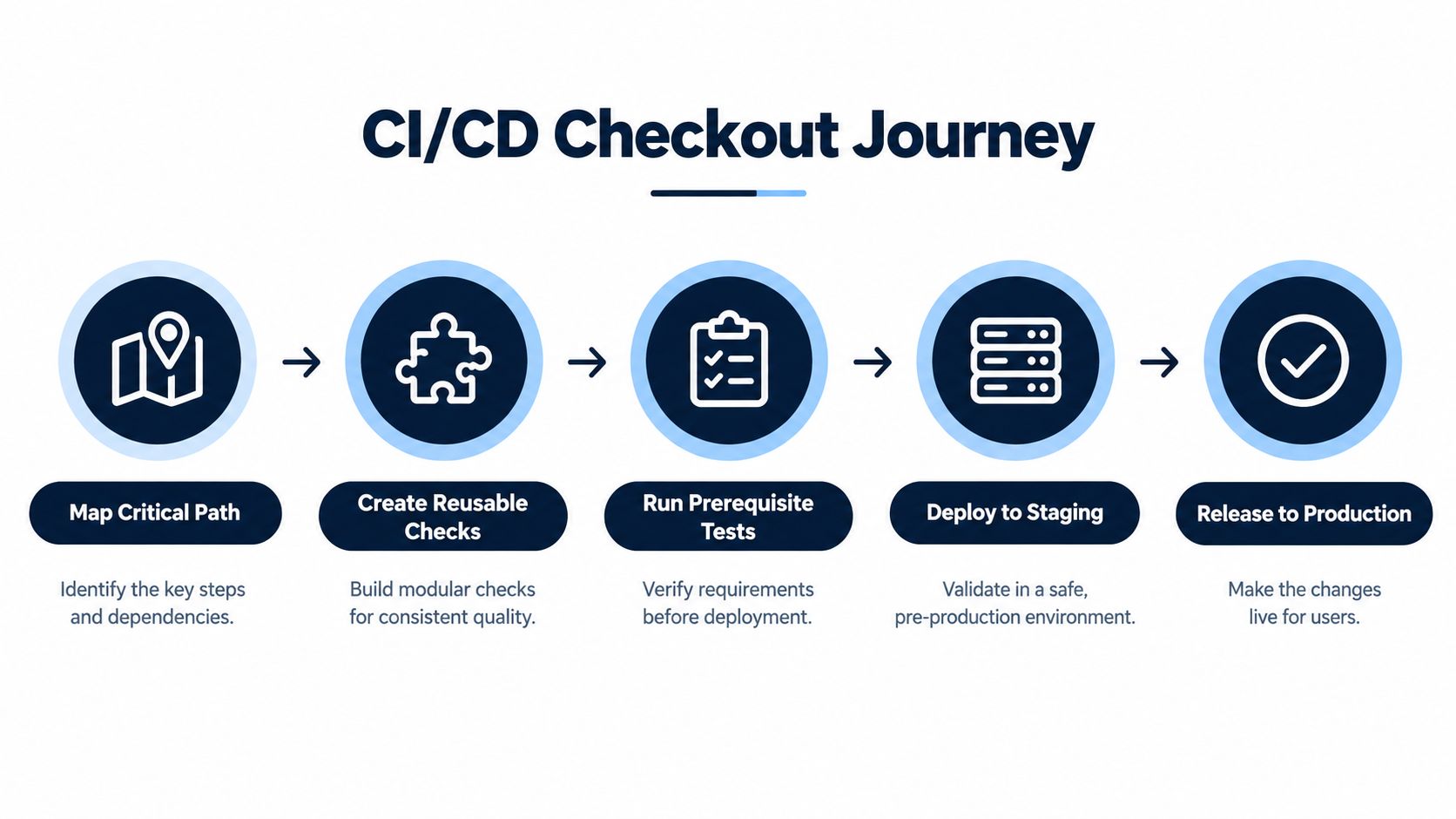
The team creates reusable checks for the prerequisites and behavior along the path. API checks can verify service responses, while a user-interface test can confirm that the customer-facing journey works through the application. The tests use controlled data and clear assertions, so a failure points to a behavior the team can investigate rather than an incidental detail.
On a pull request, a fast smoke subset checks the most important parts of the flow. If a developer changes payment handling and a relevant check fails, the pipeline provides evidence while the change is still under review. The developer can inspect the failure, determine whether the product or test is responsible, make a correction, and rerun the check.
Expand coverage at the right point
After a merge, the team can run a curated regression suite that covers more of the journey and its known variations. Additional checks may run in staging before release, where the team can assess whether the combined change is ready. The suite should be broad enough to detect meaningful regressions without making every small code change wait for every possible test.
Not every uncertainty belongs in a deterministic script. A test can confirm that a defined payment response produces the expected application state, but a tester may still explore unusual customer behavior or a confusing error message. The automated check establishes repeatable evidence; human review adds context that the test wasn't designed to capture.
Practical rule: A pipeline failure should tell the team what behavior needs attention and provide enough evidence to investigate it.
The operational loop is straightforward: a code change triggers selected checks, the system reports results, a person diagnoses failures that need judgment, and the team fixes the product or test before rerunning. Release decisions become clearer when the team can distinguish a product risk from a test or environment problem.
Measuring the Business Value of QA Automation
A small suite of stable checks often tells a release manager more than a sprawling suite that fails at random. Automation creates business value when repeated checks help teams find important regressions earlier and make release decisions with better evidence. The return depends on whether the checks cover meaningful behavior, run reliably, and report quickly enough to influence the work while it is still under review.
Testing also has limits, and knowing them prevents overinvestment. Capers Jones's software-quality research reports that each round of testing typically finds only about 30–35% of the bugs present at that stage, while design and code reviews can find more than 85%. The same body of work estimates that about 85% of defects are removed before delivery, while approximately 15% still reach customers. The roundup of Capers Jones software-quality findings provides the context for those estimates. The practical reading: automated regression testing works alongside reviews and other preventive practices, and no single technique carries the whole release.
A team can evaluate its system by tracking a small set of questions, the same kind of visibility that test automation reporting tools are designed to provide:
- Feedback time: How soon does the team learn that a relevant change may have broken a critical behavior?
- Meaningful failure rate: How often do failures point to real product risk rather than test or environment problems?
- Diagnosis time: Can an engineer identify the failing behavior and locate useful evidence without starting from scratch?
- Critical-journey coverage: Are the workflows with serious customer or operational consequences represented?
- Recurring-defect detection: Do automated checks catch known regressions before release?
- Maintenance effort: How much work goes into updating, investigating, or retiring tests?
- Flakiness and retries: Are unreliable checks visible, monitored, and followed through to repair?
Read these measures together. A team might have broad coverage yet still lose days if failures are hard to diagnose or frequently rerun, and another team might run a smaller suite that pays for itself because every result arrives fast and means something. A dependable suite provides an auditable signal about whether defined critical behavior still works, while giving engineers time for the risk analysis and exploratory testing that requires human judgment.
A successful automation system does not eliminate uncertainty. It shows the team where uncertainty remains, what has been checked, and which failures deserve attention before a release.
Avoiding Noisy and Fragile Automation
More automated tests don't always mean better quality. If a test passes and fails against the same code, its result is unreliable. Those false alarms can block releases, consume debugging time, and teach developers to discount pipeline failures, including ones that indicate genuine product problems.
Google reported that about 1.5% of test runs in its published CI data produced flaky results, and that about 84% of pass-to-fail transitions involved flaky tests. Google also described using automated reruns, monitoring, and quarantine mechanisms for unreliable checks. Google's published discussion of test flakiness illustrates why teams need to track test reliability separately from product correctness.
Common sources of noise include unstable interface selectors, shared or unpredictable data, asynchronous timing, unreliable environments, and changes in requirements. Teams can respond with stable selectors, deterministic test data, isolated test identities, explicit waits for application state, and controlled service dependencies where appropriate. Capturing logs, screenshots, and other failure artifacts can help engineers distinguish a product defect from an infrastructure or test problem.
Rerunning a failed test can help identify nondeterminism, but a pass on retry shouldn't erase the original failure. The team should investigate the cause and record whether the test is unreliable, the environment failed, or the product behavior changed unexpectedly.
A quarantined test should be out of the critical release path temporarily, not out of sight permanently.
Quarantine makes sense when a test's instability is disrupting a high-value pipeline and the team assigns ownership for repair. Fix the test when the cause is understood and the behavior still matters. Retire it when it checks behavior that no longer matters or duplicates stronger coverage elsewhere. Track the failure pattern and the time required to diagnose it, so a growing suite doesn't become less trustworthy.
Deciding When to Engage a QA Consultancy
An internal team can build a strong automation practice when it has clear ownership, enough capacity to maintain checks, and the skills to connect frameworks with CI/CD. Internal engineers also know the product's architecture and business risks. They can set conventions, prioritize critical paths, review failures, and adjust the system as the product evolves.
Outside support may be useful when important workstreams compete for the same people or when the existing suite has become difficult to trust. A consultancy can help map critical journeys, design maintainable frameworks, integrate checks into pipelines, or add focused functional, security, performance, and AI evaluation. For AI features, the team may need a layered approach that examines outputs and safety as well as conventional workflow behavior.
Before engaging outside help, ask what the work will include and who will own it afterward:
- Scope and priorities: Which user journeys and risks will the team cover first?
- System design: How will the framework, test data, and environments support maintainability?
- Pipeline integration: When will checks run, and how will failures reach developers?
- Reporting: How will the team distinguish product issues from unreliable tests or infrastructure?
- Knowledge transfer: What will internal engineers be able to maintain when the engagement ends?
A partner should leave the team with a working system and the understanding to operate it, not just a larger test suite. AskYourQA designs and implements test automation systems, including critical-flow coverage, functional and AI testing, and CI/CD integration. If your team needs to strengthen its release feedback, discuss your testing goals with AskYourQA and identify the automation work that would make the clearest difference.