
Gray box testing checks software with partial knowledge of its internal structure, sitting between black box testing (no internal knowledge) and white box testing (full source access).
Your team is about to release a billing change. The invoice page works, the API tests pass, and nobody has reported a problem. But can a customer change an invoice ID and retrieve another company's bill?
You don't need to read every line of code to investigate. You need the right account, the invoice API contract, and a clear understanding of who should own each record. That combination is where a gray box test becomes useful.
Table of Contents
- What Gray Box Testing Means and How It Differs
- What Information Gray Box Testers Need
- A Gray Box Test in Action on a Multi-Tenant App
- Gray Box Fuzzing as a Worked Example
- When to Choose Gray Box Testing in Your Strategy
- How to Map Gray Box Tests to Critical User Journeys
- What a Gray Box Pass Does and Does Not Prove
- Decide Your Gray Box Scope Before the Next Release
What Gray Box Testing Means and How It Differs
Think of testing a hotel. A guest can try the booking system, enter their room, and check whether their key opens another door. That's the black box view: judge the building through accessible behavior.
A gray box tester gets the floor plan and access list. They know which doors separate guest areas from staff areas, so they can aim their checks at those boundaries. A white box tester works more like an engineer with the blueprints, wiring diagrams, and construction details.
The NIST glossary defines gray-box testing as assuming some knowledge of the assessment object's internal structure and implementation details, and lists focused testing as an equivalent term. The important word is some: enough knowledge to guide a test, without requiring unrestricted implementation access.
Black box, gray box and white box testing compared
| Criterion | Black box | Gray box | White box |
|---|---|---|---|
| Internal knowledge | None | Partial: roles, API contracts, high-level architecture | Full: source code and detailed design |
| Access needed | Public interface, optionally with user accounts | Test accounts plus documented interfaces | Source code, builds and configuration |
| What it checks | Behavior seen from outside | Behavior plus known trust boundaries and data flows | Internal logic and execution paths |
| Typical strength | Realistic outside-user view | Targeted tests on high-risk boundaries | Deep logic and path coverage |
| Typical limit | Blind to hidden internal paths | Only as strong as the access package given | Requires code expertise and maintenance as code changes |
| Best use | Independent check of the public surface | Authorization, workflows and release regression | Unit-level logic and code review |
Internal knowledge determines how you choose inputs. Access determines what you can execute or inspect. Neither automatically guarantees that the test will find a defect.
The focus row tells you where to place assertions. The strength row describes the useful perspective each approach offers, while the limit row identifies the evidence you still lack. Best use helps you choose a starting point, not an exclusive method.
Practical rule: Classify the test by the knowledge used to design it, not by the tool that runs it.
A Playwright script can be black box or gray box. So can a request sent through Postman. Gray box testing is a test-design strategy, not a particular automation framework or a weaker version of source-level testing.
What Information Gray Box Testers Need
Useful gray box knowledge arrives as a package of artifacts, accounts, and permissions. An architecture diagram alone won't let you verify billing authorization if you can't log in as the relevant roles.
Build the package around the questions you need to answer. Ask for read-only observability where possible, and use seeded test data rather than live customer records.
Knowledge artifacts and what they let you test
| Knowledge artifact | Example | What it lets you test |
|---|---|---|
| User roles and test accounts | Standard user, team admin, billing admin | Whether a lower role can reach higher-role actions |
| API contract | OpenAPI document or GraphQL schema | Authorization on documented operations and input handling |
| High-level architecture | Diagram of services, queues and databases | Which service calls cross a trust boundary |
| Data relationships | Records assigned to tenants or accounts | Whether a tenant can read or change another tenant's records |
| Authentication flow | Login, token refresh and password reset steps | Session expiry, token reuse and reset-flow abuse |
| Deployment boundaries | Public gateway, internal services and integrations | Which paths are exposed and which should remain internal |
Say the role matrix distinguishes standard users, team admins, and billing admins. You can use those accounts to call the same billing operation and compare the results against the permission rules.
The service diagram adds another question: does the gateway enforce authorization, or must the billing service enforce it too? That distinction helps you choose where to inspect responses and logs.
Before execution starts
- Confirm identities: Verify that each account has the intended role and tenant membership.
- Check interface versions: Match the OpenAPI document or schema to the deployed application.
- Record the setup: Capture the environment, feature flags, and deployment boundaries.
- Declare exclusions: Name unavailable roles, undocumented integrations, and inaccessible paths.
An omitted partner API belongs under untested scope, not passed checks. Resolve missing inputs before execution where possible. Where that isn't possible, preserve the gap in the report rather than quietly shrinking the test's meaning.
A Gray Box Test in Action on a Multi-Tenant App
Say a project-management SaaS serves Company A and Company B. Each company should see only its own invoices. The tester has a standard-user account in Company A and API documentation showing that invoices are fetched by numeric ID.
The work looks ordinary from the outside. The important decisions happen in the request details.

Follow the invoice boundary
Use an authorized test environment with synthetic invoices assigned to each company. A fixture manifest can identify Company B's invoice without giving the tester a Company B login.
- Establish normal behavior. Log in as the Company A user and retrieve an invoice belonging to Company A.
- Inspect the request. Note where the invoice ID appears and how the session token accompanies it.
- Change the target. Replace the invoice ID with the known Company B fixture ID, keeping the Company A session unchanged.
- Check the outcome. Confirm that the API denies access and returns no protected invoice fields.
If the API returns Company B's invoice, the tenant boundary has failed. A hidden invoice link in the browser doesn't fix that defect. The server must check access to the requested record.
A black box tester could discover the same issue. However, without the contract and ownership fixtures, they might not identify the operation or distinguish an inaccessible record from a nonexistent one.
A white box reviewer could inspect the ownership checks directly. For this specific question, tracing controllers, middleware, and repository filters may take more setup than replaying the request, though readable code can also reveal the mistake quickly.
Follow a checkout across services
Now consider checkout. The UI displays a confirmed order, while architecture notes say the inventory service must reserve stock and publish an event.
The tester checks more than the confirmation message:
- Order API: The returned order has the expected state and tenant.
- Event stream: The expected reservation event carries the correct order reference.
- Inventory store: Read-only access confirms the reserved stock matches the order.
For asynchronous processing, wait for the documented completion condition rather than adding an arbitrary sleep. If the UI confirms success but inventory never changes, report the mismatch with the order and event identifiers.
The value came from knowing where the boundaries were, then checking what crossed them.
Gray Box Fuzzing as a Worked Example
Gray box testing also applies to software without a browser. Consider a file parser that accepts untrusted JSON documents containing a structured header.
A coverage-guided fuzzer uses lightweight instrumentation to collect runtime feedback. The paper hosted by the University of Szeged describes using coverage feedback to guide input exploration, while distinguishing coverage from actual defect discovery.
Follow the feedback loop
- Seed the corpus: Start with valid sample files covering supported document shapes.
- Mutate inputs: Change values, remove fields, or alter nested structures.
- Reward exploration: Retain inputs that reach a new branch or edge and prioritize further mutations.
- Reduce repetition: Spend less effort on inputs that exercise only familiar behavior.
- Preserve failures: Save the crashing input, available execution trace, build identifier, and run configuration.
A mutated JSON document might reach an unexplored header-validation branch and crash the parser. The team can replay the saved file against the same build, then minimize it into a small regression case.
Black-box fuzzing can mutate inputs without internal coverage feedback. White-box symbolic execution reasons over code and path constraints. This gray-box approach uses a narrower signal: which execution paths the inputs reached.
More coverage means you exercised more behavior. It doesn't mean that behavior is correct.
Run a time-boxed nightly job against parsers that accept untrusted input. Track reproducible failures and newly reached paths, and complement it with security testing for APIs when those parsers sit behind application endpoints.
For a visual introduction to the testing approach:
When to Choose Gray Box Testing in Your Strategy
Choose the approach by the risk you're checking and the knowledge you can supply. If the risk sits at a boundary you can name, gray box is often a useful first choice; if it sits inside an algorithm, start with white box analysis.
Which testing approach fits each situation
| Situation | Best fit | Why |
|---|---|---|
| New feature with a documented API | Gray box | Tests the contract and known boundaries without requiring source code |
| Pre-release regression on critical journeys | Gray box | Runs repeatedly in CI using test accounts and stable interfaces |
| Authorization across several roles | Gray box | Uses realistic accounts and role knowledge to expose access gaps |
| Third-party app with no source access | Black box initially | Public behavior and ordinary test accounts are available, but no internal context |
| Review of a cryptographic or parsing library | White box | Examines algorithmic and implementation flaws that external checks may miss |
| Checking that a patch closed a reported bug | Gray box | Targets the affected path and verifies the observable fix |
Having an account doesn't automatically make a test gray box. If you receive only ordinary user access and discover behavior without internal guidance, you're still working from a black-box perspective. Add a permission matrix or service contract, and you can design more focused tests.
Likewise, white box isn't the only way to find a parser defect. It's the better fit when the question requires inspecting bounds checks, arithmetic, or algorithmic assumptions rather than observing a known failure.
NIST's security-testing guidance recommends examining high-risk compiled components, component interactions, and interactions between the application and its environment. That supports a layered testing strategy rather than choosing a single label for the whole product.
Interface-based suites can require less routine maintenance than repeated source-level reviews when the interfaces remain stable. But fixtures, permissions, and expected outcomes still need owners. Use fast boundary checks during development and reserve deeper reviews for changes that need implementation-level evidence.
How to Map Gray Box Tests to Critical User Journeys
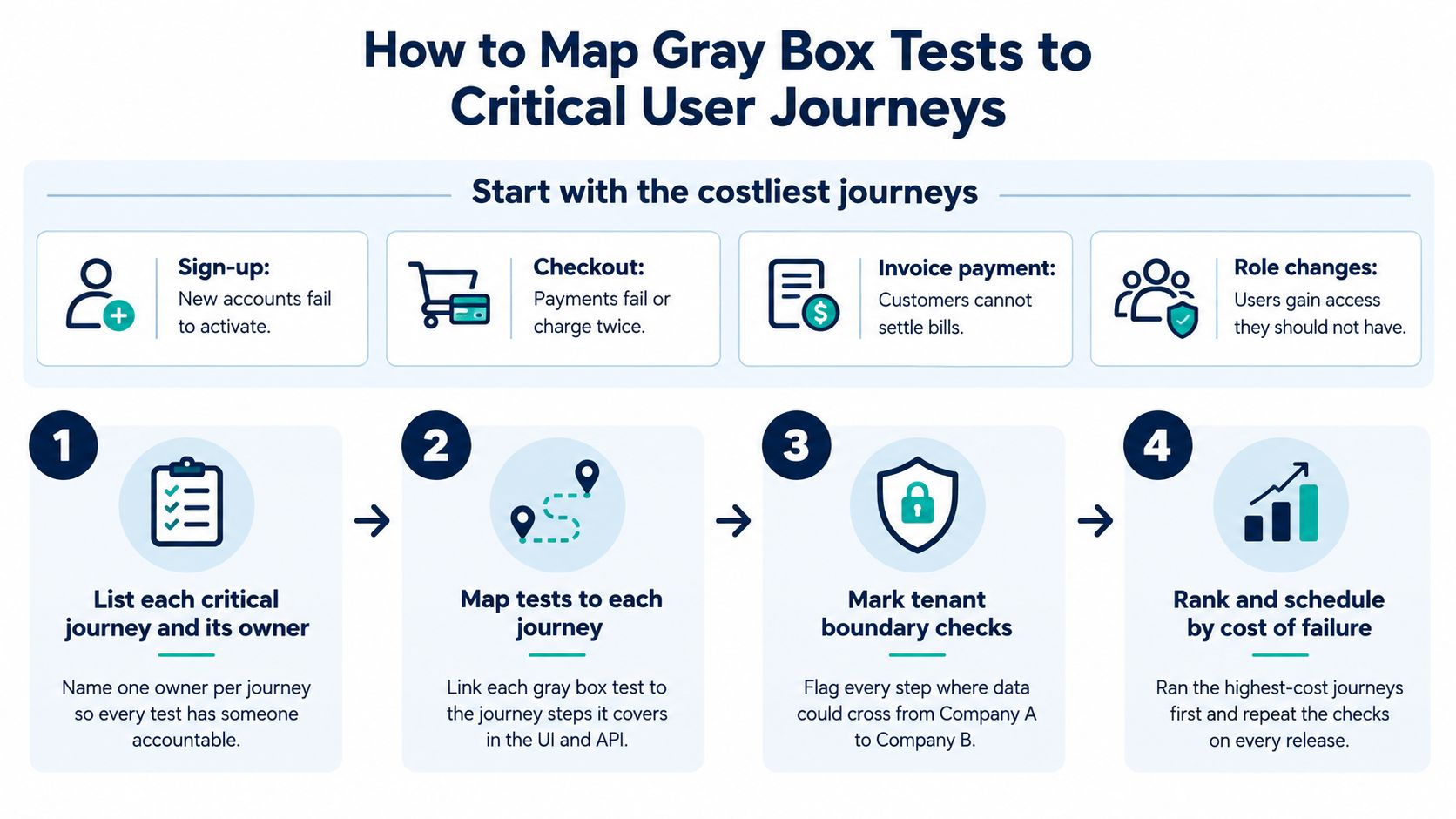
Start with the journeys that hurt customers most when they break: sign-up, checkout, invoice payment, and role changes. Prioritize the failure customers would experience, not the service your team happens to own.
Imperva's gray-box testing guide identifies limited internal visibility and difficulty locating root causes in distributed systems as practical constraints. Journey-based tests help by recording both the customer outcome and the service boundary where behavior diverged.
Use this planning overview to agree on priorities before building the detailed checks.
Turn the journey into executable checks
-
List each critical journey and its owner. Name the customer outcome and the person accountable for investigating failures. For checkout, the outcome might be an accepted payment linked to an order that can be fulfilled.
-
Map the roles and tenants involved. Invoice payment might allow a billing admin to pay while allowing a standard user only to view the invoice. Include partner and support identities when they participate, rather than treating all authenticated users alike.
-
Mark the boundaries crossed. Trace checkout from the UI through the order API, payment provider, queue, and inventory store. Identify where identity, ownership, or payment state must survive a handoff.
-
Write an assertion for each relevant boundary. Check the displayed confirmation, the API's order state, the emitted payment event, and the downstream invoice balance. Include negative assertions, such as no payment request when authorization fails.
-
Record the execution context. Save account references, tenant fixtures, environment, feature flags, documentation version, and service dependencies. Store secrets in the CI secret manager, not in reports or source control.
-
Schedule the test where its feedback is useful. Run a small checkout smoke test on pull requests and the broader journey and role matrix before release. Keep provider sandbox failures distinguishable from failures in your application.
This is a practical application of risk-based software testing: spend execution effort according to the consequence of failure. A cosmetic settings-page issue shouldn't receive the same release attention as a payment accepted without an order.
Make the failure report actionable
A useful failure says that the payment event arrived but the invoice balance remained unchanged. It includes correlation identifiers and names the responsible service boundary, so the team can begin investigating without replaying the entire journey.
A blocked test isn't a passed control. If the payment sandbox was unavailable, downstream payment assertions weren't evaluated.
Use separate outcomes for a failed assertion, a blocked dependency, and an excluded path. That distinction keeps release decisions honest and prevents a green dashboard from hiding checks that never ran.
What a Gray Box Pass Does and Does Not Prove
Gray box testing doesn't automatically provide halfway assurance between black-box breadth and white-box depth. A result describes the modeled user or attacker state: what someone with those credentials, knowledge, and reachable interfaces could do during the test.
The paper available through arXiv highlights how limited accounts, incomplete API documentation, and omitted administrative or partner roles can leave authorization boundaries unexamined. A clean result is therefore evidence about the exercised scope, not a certificate for the whole application.
What each gray box result supports and what it leaves open
| Result seen | What it supports | What it does not prove |
|---|---|---|
| Pass with a standard-user account | Tested standard-user paths met their assertions | Admin, partner and support roles are safe |
| Unauthorized cross-tenant request returns protected data | A tenant boundary defect exists on that path | Other tenant boundaries or endpoints are safe or unsafe |
| No finding on documented APIs | Tested documented operations met the checked expectations | Undocumented or internal endpoints are safe |
| Pass on a feature-flagged environment | The tested configuration met its assertions | Production behavior with other flags is covered |
Read the first row narrowly. Standard-user checks don't exercise support impersonation or administrative exports unless those actions were explicitly included.
The cross-tenant failure is stronger evidence in a different direction. It demonstrates a concrete defect, but it doesn't tell you how widely the same mistake appears.
“No finding” also needs careful wording. It means your cases didn't expose a problem, not that every possible input or sequence behaved correctly.
Keep the blind spots visible
Incomplete documentation can leave endpoints unexamined. Source-code flaws, infrastructure-as-code mistakes, and subtle algorithmic weaknesses may require targeted internal review. Independent outside reconnaissance can also uncover entry points that a documented service map leaves out.
Keep time for unknown-path exploration instead of following only the architecture diagram. Pair the scoped suite with periodic black-box discovery and focused code or infrastructure analysis.
Before trusting a result, ask: Which security claims can this exact gray box scope support?
Decide Your Gray Box Scope Before the Next Release
Make these decisions before adding more scripts to the pipeline. A small, explicit scope gives engineers a clearer release signal than a broad suite whose assumptions nobody can explain.
-
Choose the critical journeys. Start with the customer actions whose failure would cause the greatest harm this quarter. Assign an owner and a concrete success condition to each.
-
Write the access package. Specify roles, tenant fixtures, documented APIs, architecture notes, and exclusions for each journey. Keep the distinction between test strategy and test plan clear: the strategy explains your approach; the plan records how you'll execute this scope.
-
Set the cadence. Run smoke-level gray box checks on pull requests and full journey and role-matrix checks before release. Add black-box reconnaissance before major releases and targeted code review whenever sensitive logic changes.
If implementation is the bottleneck, an outside QA automation team can help translate this scope into fixtures, a maintainable framework, and CI reporting. Keep ownership of the risk decisions inside your engineering team.
For a user-journey suite, apply this plain test: if the team can't name the roles and boundaries a check covers, it isn't yet a well-scoped gray box test.
AskYourQA maps business-critical user journeys, builds automation frameworks, and integrates checks into CI/CD pipelines. Visit AskYourQA to discuss turning your gray box scope into repeatable tests with clear boundary assertions and actionable release feedback.