
The release is scheduled for Friday afternoon. The change looks routine, the feature tests pass, and the deployment checklist is nearly complete. Then someone asks whether the new endpoint enforces the same permissions as the old one. Nobody is certain, so the team runs a scanner, receives a long report, and still can't answer the question that matters: can the wrong user access or change the wrong data?
That gap explains why security testing for websites must be treated as an engineering discipline rather than a final audit. Modern web applications fail through broken authorization, unsafe configuration, vulnerable dependencies, weak release controls, and business-logic errors, not only through injection and cross-site scripting. The practical answer is a layered program that starts in design, runs through CI/CD, and proves that fixes remain closed after deployment.
Table of Contents
- Why Website Security Testing Has Become a Release Discipline
- Start with Threat Modeling Before Any Scan Runs
- Layered Scanning with SAST, DAST, and Dependency Checks
- Auth, Authorization, and Business Logic Checks Scanners Miss
- Wiring Security Gates into CI/CD Pipelines
- Prioritizing Findings and Running a Clean Remediation Loop
- Release Readiness Checklist and Common Questions
Why Website Security Testing Has Become a Release Discipline
A team can deploy code many times while testing its application only occasionally. CyCognito's 2024 State of Web Application Security Testing report found that nearly 75% of organizations test web applications monthly or less often, leaving more than 40% of the attack surface untested. The same report says 35% of respondents experience a significant web application security event at least weekly, while 26% experience a major incident that often.
That mismatch creates a predictable failure mode. A SaaS team ships a normal administrative feature, changes an authorization check, or adds a token to a deployment workflow. Months later, an external scan reveals that an administrator credential was never rotated or that a new endpoint accepts an old session with excessive privileges. The defect isn't necessarily difficult to find. It was not tested at the point when the team could still fix it cheaply.
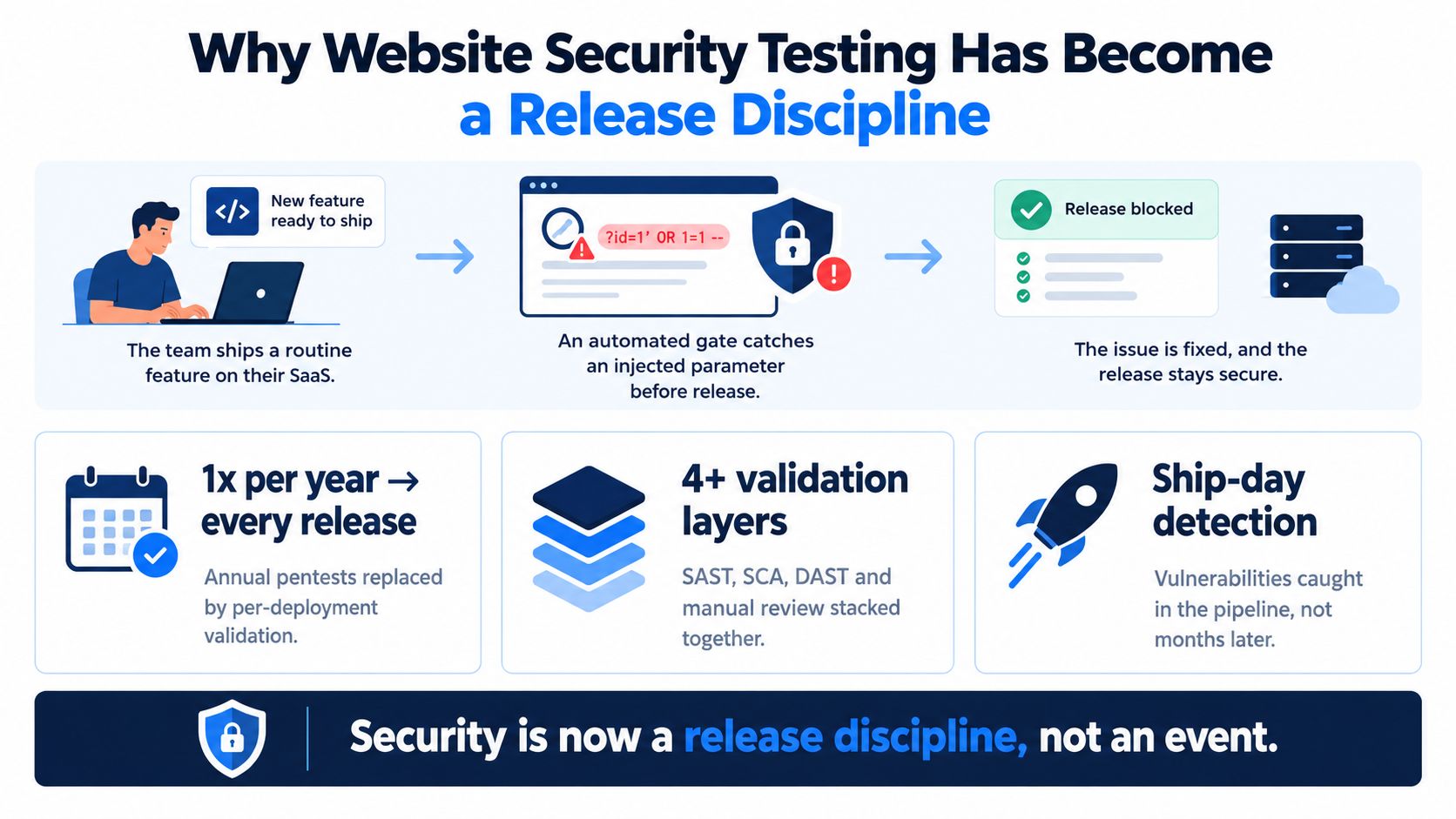
Replace the event with a sequence
Annual penetration tests still have value. They provide independent scrutiny, uncover attack paths that internal teams may miss, and create useful evidence for customers or auditors. They don't replace checks that run when developers change code, dependencies, infrastructure, or access rules.
A useful shift-left model, described in practical terms by this guide to shift-left testing, places lower-cost checks earlier and reserves human investigation for the areas that require judgment. The trade-off is real. Automated checks consume pipeline time and need maintenance. Manual review takes specialist and engineering hours. But a small blocking check on a pull request can prevent a defect from becoming an expensive incident or a release-wide investigation.
Practical rule: Block releases on findings that are clear, exploitable, and relevant to the changed component. Keep uncertain findings visible, but don't train developers to ignore every pipeline warning.
The rest of the program should operate as one connected discipline: model threats before implementation, run SAST, DAST, and dependency checks at appropriate stages, manually test authentication and business logic, prioritize findings by context, and retest after remediation. A release is ready when those layers provide evidence, not when a dashboard merely says “scan complete.”
Start with Threat Modeling Before Any Scan Runs
A scanner doesn't know which endpoint moves money, which record contains personal data, or which role can disable an account. It sees requests, code patterns, and responses. Threat modeling supplies the missing business and architectural context.
OWASP's Top 10 has served as a foundational reference since its first release in 2003, and the OWASP Top 10 project describes its 2025 edition as a data-driven representation of broad consensus. In that edition, Broken Access Control remains ranked first, with 3.73% of tested applications showing one or more of its 40 mapped CWEs. Security Misconfiguration ranks second, with 3.00% of tested applications showing one or more of its 16 mapped CWEs. Those categories should influence the model, but they shouldn't replace architecture-specific analysis.
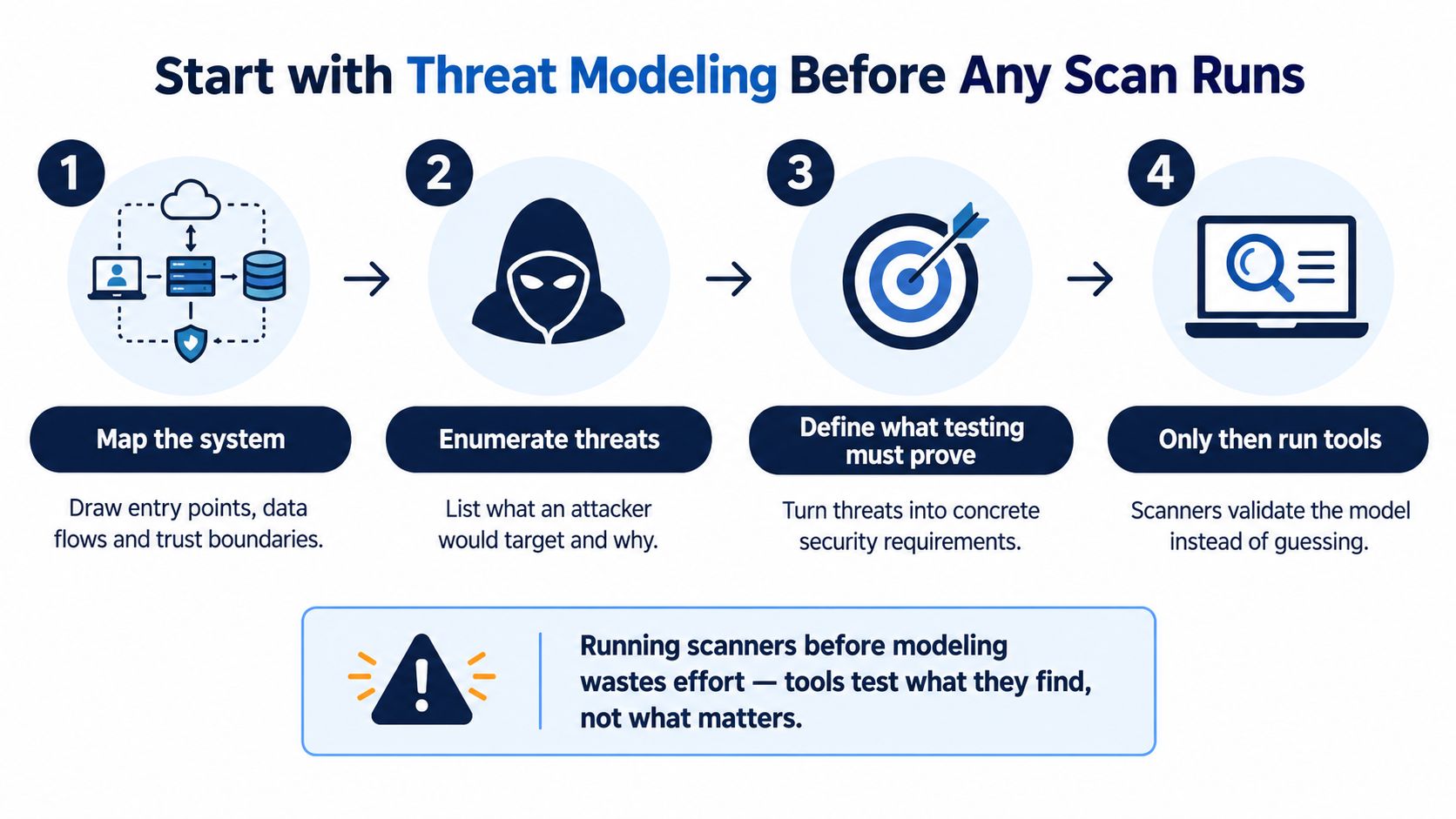
Build a lightweight model
Start with a diagram. Put users, administrators, service accounts, browsers, APIs, queues, databases, object storage, third-party services, and deployment systems on the page. Draw data flows and mark trust boundaries, especially where a request moves from a browser to an API, from one service to another, or from an external provider into your application.
Then enumerate threats by trust zone. Ask what an attacker could read, modify, impersonate, trigger, or cause the application to fetch. For a web product, that often means testing authorization across tenants, exposure of administrative functions, unsafe defaults, dependency and build integrity, and server-side requests to internal services.
Turn threats into proof
Rate each threat using a simple two-by-two matrix. High-impact, likely paths should become release gates. High-impact but less likely paths may need targeted manual testing and a compensating control. Low-impact issues can remain backlog work if the decision is documented.
The important output isn't the diagram. It's a testable statement such as:
- Tenant isolation: A user from one tenant can't read or mutate another tenant's records.
- Administrative control: A non-administrator can't invoke privileged actions, even by calling the API directly.
- Release integrity: The build can't deploy a dependency or image outside the approved policy.
- Configuration safety: Production doesn't expose debug behavior, unsafe headers, or unintended management interfaces.
Each statement should map to a tool check, a code review rule, an automated test, or a manual probe. OWASP's Web Security Testing Guide introduction recommends combining manual inspection, source review, penetration testing, and automated methods because code review can identify business-logic errors, cryptographic weaknesses, and race conditions that black-box tools often miss.
Layered Scanning with SAST, DAST, and Dependency Checks
No single scanner covers a modern web application. The useful question isn't which tool wins. It's which layer can observe the failure mode you care about, and where another layer must take over.
| Tool | When It Runs | Strengths | Blind Spots |
|---|---|---|---|
| SAST | Pull request or build | Inspects source or compiled code for unsafe data flows, injection sinks, hardcoded secrets, insecure cryptography, and risky APIs | Can't reliably understand runtime configuration, live authentication behavior, or deployment exposure |
| DAST | Staging or an isolated running environment | Exercises the application from the outside and can reveal runtime misconfiguration, CORS problems, missing headers, and observable authentication weaknesses | Lacks source context and often misses business rules, hidden workflows, and authorization semantics |
| SCA | Commit, dependency update, or build | Reviews manifests and lockfiles for known vulnerable packages, licensing concerns, and dependency health | Doesn't prove whether a vulnerable code path is reachable or whether custom application logic is safe |
Give each layer a defined job
Run SAST on pull requests so developers receive feedback while the change is still local. Tune the rules around the languages and frameworks you use. A generic rule that reports every possible data flow can create more distrust than protection, especially when developers can't see why a finding matters.
Run SCA on every commit or dependency change. Supply-chain exposure often enters through an innocent package update, a transitive dependency, a container base image, or a build action. GitLab's discussion of what changed in the OWASP Top 10 2025 highlights the increased emphasis on configuration and software supply-chain failures. It also notes that supply-chain failures became a distinct category and that mapped CVEs in that category had the highest average exploit and impact scores.
DAST belongs against a deployed build, preferably in staging with realistic routing, authentication, headers, and feature flags. An unauthenticated scan of a public landing page tells you little about an authenticated SaaS application. Configure a test account, crawl important routes, include APIs, and preserve evidence for each finding.
Don't confuse coverage with confidence
A green SAST job doesn't prove tenant isolation. A clean dependency report doesn't prove that a package is configured safely. A DAST scan that crawls only the homepage can't validate an administrator workflow.
Use coverage reports to identify blind spots, not to claim that the application is secure. Teams using SonarQube or similar code analysis should also understand what test coverage measures and what it doesn't, as explained in SonarQube's coverage guidance. Security validation needs its own assertions, especially around access decisions and sensitive business actions.
Auth, Authorization, and Business Logic Checks Scanners Miss
The most valuable manual testing often starts with two accounts, two sessions, and a clear permission matrix. Automated scanners can identify suspicious parameters or inconsistent responses. They usually can't determine whether a customer should be allowed to read another customer's invoice or whether a support role should export an entire tenant.
Test horizontal and vertical access separately
For horizontal authorization, log in as User A, capture a request for User A's object, and replay it while changing the object reference to User B's record. Test read, update, delete, export, and action endpoints. Don't stop at predictable numeric identifiers. UUIDs, slugs, nested paths, and GraphQL object references can all expose the same underlying failure.
For vertical authorization, use a low-privilege session against administrator routes. Then change the account's role, revoke access, or disable the user and replay the old token. The application should enforce the current authorization state at the server, not trust an earlier role embedded in a session.
Authorization is a server-side decision. A hidden button is not an access control.
Walk through the flows attackers abuse
Authentication testing should include password reset and account recovery, not only the login form. Check whether reset tokens expire, can be reused, leak through redirects, or remain valid after a password change. For JWT-based systems, review algorithm handling, key strength and rotation, issuer and audience validation, and whether the server accepts tokens after privilege changes.
OAuth deserves the same attention. Test whether redirect_uri validation is exact and bound to a registered client, whether state values prevent request forgery, and whether an attacker can cause authorization codes or tokens to land at an unintended destination. If the application fetches a user-supplied image or document, test SSRF controls with safe internal test targets and verify that redirects, alternate URL forms, and DNS changes don't bypass the policy.
| Check Area | Manual Test Needed | Scanner Reliability |
|---|---|---|
| Object-level authorization | Replay requests across users and tenants | Low without a modeled identity and object relationship |
| Role changes | Reuse sessions after elevation or revocation | Low |
| Password recovery | Reuse, alter, and race reset flows in a controlled environment | Inconsistent |
| JWT validation | Test claims, algorithms, keys, issuer, audience, and revocation behavior | Limited |
| OAuth redirects | Manipulate redirect handling and state validation | Variable |
| Business actions | Test whether the workflow permits an unintended sequence | Low |
| SSRF defenses | Exercise fetchers, redirects, and network restrictions safely | Partial |
The consistent principle is simple: scanners detect patterns, but humans validate meaning. Keep these checks as repeatable HTTP tests where possible, then run them against every release that changes identity, permissions, workflows, or integrations.
Wiring Security Gates into CI/CD Pipelines
A security gate earns its place in the release path when it returns fast, actionable feedback. Blocking every warning trains engineers to bypass the pipeline, while unowned findings turn into background noise. Design each gate around a defect it can detect reliably and a decision the team can make.
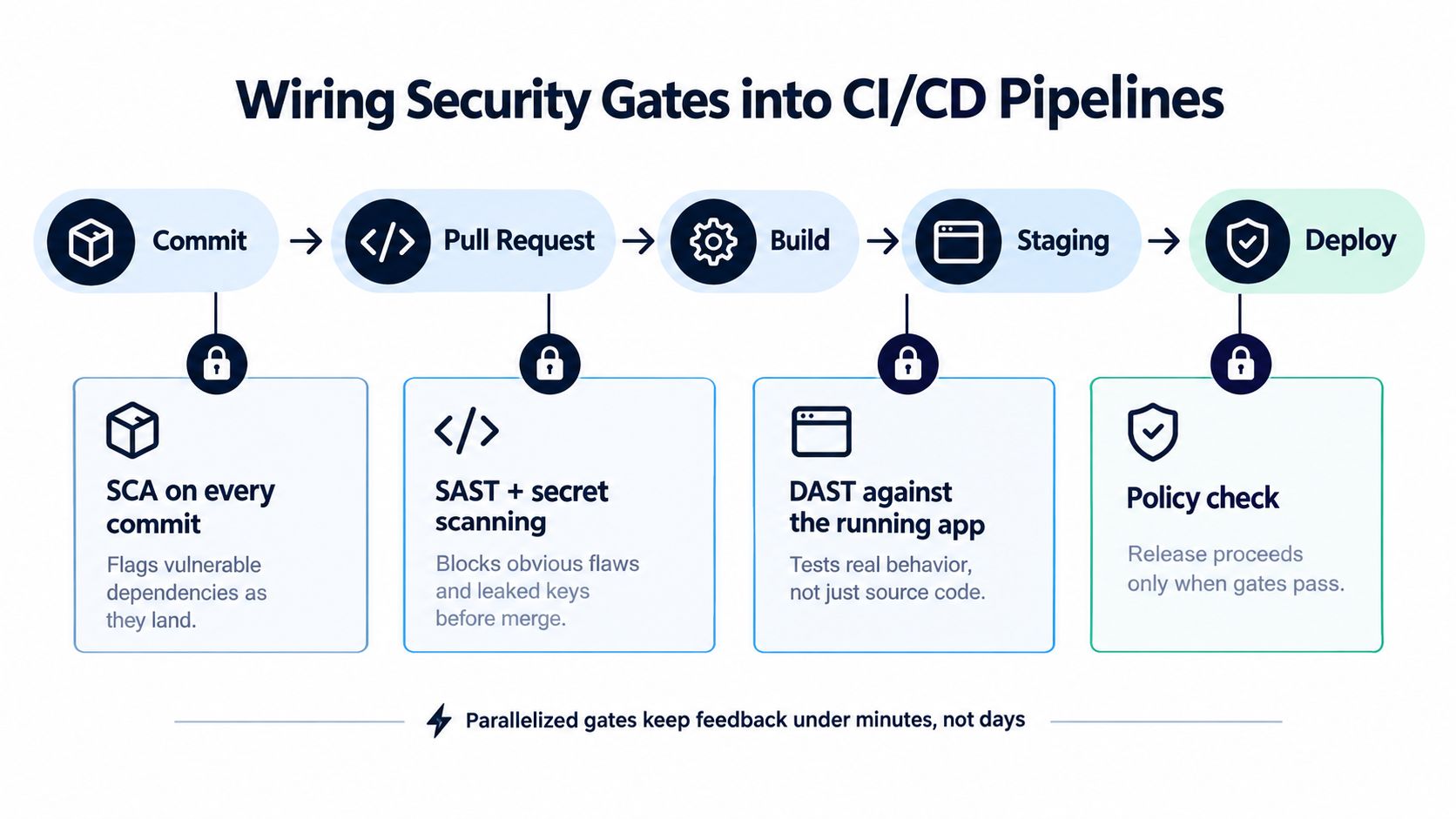
Place checks where they have the most impact
Run fast checks close to the code change, then test the assembled application in an environment that matches production:
- Pull request: Run SAST and secret scanning. Block exposed credentials and critical findings with a clear remediation path.
- Commit or dependency update: Run SCA and inspect lockfile changes. Block known vulnerable dependencies when an approved fixed version exists.
- Build: Scan images, generated artifacts, and infrastructure definitions. Enforce approved base images, signing, and deployment policy.
- Merge to main: Deploy an isolated build to staging and run authenticated DAST against routes identified during threat modeling.
- Release: Require a policy decision, evidence from completed gates, and an explicit record for accepted risk.
For context on pipeline stages, see how CI/CD pipelines work.
Separate blocking from advisory feedback
Block secrets, critical SAST findings, policy violations, and exploitable dependency issues when a fix is available. Keep lower-severity DAST findings advisory until engineers confirm reachability and recurrence. Advisory status still requires an owner and due date.
Baseline existing findings only with a documented reason, an owner, and an expiry or review date. Suppression comments should explain why a rule does not apply, rather than just label it a false positive. Signed attestations can connect the tested commit, build artifact, scan results, and approval decision.
The CI/CD integration approach described by AskYourQA supports focused smoke and regression checks across pull requests, merges, and releases. Apply the same discipline to security testing: parallelize independent jobs, keep pull-request feedback narrow, and reserve deeper authenticated checks for the assembled environment.
A bypassable gate provides little control. Record skipped jobs, overridden policies, expired suppressions, and deployments missing expected evidence. Review exceptions during release retrospectives, then adjust the pipeline so the compliant path remains the easiest one.
Prioritizing Findings and Running a Clean Remediation Loop
Raw scanner output is an intake queue, not a remediation plan. A finding's severity matters, but the release decision depends on how the issue behaves in your application.
Start by asking four questions:
- Exploitability: Can an attacker reach the vulnerable path, with the required privileges and conditions?
- Exposure: Is the component internet-facing, partner-facing, or isolated behind internal controls?
- Business impact: Does exploitation affect authentication, tenant data, money movement, administration, availability, or a low-value feature?
- Fix availability: Is a tested patch, configuration change, upgrade, or compensating control available?
Convert evidence into an owned queue
Deduplicate findings across tools before assigning work. One vulnerable library may appear in SCA, an image scanner, and a deployment report. One misconfiguration may produce several DAST observations. Link those records to a single root-cause issue so engineers don't close one alert while leaving the underlying defect active.
Capture the minimum context in the backlog:
| Field | Decision to record |
|---|---|
| Affected asset | Service, route, package, image, or configuration |
| Evidence | Request, code path, dependency path, or reproducible behavior |
| Risk context | Reachability, exposure, affected data, and required privileges |
| Owner | Team or individual responsible for the fix |
| Due date | Agreed remediation target based on severity |
| Verification | Regression test, rescan, manual retest, or production confirmation |
| Exception | Approver, rationale, compensating control, and review date |
A remediation loop should contain four distinct actions. Confirm the finding manually or with proof. Identify the root cause rather than patching one symptom. Add a regression test that would fail if the defect returns. Then rerun the relevant check and confirm that the deployed version no longer exposes the path.
A finding isn't closed because the ticket says fixed. It's closed when a test or retest proves the vulnerable behavior is gone.
Scanner tuning determines whether that loop remains credible. OWASP Benchmark data has been cited as showing legacy DAST false-positive rates as high as 82%, while more recent vendor benchmarks report lower rates in the 5% to 8% range for leading tools, with seeded benchmarks varying from 0% to 23% depending on configuration, as summarized by Snyk's discussion of DAST false positives. Treat those figures as a warning about configuration, not as a promise from any tool. Supply authentication, increase scan depth where needed, add custom rules, verify findings manually, and rescan after the fix.
“Won't fix” and “accepted risk” decisions should remain visible. Record the reason, business owner, security reviewer, compensating control, and next review date. Retire rules that repeatedly produce irrelevant alerts, but only after reviewing representative samples and confirming that the rule isn't hiding a real class of defect.
Release Readiness Checklist and Common Questions
Use the following as fields in the release ticket. Each item should link to evidence, not just receive a checkbox.
- Threat model current: Recent architecture, trust boundaries, sensitive data flows, and privileged actions are represented.
- Critical SAST findings addressed: Blocking findings are fixed, verified, or formally accepted.
- Authenticated DAST completed: Staging reflects the release candidate, and important authenticated routes were exercised.
- Dependencies reviewed: SCA and artifact checks show no unacceptable vulnerable package or image path.
- Authorization tests executed: Horizontal and vertical access checks cover changed resources and roles.
- Business workflows tested: Password recovery, token behavior, OAuth redirects, file fetchers, and sensitive actions were reviewed where relevant.
- Pipeline evidence present: Required gates passed, and every override has a documented decision.
- Remediation commitments met: Critical issues have an owner, an approved action, and verification evidence.
- Production confirmation planned: Monitoring and security regression checks will validate the deployed change.
Questions release leads usually ask
How often should we scan?
Run lightweight SAST, secret scanning, and dependency checks with code changes. Run authenticated DAST whenever the assembled application changes in a meaningful way. Schedule independent penetration testing when scope, architecture, or risk justifies it, but don't use a periodic test as a substitute for pipeline validation.
Should we choose open-source or commercial tools?
Choose based on coverage, authentication support, framework compatibility, evidence quality, tuning controls, and how well the tool fits your delivery process. Open-source tools can provide strong building blocks, but your team owns integration and maintenance. Commercial tools may reduce operational work, but they still need correct scope, credentials, scan depth, and human triage.
What if a critical finding can't be fixed before launch?
Don't hide it in a suppression list. Stop the release if the exposure is unacceptable. If a responsible business owner approves a temporary exception, document the impact, compensating control, expiry, and a concrete fix plan, then verify that the control is active.
Does a bug bounty replace structured testing?
No. A bounty program can add independent perspectives and discover unexpected paths. It doesn't guarantee coverage of every release, authenticated workflow, dependency change, or internal permission rule. Keep it complementary to threat modeling, automated checks, manual testing, and remediation verification.
Security testing for a website is ready for production when the team can explain what it tested, what it couldn't test, why remaining risks are acceptable, and how it will detect regression. That standard is more useful than a clean-looking scanner dashboard.
AskYourQA designs security and broader test automation around critical application flows, APIs, authentication, authorization, and CI/CD release checks. If your team needs high-signal testing and structured evidence before shipping, visit AskYourQA to discuss an assessment or automation system.