
The release is booked for Thursday. Three squads say their changes are ready, one says probably, and the build sitting in staging came from a branch that has moved twice since. Nobody can say with confidence what's inside it. Someone suggests a final approval meeting, and someone else points out that the last four approval meetings didn't catch the checkout bug that broke payments for forty minutes.
Every team meets this moment. What separates the teams that ship calmly from the ones that hold their breath isn't talent or tooling budget. It's whether release management exists as a designed process or as a scramble repeated every few weeks.
Here's the idea worth holding onto from the start: speed and stability aren't opposites. Teams that release often and teams that break production are usually not the same teams. The ones shipping daily tend to fail less, because small changes are easier to test, easier to reason about and easier to undo. Getting there is a design problem, and it's solvable.
Table of Contents
- What Software Release Management Means in Plain Terms
- The Release Lifecycle From Planning to Review
- Four Metrics That Show Whether Releases Are Healthy
- Where Your Team Stands on Delivery Performance
- Release Strategies and When Each One Fits
- How Automation and CI/CD Keep Releases Reliable
- Roll Back or Fix Forward
- Confirm Your Release Process Before Your Next Release
What Software Release Management Means in Plain Terms
Picture a busy restaurant kitchen. A dish is cooked in ninety seconds, and it still doesn't reach the table in ninety seconds. The head chef checks it against the other plates on the order, looks at the plating, confirms it matches what's on the menu tonight, and only then does the runner walk it out. If a plate comes back, the kitchen knows which order to remake and which station to check first.
Software release management is that same job applied to code. It's the set of planning, testing, approval, deployment and follow-up activities that carry a change from a developer's branch to real users. Done well, it answers four questions before anything reaches a customer: what's in this version, when does it ship, who agreed it was ready, and how do we undo it if it isn't.

The Three Things It Protects
- Predictable timing: the business can plan a launch, a marketing campaign or a support rota around a date it trusts, because the date comes from a process rather than optimism.
- Quality for users: the checks that decide whether a change is safe run before users meet the change, not after.
- A way back: when something does break, someone knows exactly what to revert, who calls it, and how long it takes.
The people involved usually include a release manager or coordinator who owns the plan and the calendar, developers who build the change, QA engineers who decide whether it behaved, a DevOps or platform engineer who runs the pipeline and the environments, and a product owner who decides scope. Small teams fold several of these into one person, which works fine as long as somebody is accountable for each answer.
A distinction beginners trip over: a release is the version you make available to users. A deployment is the act of putting code onto servers. You can deploy something and not release it, by leaving a feature switched off until the team decides the moment is right.
Here's a quick self-check. Can your team name, right now, what's in the next release, who approved it, and how you'd roll it back within an hour? If any of those answers takes a meeting to produce, the process is still implicit rather than designed.
The Release Lifecycle From Planning to Review
Every release travels the same rough path, whatever the company size or the technology stack. The stages below are the spine of it.
| Stage | Main activity | Usually owned by | Output |
|---|---|---|---|
| Plan | Pick changes, set date and goal | Product owner and release manager | Agreed scope list |
| Build | Compile, package and version the artifact | Developers and CI system | One versioned build |
| Test | Run automated and targeted manual tests | QA engineers | Test report with pass or fail |
| Stage and approve | Verify in a production-like environment and decide | Release manager and tech lead | Go or no-go decision |
| Deploy | Release using the chosen strategy | DevOps or platform team | Live version |
| Monitor and review | Watch metrics and log lessons | On-call engineers and whole team | Incident notes and updated checklist |
Here's the same sequence laid out end to end, so you can see where each stage hands off to the next.
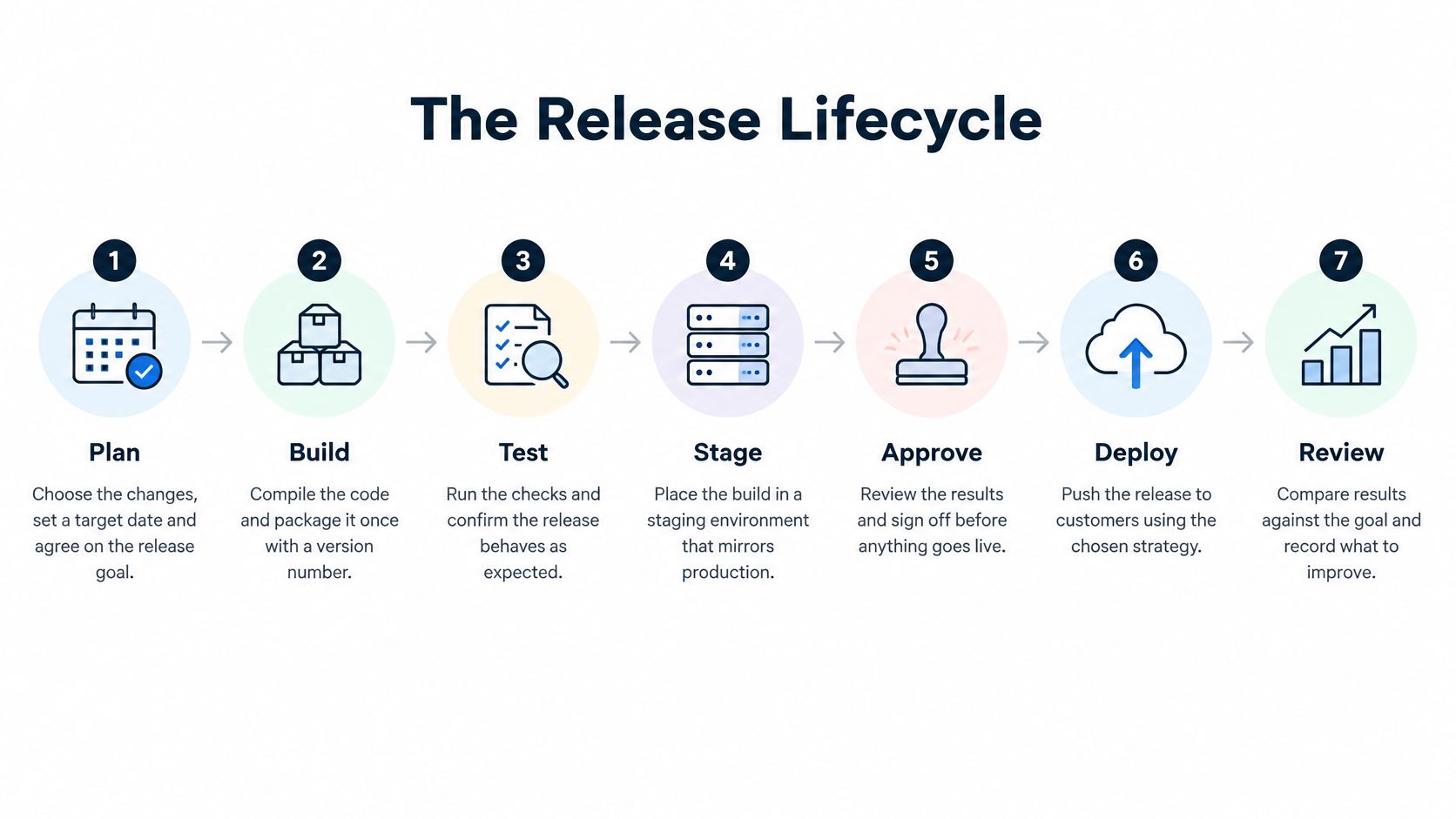
Planning is where most release pain is created or prevented. The scope gets chosen, the target date gets set, and the goal gets written down in a form someone can check afterwards, such as "customers can pay with a saved card without re-entering details." Scope conversations often start in sprint planning, so a release that begins with vague commitments rarely ends cleanly. If that's where your team struggles, these notes on how to improve your sprint planning sessions are a useful companion.
Build Once and Promote the Same Artifact
Build the code once, stamp it with a version number, and move that identical artifact from environment to environment. The moment you rebuild for staging or patch a config by hand before production, your testing stops describing what customers will get. Every environment should run the same bytes with different configuration.
Testing then means something. Automated unit, API and end-to-end suites run first, and targeted manual passes cover the risky flows automation can't judge, like a redesigned payment form or a permission change. The output is a report with a verdict, not a folder of screenshots someone has to interpret.
Stage and Approve On Evidence
Staging exists to be a rehearsal: a production-like environment where the release runs against realistic data and dependencies. Approval is the decision that follows, and it should rest on facts rather than ceremony. A sign-off meeting records that people were in a room; it doesn't test anything.
Before a release moves into the approval conversation, it should clear a short list of entry criteria:
- All critical tests passing on the exact artifact that will ship.
- No open blocking bugs, with everything else triaged and accepted knowingly.
- A rollback path that has been tried at least once in a non-production environment.
- A canary or phased exposure plan for the first slice of real traffic.
- A named on-call owner for the hours after deployment.
Deploy, Monitor and Review
Deployment follows the strategy that fits the risk, which is a topic in its own right. Monitoring covers the first hours and days: error rates, response times and whether the journeys that matter, such as sign-up, search or checkout, still complete. Review happens after the dust settles, and its job is to write down what surprised the team and turn that into a change in the checklist.
Four Metrics That Show Whether Releases Are Healthy
Arguments about release quality usually stall because nobody is measuring the same thing. The research program behind the DORA State of DevOps reports fixed that by giving teams a shared vocabulary, and the history of the DORA delivery metrics is worth reading because it explains why the set is shaped the way it is. Four measures form the original core.
Deployment frequency is how often changes reach production. A team shipping twice a week has a frequency; a team shipping twice a quarter has a different one, and neither number means anything without the others next to it.
Change lead time is the elapsed time from committing code to running successfully in production. If a developer merges on Monday and the change serves customers on Thursday, the lead time is three days, whatever the deploy button says.
Change failure rate is the share of deployments that cause a production problem needing intervention, such as a rollback or a hotfix. Deploy ten times and fix three of those releases under pressure, and the rate is 30 percent.
Failed deployment recovery time measures how long it takes to get back to normal after such a failure. It's the difference between a blip and a bad afternoon, and it's the number customers feel.
The metric teams forget: in 2024 DORA added deployment rework rate, the share of deployments that are unplanned repair work. A team can look fast and stable by the first four measures while quietly spending half its releases fixing the previous ones.
Read together, the five split into two ideas. Deployment frequency, lead time and recovery time describe throughput, how quickly work moves. Change failure rate and rework rate describe instability, how much of that movement is damage control. Faster shipping that raises failures isn't progress, it's just churn with a nicer dashboard.
Start small. Pull deployment counts from your pipeline logs and incident records from your ticketing tool, put them on one page, and review them once a month as a team. Add the context of quality software metrics so throughput doesn't become the only story you tell about a release.
Where Your Team Stands on Delivery Performance
Benchmarks are useful for one reason: they turn "we should ship more" into a target. The 2024 DORA report groups teams into four bands, and the spread between them is enormous.
| Performance band | Deployment frequency | Change lead time | Change failure rate | Time to recover |
|---|---|---|---|---|
| Low | Once per month to once every six months | One to six months | About 40% | One week to one month |
| Medium | Weekly to monthly | One week to one month | 10% | Less than one day |
| High | Daily to weekly | One day to one week | 20% | Less than one day |
| Elite | On demand, potentially multiple times per day | Less than one day | 5% | Less than one hour |
Find the row where most of your numbers fit. Mixed results are normal, and teams often have one metric sitting a band above the others, often recovery time, because someone happens to be good at rolling back. Don't average the rows; work on the weakest one.
The gap between the outer bands is hard to picture until you see it side by side. According to the 2024 DORA report, elite teams deploy 182 times more frequently than low performers, have change lead times 127 times faster, keep a change failure rate eight times lower, and recover from failures 2,293 times faster.
What that actually means: the elite group isn't trading stability for speed. It has both. Recovery in under an hour instead of a week is what makes frequent deployment safe in the first place.
Notice the high band's 20 percent change failure rate, which is higher than the medium band's 10 percent. Moving up isn't a simple matter of adding releases to the calendar. If you ship more often without shrinking change size or improving detection, you'll land in the high band's failure profile rather than the elite one.
For a team in the low band, the single most useful change is making each deployment smaller. A change touching three files and one API can be reviewed properly, tested quickly and reverted in minutes. A change touching forty files across four services can't be any of those things, no matter how many people approve it.
Moving from low to medium usually comes from more frequent releases plus a faster recovery route, not from more approval meetings. And the field is wide: independent technology researcher Coté reported in 2024 that 40% of surveyed developers deployed to production once a month or less, while 9% deployed multiple times per day. Wherever you sit, plenty of teams are near you, so pick the next band up as your target rather than jumping straight for elite.
Release Strategies and When Each One Fits
How you push a version out decides how much damage a bad one can do. Four strategies cover almost every situation teams meet.

- Big bang sends every user the new version at once. Simple, fast, and unforgiving.
- Rolling replaces servers in batches, so the fleet moves over gradually instead of flipping in one step.
- Blue-green keeps two identical environments and switches traffic from one to the other once the new one is verified.
- Canary sends a small share of traffic to the new version first and watches what happens before widening it.
| Strategy | How it works | Users exposed at first | Rollback speed | Best fit |
|---|---|---|---|---|
| Big bang | Every user gets the new version at once | All users | Slow, requires a full redeploy | Small internal tools with low traffic |
| Rolling | Servers are replaced in batches | Grows batch by batch | Moderate, reverse batch by batch | Stateless services with many instances |
| Blue-green | Two identical environments with traffic switched between them | All users at the switch | Fast, switch back | Services where a clean cutover matters |
| Canary | A small share of traffic receives the new version first | About 5 percent | Fast, with automatic rollback | High-traffic products with strong monitoring |
What a Canary Policy Must Define Before Deployment
A canary limits the blast radius, and that's the whole point. Google's SRE workbook on canarying releases makes the reasoning explicit: the impact on reliability is proportional to the traffic exposed to a defect, so putting 5 percent of representative traffic in front of a new version limits the immediate damage compared with exposing 100 percent, assuming detection and rollback are comparably fast.
"Assuming" is doing a lot of work in that sentence, which is why the policy has to be written down before anyone deploys. Name the canary cohort and how it's selected, set the observation window, set the thresholds that promote the release, and set the conditions that trigger automatic rollback. None of these can be improvised at 5pm on a Friday.
Then choose signals that describe customers rather than processes. Request error rate, latency percentiles, resource saturation, and whether business-critical journeys still complete end to end. A build that says "deployed successfully" while checkout returns 500 errors is not a healthy release.
The control that ties it together is the error budget. While the budget for a service remains healthy, releases proceed on their normal cadence. After repeated violations of its service-level objectives, new releases pause and the team spends the time on testing, resilience or performance. That converts release management into a feedback loop: progressive exposure supplies production evidence, telemetry detects deviation, and automated rollback limits the customer impact.
If you're still deciding how much of the path to production should run without human hands, this comparison of continuous deployment vs continuous delivery is a useful way to pick a model before you redesign the pipeline.
How Automation and CI/CD Keep Releases Reliable
A release is more reliable when each change gets useful feedback before it reaches customers. Continuous integration builds and tests changes as they are merged, so a broken branch is caught early. Continuous delivery moves tested builds toward production automatically, with human review at points where a decision is needed.
The pipeline works like a series of filters: quick checks catch simple problems early, while broader tests examine how the product behaves as a whole. The guide to CI/CD pipeline test automation explains how to connect those checks to a delivery pipeline.
Checks Run in Layers
On each pull request, run unit tests, linting, and a short smoke suite. These checks aim to return feedback in minutes, while the change is still fresh in the developer's mind.
On merge, run API and integration tests that check how services communicate, including contract checks for systems outside your control.
Before a release, test critical user journeys such as sign-up, checkout, or payment. Add performance tests under realistic load and security checks for risky flows. CI/CD integration builds automated test execution into the delivery pipeline, giving every release fast, reliable feedback instead of adding a gate that only delays it.
After release, synthetic transactions repeat key journeys against live systems. They can reveal a broken payment provider before customers report the problem.
Fewer Tests With More Signal
A high-signal suite uses fewer, better tests to show whether the product works, rather than thousands of noisy checks. Coverage percentages alone can obscure gaps: an end-to-end checkout test may catch a broken payment API that isolated unit tests miss.
Flaky tests need a decision. If a test fails for reasons the team cannot act on, people may stop trusting red builds. Fix the test within the sprint, or remove it and record the risk the team is accepting.
Where to draw the line: A failing build should block a release if it breaks a critical journey, security control, or data contract. Style issues, minor coverage dips, and non-blocking performance regressions can raise a warning without stopping delivery.
Extra Controls for AI-Assisted Code
AI-assisted code can increase the volume of changes reviewers need to assess, along with the risk that a defect reaches production. More code arriving faster does not automatically make releases safer.
Approval meetings alone do not address that risk. Instead, apply careful review to AI-assisted pull requests, test contracts at service boundaries, and check the behavior of features that use an LLM or agent. For AI features, validate output quality and safety as well as whether the code compiles.
AskYourQA integrates automated testing into CI/CD pipelines to provide fast, high-signal feedback before each release. Full visibility helps teams see what is covered, what is at risk, and where quality issues could affect a release.
Roll Back or Fix Forward
The decision arrives at the worst possible moment, usually with an alert firing and someone asking what to do. Having the rule settled in advance is most of the answer.
Roll back when the cause is unknown, when users are being harmed right now, or when no safe fix exists yet. Fix forward when the problem is small, well understood, and a patch can reach production faster than a revert can. Most bad calls come from teams discussing this for the first time during the incident.
Rollback speed depends on preparation far more than courage. Keep the previous artifact available to redeploy, make database migrations backward compatible so the old code still works against the new schema, and put risky features behind flags that can be switched off without a deployment. Without those three, a rollback is a project rather than a button.
- Detect. Alerts, journey checks or a support ticket flag the problem, and the on-call engineer confirms it's real.
- Decide. The on-call lead picks rollback or fix forward inside a fixed limit, fifteen minutes works well, and announces the choice.
- Contain. Redeploy the previous version, switch the flag off, or route traffic away from the failing instances.
- Communicate. Tell support, affected customers and internal stakeholders what's happening and when they'll hear more.
- Review. Hold a blameless session that records the cause, the time to recover and one concrete change to the checklist.
A recovery that takes twelve minutes and happens twice a quarter is healthier than one that takes four hours and happens once. Customers remember the outage, not the frequency.
Then watch the pattern rather than the single event. If the same class of failure keeps returning, that's a gap in testing or release controls surfacing through your rework rate, not bad luck. Repeat failures are a design signal.
Confirm Your Release Process Before Your Next Release
Reading about release management changes nothing. Two weeks of small, deliberate changes do. Here's a sequence you can start this week.
- Measure where you are. Write down your deployment frequency and the failure rate across your last ten releases, using whatever data your pipeline and incident tracker already hold.
- Find your surprise point. Look back at the last three release problems and identify which lifecycle stage should have caught each one. The pattern is usually obvious once it's on a page.
- Add one gate. Pick the most valuable user journey and add a single automated end-to-end check for it at the stage where surprises keep appearing. One reliable gate beats five half-maintained ones.
- Set a recovery target. Choose a number you can defend, such as back to normal within one hour, then run a rollback rehearsal and see whether your process meets it.
- Review and adjust. After two weeks, compare the numbers with your starting point and change one thing at a time.
If you'd like an outside view, we offer a free 20-minute call that maps your critical flows and shows how quickly an automation framework could be up and running. On that discovery call, we map your current testing process and identify where automation helps most.
The goal isn't a perfect process. It's a release you can do on a Thursday afternoon without holding your breath, and a failure that becomes a twenty-minute inconvenience instead of a bad week. Ship more often, fail less, and treat both as the same objective.
Release confidence comes from evidence, and evidence comes from automated checks that run on every change and tell you plainly whether the journeys your business depends on still work. AskYourQA builds end-to-end test automation for critical user flows and connects it to your pipeline, so each release candidate gets a real go or no-go signal instead of a hopeful one. Visit AskYourQA to see how a first release gate would be scoped for your product.