
The most common advice about sanity testing is to keep it small and check that the basics work. That advice misses the important question: which failure would make this build unacceptable? An application can start normally while customers can't sign in, save their work, or complete a payment.
A useful software sanity test is a risk-based decision gate. It checks the changed behavior and the journeys your business can't ship without, then determines whether the build deserves deeper testing. A fast pass isn't proof that the product is safe. It's permission to continue gathering evidence.
Table of Contents
- Software Sanity Test Versus Smoke and Regression
- When to Run a Sanity Test and When a Red Build Blocks
- What Belongs in a High-Signal Sanity Suite
- How to Gate a Build in CI
- Sanity Checks for Real Changes
- Check Whether Your Suite Is Still a Sanity Test
Software Sanity Test Versus Smoke and Regression
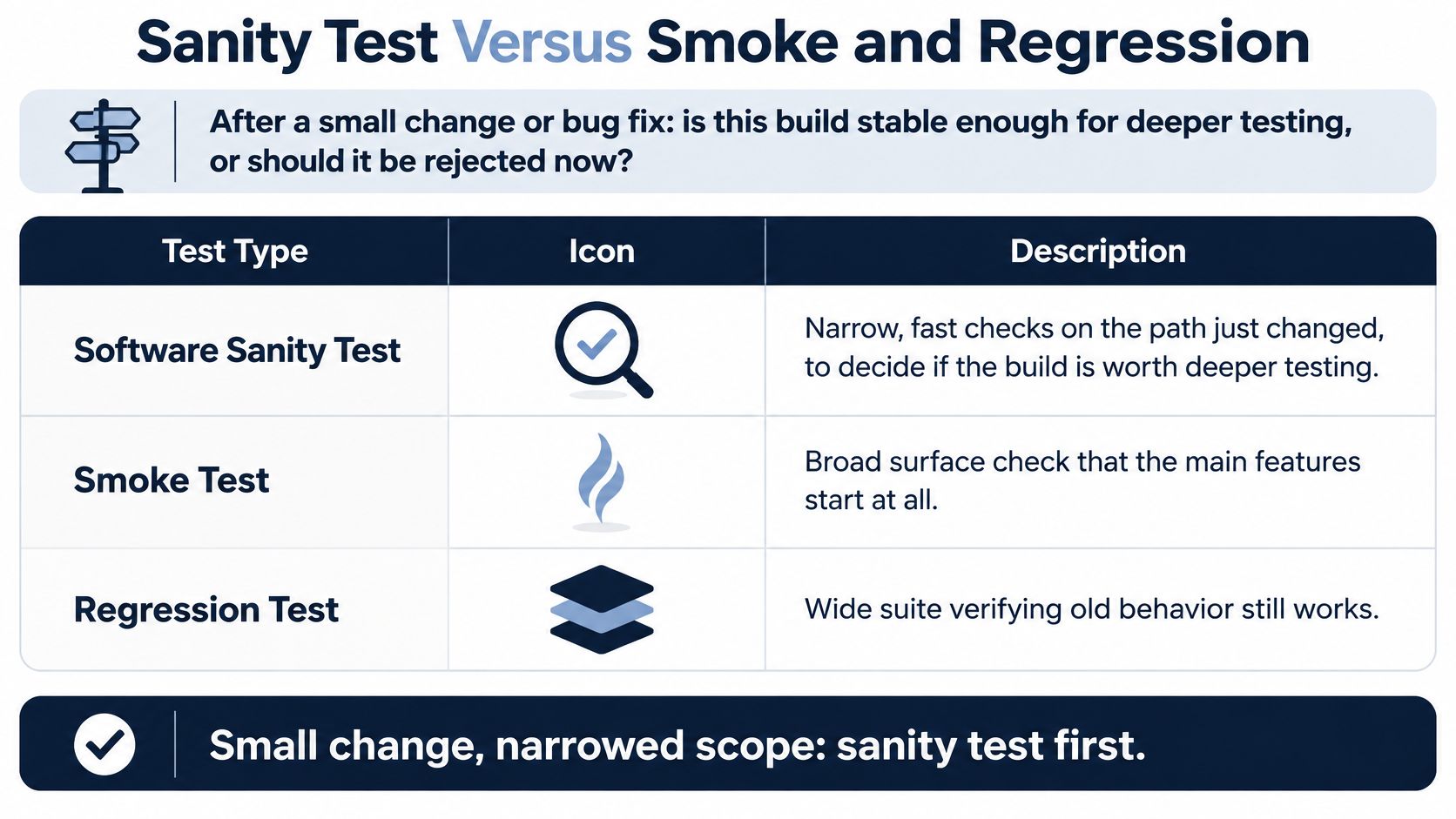
After a small change or bug fix, is this build stable enough for deeper testing, or should the team reject it now? That's the decision a software sanity test should support.
Sanity, smoke, and regression at a glance
| Test type | Trigger | Scope and depth | Typical runtime | A pass means |
|---|---|---|---|---|
| Sanity test | Small change or bug fix | Narrow, deeper on the change plus a few critical paths | A short, explicitly bounded gate | Stable enough to start deeper testing |
| Smoke test | New build just deployed | Broad and shallow across main functions | A short build-acceptance check | The build is testable |
| Regression test | After the gate passes, or before release | Wide and deep on behavior the change might affect | Budgeted according to affected behavior and suite size | No known side effects in the covered areas |
These runtime descriptions are design rules, not promises. A slow environment or expensive setup can make even a short checklist unsuitable as an early gate.
The terminology matters less than the decision
The ISTQB glossary treats sanity test as a synonym for smoke test, describing a suite that covers main functionality before planned testing begins. You don't need to argue that your team's vocabulary is the only correct one.
In daily release work, trigger and depth offer a useful distinction. Smoke testing asks whether a newly deployed build's main functions work at all. Sanity testing concentrates on a recent modification while preserving checks for release-critical journeys.
Think of a house. Smoke testing asks whether the power is on. Sanity testing asks whether the repaired circuit still lights the rooms people use, while regression testing checks the wider house for unintended effects.
Release-gate rule: If a critical path fails, dependent functional, security, or performance results may be hard to interpret because the system hasn't reached a valid state for those tests.
For example, a broken authentication service can cause checkout, account settings, and order-history tests to fail together. Running them all doesn't necessarily reveal separate defects. It may only produce more evidence of the same blocker.
Give each check a clear job
A test script doesn't have to belong permanently to one category. A login check can participate in an acceptance gate and a broader regression suite, provided the pipeline gives each execution a clear purpose.
Document that purpose alongside its trigger and blocking policy. Your CI/CD integration testing strategy should make those relationships explicit rather than rely on folder names.
Before adding tests, label your current checks as smoke, sanity, or regression according to the decision they support. If nobody can explain what a failure changes, clarify the policy before expanding coverage.
When to Run a Sanity Test and When a Red Build Blocks
Run the gate after deployment to a known test environment, when the application and its configuration are available together. A successful compilation can't tell you whether the deployed service received the right credentials, feature flags, or database configuration.
Use it after a bug fix, a dependency update, a configuration change, or a hotfix to an individual service. Run it on merges to the release branch so a broken candidate doesn't automatically start expensive downstream testing.
Match the trigger to behavioral risk
A documentation-only change doesn't need a newly designed sanity suite. Neither does a copy edit with no behavioral effect. A refactor already represented by your critical-path checks may need no additional gate cases, although the existing gate should still run when that refactor produces a deployable build.
Use this sequence: build, deploy, sanity, targeted regression, then broader required validation. Add specialized security or performance checks according to the change's risk, without dropping checks your release policy already requires.
Say the team prepares a Friday payment hotfix. The gate should exercise baseline login and checkout, plus the changed payment behavior. It shouldn't begin with unrelated catalog filtering tests while customers are waiting for a payment repair.
Keep the gate's execution budget separate from the regression budget. If it starts taking as long as the suite it protects, stop adding cases and review setup costs, redundant checks, and test placement.
Result labels and the release action for each
| Label | Meaning | Release action |
|---|---|---|
| passed | Gate checks succeeded | Deeper suites may start |
| failed | Repeated product failure on a critical path | Block promotion |
| flaky-suspected | Same check passes and fails on unchanged code | Investigate, no silent retry |
| infrastructure-blocked | Dependency or environment down before the app reached it | Not a product regression, rerun when restored |
A red icon needs evidence
Infrastructure-blocked doesn't mean approved. If the payment sandbox is unavailable, you haven't proved a product defect, but you also haven't established that payment works. Keep promotion paused until the missing evidence is available or an authorized person records an explicit exception.
Likewise, a retry mustn't erase the original failure. Preserve both executions, their timestamps, and their environment details. A green rerun can help diagnosis without proving that the earlier failure was harmless.
A trustworthy blocker names the failed journey, identifies the build, and preserves an artifact. A red icon alone isn't a diagnosis.
Attach the commit, failing request or browser step, expected outcome, and relevant log or trace. For a browser failure, Playwright traces can help distinguish an unresponsive page from an incorrect selector or an application error.
For AI-enabled products, keep the gate's conclusions especially narrow. The OWASP AI Testing Guide provides a broader testing context for AI systems; a successful login and prompt submission shouldn't become approval of model quality or safety.
Assign investigation rather than repeatedly rerunning an unstable check. Until someone explains the conflicting results, treat the release evidence as incomplete.
What Belongs in a High-Signal Sanity Suite
Start with the journeys the business depends on, not the screens that are easiest to automate. Use this baseline as a candidate list, then translate each row into an observable customer outcome.
Checks that belong in the sanity gate
| Check | Why it is in the gate | If it fails |
|---|---|---|
| App starts and health endpoint responds | Proves the build is up and testable | Block promotion |
| Login | Proves the main entry path works | Block promotion |
| Authorization for a normal user | Proves a real user can reach protected actions | Block promotion |
| One primary read | Proves core data can be fetched | Block promotion |
| One primary write | Proves a core change can be saved | Block promotion |
| One essential integration | Proves a dependency the business needs is reachable | Block if the product failed, mark infrastructure-blocked if the dependency is down |
| The journey touched by this change | Adds change-aware signal without replacing the baseline | Block promotion |
Prove usability, not just availability
A health endpoint can return success while an API response has lost a field the mobile client requires. A login API can issue a token while the app can't store it. A payment service can accept a connection while the checkout sends the wrong authorization details.
These are false passes: the checks succeed, but they don't demonstrate the behavior the release decision requires. Validate meaningful outcomes, such as a saved record appearing in a subsequent read, rather than only checking response status.
For a product with mobile customers, include the client boundary where it matters. LetsDeployIt's React Native testing guide is a useful companion when deciding how to exercise mobile behavior rather than relying entirely on backend checks.
At AskYourQA, we begin by mapping the user journeys the client's business depends on. Our end-to-end coverage tests those flows from start to finish, rather than treating isolated feature assertions as evidence that customers can finish a task.
Select by consequence, not test count
There's no universal correct suite size. Use test case prioritization techniques to assess customer impact, dependency reach, and the likelihood that a modification affects a journey.
Keep the execution layered:
- Establish readiness. Check deterministic startup and deployment health before attempting user workflows.
- Exercise business outcomes. Use API checks where they prove the requirement, and end-to-end checks where client behavior is part of the risk.
- Inspect change-specific risks. Add focused authorization, security, or performance assertions when the modification warrants them.
For AI-dependent journeys, the ITU AI standards report offers broader standards context. Don't confuse a usable application shell with validated AI behavior.
Leave exhaustive edge cases, pixel-level comparisons, and large historical datasets in later suites unless they directly protect a release-critical outcome. Faster doesn't mean arbitrarily smaller. It means removing work that doesn't improve this decision.
Our high-signal approach uses fewer, better tests instead of thousands of noisy checks. Give the gate a named owner, require all designated critical paths to succeed, and review the selection whenever architecture or a business-critical journey changes.
How to Gate a Build in CI
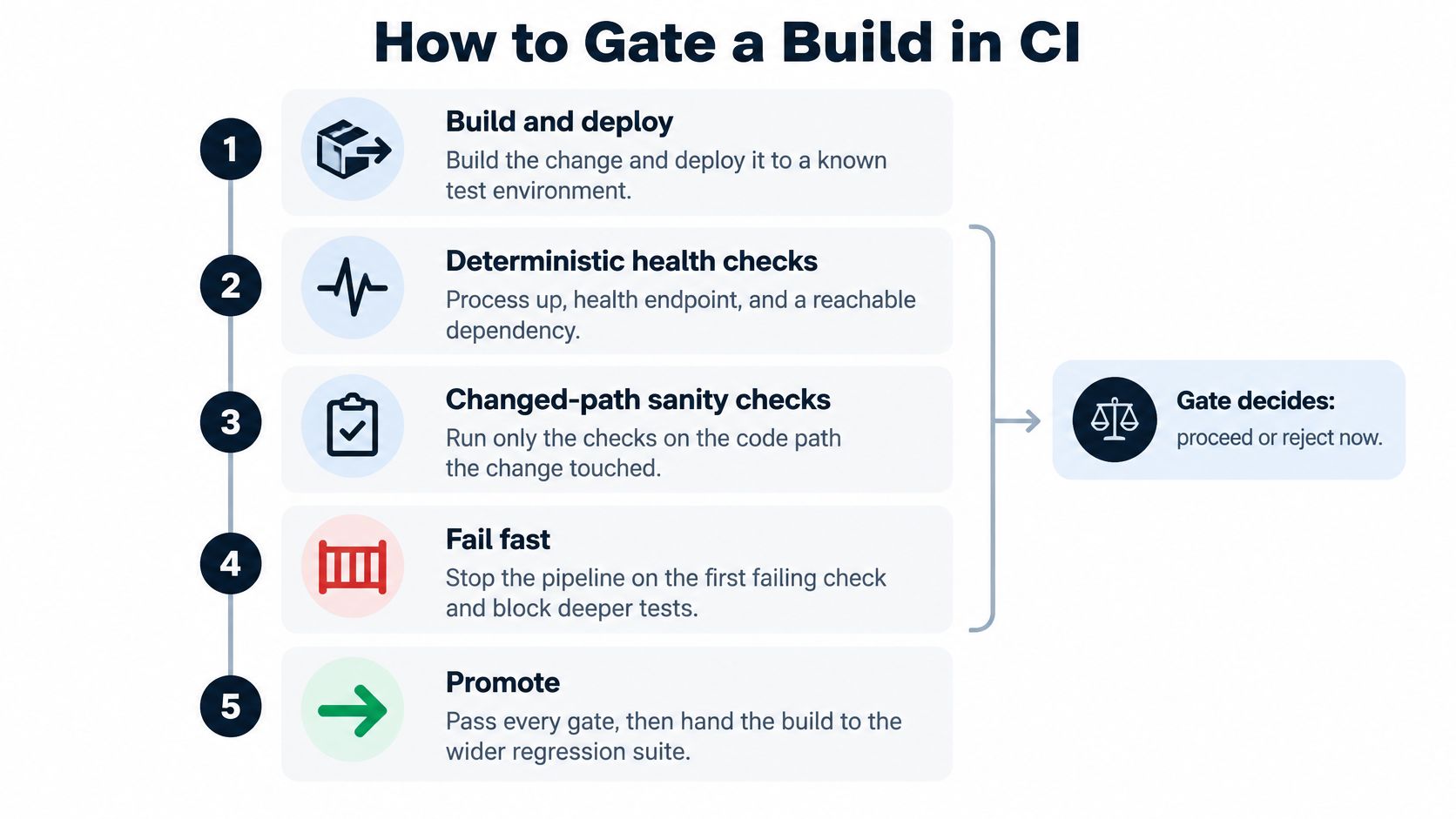
Treat the gate as a pipeline stage with explicit inputs, outputs, and ownership. A folder called sanity isn't enough if subsequent jobs start regardless of its result.
Make the execution reproducible
-
Build and deploy the candidate. Deploy an identifiable artifact to a known environment. Record the application version and configuration revision so investigators can reproduce what was tested.
-
Establish environment readiness. Check the process, health endpoint, and required dependency connectivity. If setup fails before product behavior can be exercised, publish an infrastructure-blocked result instead of reporting a checkout defect.
-
Execute the stable critical paths. Run the selected login, read, write, and essential integration checks. Use dedicated accounts and fixtures so another pipeline execution can't delete or modify the data underneath them.
-
Select the change-aware checks. Use component, API, contract, or feature-flag tags to add relevant cases. Publish the selected tags with the result so reviewers can see why the pipeline chose those tests.
-
Stop dependent work on failure. A confirmed product failure marks the gate failed and blocks promotion. Don't launch downstream suites that require the broken path; preserve completed evidence before cleanup runs.
-
Publish an actionable result. Include the outcome label, service, endpoint, environment, commit, and correlation ID. Attach request details, traces, or screenshots as appropriate, while redacting credentials and personal data.
Configure job dependencies in GitHub Actions, GitLab CI, or Jenkins so later stages require a successful gate. A reporting dashboard can display the result, but the pipeline itself must enforce the decision.
Control instability and execution cost
Use isolated test data and explicit synchronization. In Playwright, wait for the expected UI state or response rather than inserting a fixed sleep and hoping the application finishes in time.
Set an execution budget based on the feedback window your team needs. If a check repeatedly exceeds it, investigate expensive setup, move suitable assertions to the API layer, or place deeper coverage in regression. Don't remove the only protection for a critical journey merely to improve runtime.
Retry policy: Keep the original failure visible. A later success is additional evidence, not permission to rewrite the execution history.
Build these controls into CI/CD pipeline test automation for pull requests with deployed previews, merges, and releases. Our CI/CD integration embeds automated execution in the delivery pipeline so each release receives fast, reliable feedback.
Name a squad or individual responsible for maintaining the gate. A red result remains a blocker until that owner records the diagnosis, the repair, or an authorized exception with a reason.
Sanity Checks for Real Changes
Consider a checkout service with a payment-authorization bug. Before the fix, a customer's valid payment request is rejected. After the fix, the team needs evidence that authorization works without introducing duplicate charges or breaking recovery.

A payment fix needs more than a successful charge
Keep the stable gate, including login, a saved-payment-method read, and a successful sandbox charge. Add checks for the changed authorization rule, the provider request, duplicate submission handling, and recovery after a declined payment.
For the duplicate submission, assert the business outcome: the same payment intent mustn't create another charge. For recovery, verify that the customer can correct the payment method and continue without losing the order.
Leave receipt layouts, unaffected card-brand combinations, and historical-order browsing for later regression. Promote any of those checks into the early selection if the change touches their shared code.
A mobile login hotfix needs the mobile path
Suppose the API accepts credentials, but a mobile client loses its session after authentication. A backend-only check would miss the defect the team intends to repair.
Keep the normal baseline and add the actual mobile sign-in path, session persistence, and refresh behavior. Don't retest the entire catalog just because it's available in the same application. Keep unrelated product browsing and historical-order scenarios in regression unless session changes affect them.
A feature flag needs both states
A checkout experiment can pass when a test account receives the old experience while real customers receive a broken new path. Run baseline checkout, then explicitly select flag-on and flag-off accounts or configurations.
Verify the evaluated flag state in the test evidence. Otherwise, a passing scenario may never have exercised the intended branch.
The useful selection principle is likely side effects of this modification, not arbitrary test order. The ISTQB testing glossary provides terminology for distinguishing confirmation and regression testing; use that distinction to separate proving the repair from looking for unintended effects.
Tag tests by capability, map code areas to journeys, and record selection reasons. For teams introducing agents into engineering workflows, Grail Computer Labs' agentic delivery guide for CTOs offers related delivery context. Agent-generated changes should face the same evidence requirements as human-written changes.
A sanity failure blocks the build. A later targeted regression failure requires repair, quarantine of the affected change, or release under explicitly accepted risk, not an unexplained override.
Check Whether Your Suite Is Still a Sanity Test
Review the suite's behavior, not its name. A small suite can still be ineffective if it tests convenient endpoints instead of customer outcomes, and an impressive dashboard can hide a gate that nobody enforces.
Use this self-check during release planning:
- Placement. Does the gate run against the deployed candidate before expensive downstream testing?
- Representation. Does it demonstrate the essential customer journeys and the behavior this modification touched?
- Decision. Can a critical-path failure stop promotion, rather than merely notify a channel?
- Evidence. Can an engineer identify the failing build and inspect useful artifacts without reconstructing the run?
- Maintenance. Does someone remove obsolete checks and resist adding every new feature scenario?
Fix the decision before adding coverage
Several weak answers suggest that the suite has drifted. If it checks only startup, strengthen the customer outcomes. If it performs exhaustive feature validation, move nonessential depth into regression while preserving the early blocking checks.
Don't delete a test merely because it hasn't failed recently. First determine whether another check protects the same outcome and whether the failure it detects still matters to release readiness.
For the next release candidate, write down the business journeys that would stop shipment and map each to an automated check. Mark checks that protect none of those journeys for review, then run the candidate and record execution time, selected coverage, and any non-passing outcome.
Put the journey map on the release-review calendar. When the product adds a new payment provider, authentication method, or customer platform, the release policy needs an explicit decision about whether that boundary belongs in the gate.
AskYourQA offers a free 20-minute call to map your critical flows and show how fast an automation framework can be up and running. Bring your current release checklist to AskYourQA, and use the conversation to identify which journeys your software sanity test should protect and which failures should stop deployment.