
Automation testing in software testing is the use of software tools, scripts, and repeatable procedures to execute tests, compare actual results with expected results, and report failures with limited human intervention. It's how teams keep delivery fast without asking people to click through the same checks all day.
You're probably staring at a suite that's getting slower, flakier, and harder to trust, while releases still can't wait. That problem: automation only helps when it gives you reliable answers quickly enough to matter.
Table of Contents
- A Working Definition That Goes Beyond Replay
- How Automation Testing Evolved Into a System
- The Main Types of Automation Tests
- What to Automate and What to Keep Human
- Common Architecture and Framework Patterns
- The ROI of Automation Testing
- Common Pitfalls and How to Avoid Them
- Integrating Automation With CI/CD for Real Feedback
A Working Definition That Goes Beyond Replay
A release can stall because a selector changed, a fixture is invalid, or the test environment is unhealthy. If the suite cannot separate those causes, engineers stop treating its failures as useful quality signals.
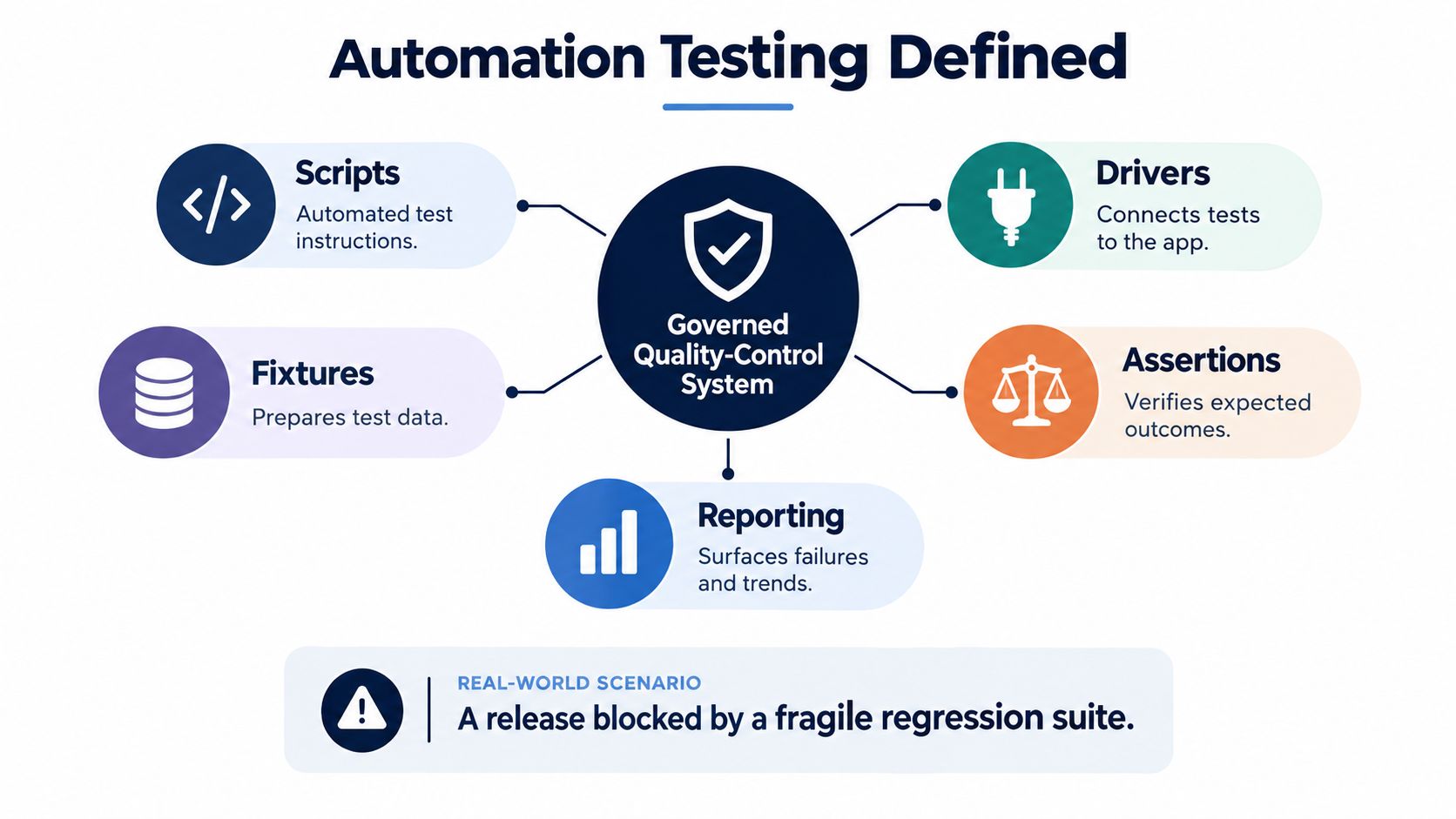
What automation testing is
Production-grade automation testing is a governed system, not browser replay. Scripts, drivers, fixtures, assertions, and reporting work together to check application behavior repeatedly with limited manual intervention. The scope can include unit, API, integration, end-to-end, mobile, performance, security, and regression checks, rather than only UI flows (source).
The objective is not to remove human testers. Automation handles deterministic questions, while people assess usability, ambiguity, risk, and behavior the requirements did not anticipate. A machine can confirm a defined expectation; a person must decide whether that expectation still reflects a useful product outcome, especially when AI-generated or AI-powered features produce variable results.
Practical rule: automate a test when it should answer the same question every run. Keep it human when the answer depends on judgment, context, or visual interpretation.
The mental model worth keeping
Automation is a decision-quality system, not a test-count system. A small set of stable checks around critical user journeys can protect releases better than a large collection of brittle scripts that engineers ignore.
For a CTO, the measure is operational: failures should identify a meaningful risk, runtime should fit the delivery cadence, and results should support a confident release decision. More checks do not guarantee better coverage if they create noise instead of evidence.
How Automation Testing Evolved Into a System
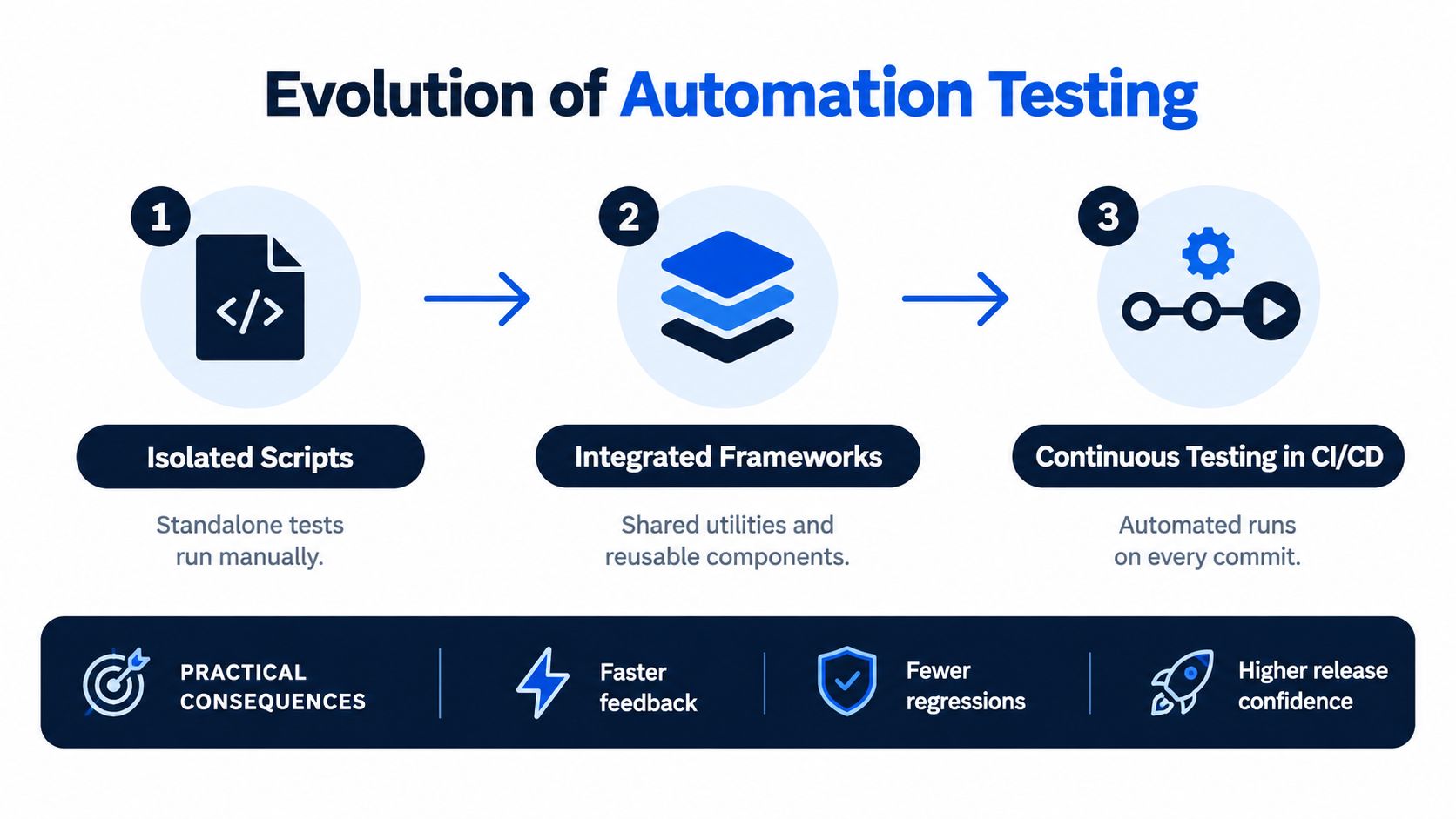
A release fails in staging. The team reruns the suite, three checks pass on retry, one still fails, and nobody is sure whether the problem is the product, the environment, or the test itself. That is the point where automation stops being a script collection problem and becomes a system design problem.
From isolated scripts to integrated frameworks
Early automation centered on standalone scripts that checked one component or flow at a time. As teams grew and delivery sped up, that approach broke down. Testing needed structure, repeatable documentation, and shared conventions, which is why formal test planning standards such as IEEE 829 mattered to the field's evolution (source).
In practice, the shift was architectural. Teams had to build common fixtures, stable setup and teardown, reusable test data, environment controls, and reporting that supported a decision instead of dumping logs. If a failed run cannot tell engineers what changed, where the break surfaced, and whether the failure belongs to the application or the test harness, the suite slows delivery instead of protecting it.
That matters even more for AI-generated and AI-powered features. Outputs can vary while still being acceptable, so the system has to separate deterministic checks from judgment-based evaluation instead of forcing both into the same pass-fail pattern.
Why CI/CD changed the standard
Modern automation sits inside continuous integration and delivery pipelines, where checks run on pull requests, merges, and releases because fast feedback improves delivery performance (source). The standard changed with the operating model.
Teams trust suites that finish in time, fail for real reasons, and point to the next action. Teams bypass suites that flake, stall pipelines, or produce noise. A good automation system shapes how engineers design changes, review risk, and release software. It improves decision quality, which is the only reason to automate in the first place.
The Main Types of Automation Tests
A production-grade stack isn't one kind of test. It's a set of layers, each catching a different class of defect and missing others by design.
Where each layer fits
Unit tests catch logic errors in isolated functions or methods. They're fast and precise, which makes them ideal for code paths where the failure is inside the code itself. They miss integration issues, environment drift, and broken assumptions between services.
API and contract tests validate service behavior at the protocol boundary. They're useful for authentication, payload shape, validation rules, and compatibility between components, and they catch issues that UI tests often hide behind a front end.
Integration tests verify that multiple components work together in a realistic environment. They're slower than unit tests, but they expose wiring problems, data flow issues, and dependency mismatches that never show up in isolated code paths.
End-to-end UI tests cover business-critical user journeys across the front end and back end. They're the best fit for high-value flows like sign-in, checkout, or account creation, but they're also the easiest to make brittle if you rely on them for everything.
Mobile tests validate platform-specific behavior across iOS and Android. They catch device-level issues, navigation problems, and app-specific regressions that desktop-focused suites won't see.
Performance and security tests tell you whether the system remains usable and safe under stress. DAST and SAST serve different purposes, one probing the running application and the other analyzing code earlier in the build process (source).
AI behavior validation is a newer category. It checks properties like factuality, safety, policy compliance, tool use, and resistance to adversarial inputs when the product output isn't identical every time.
Test layers and what they actually catch
| Layer | Catches | Typical Speed | Best Pipeline Stage |
|---|---|---|---|
| Unit | Logic defects, edge-case math, local regressions | Fastest | Pull request |
| API and contract | Payload, auth, compatibility, service rules | Fast | Pull request, merge |
| Integration | Wiring, dependency, data-flow issues | Medium | Merge, nightly |
| End-to-end UI | Critical user journeys, visible regressions | Slower | Merge, release |
| Mobile | Device and platform-specific defects | Medium to slow | Merge, release |
| Performance and security | Load issues, bottlenecks, vulnerabilities | Slower | Nightly, release |
| AI behavior | Safety, policy, factuality, tool-use errors | Variable | Release, monitoring |
The important point is not to force every defect into the same layer. Good teams place fast checks close to the code and reserve slow, expensive tests for the journeys that justify them.
What to Automate and What to Keep Human
The biggest mistake I see is treating automation as a percentage goal. Teams chase coverage for its own sake, then inherit a suite that's expensive to maintain and weak at decision-making.
A simple decision filter
Use four questions.
Business criticality. If a flow affects revenue, access, or trust, it deserves stronger automation. Login, checkout, payments, data validation, and API contracts are obvious candidates.
Execution frequency. Repeated checks repay the setup cost quickly. If a test runs on every build or every merge, automation usually earns its place.
Determinism. If the expected result is stable and measurable, automation fits. If the outcome depends on opinion, visual taste, or shifting product context, human review is still the better tool.
Cost of change. If the UI changes every sprint and a selector breaks every week, a brittle UI test is a bad investment until the layer below it is stable enough to support it.
Automate what is stable, frequent, and critical. Keep the ambiguous, visual, and exploratory work with people.
What usually belongs where
Stable smoke flows, API contracts, authentication, and payment journeys are strong automation candidates. Exploratory testing, usability review, and edge cases discovered during active product design are better left to humans, because those checks depend on judgment rather than strict pass or fail logic.
A risk-based model works better than a fixed automation target. If you want a practical framework for that, risk-based software testing is the right lens, because it forces the team to prioritize by impact instead of volume.
The payoff is cleaner. You stop asking, “How many tests can we automate?” and start asking, “Which checks give us the fastest, most trustworthy release decisions?”
Common Architecture and Framework Patterns
The code structure matters as much as the test idea. A clever suite with a messy architecture becomes a maintenance tax, while a simpler framework can stay useful for years.

The patterns teams actually use
Modular frameworks split test logic into reusable parts, which keeps large suites manageable when the product has many workflows.
Data-driven frameworks separate test logic from test data, which is helpful when the same scenario needs to run across many inputs or customer profiles.
Keyword-driven frameworks express actions in higher-level business language. They can help non-developers read the flow, but they often add complexity if the team overengineers them.
Page Object Model works well for UI automation because it keeps locators and page behavior in one place. That reduces selector churn when the interface changes, which is exactly why teams use it for front-end-heavy products.
Choosing the right fit
A small team with a stable product usually benefits from a lightweight modular setup. A larger team with many data combinations often gets more value from data-driven design. UI-heavy products need a strong page object layer, while keyword-driven approaches can make sense when the business wants readable test steps and the execution layer stays tightly controlled.
The key is to match the pattern to product change rate, team skill, and reporting needs. If the stack creates more abstraction than clarity, it's the wrong stack.
For a deeper look at how teams organize this work in practice, QA test automation is the broader operational problem, not just the choice of framework syntax.
The ROI of Automation Testing
A team can automate thousands of checks and still release with poor judgment. I see the payoff in a different place. Automation earns its budget when it improves release decisions, shortens feedback loops, and catches failures in the workflows that matter before customers hit them.
The financial case starts with escaped defects. A 2002 NIST study estimated that inadequate software testing infrastructure cost the U.S. economy between $22.2 billion and $59.5 billion annually, with more than half of that burden falling on end users through failures, workarounds, and disruption (source).
What leadership should measure
Automation is a risk-control mechanism as much as a developer convenience. The return shows up when critical defects are caught before customers see them, when regressions stop slipping into production, and when teams stop rechecking the same stable paths by hand every release.
That is why test-count metrics mislead executives. Track cycle time, defect escape rate, coverage of critical workflows, rerun frequency, and whether a pipeline failure gives the team an actionable diagnosis. Those measures show whether automation is improving decision quality, not just execution volume.
This matters even more for AI-generated and AI-powered products. In those systems, teams often face fast-changing outputs, probabilistic behavior, and product risk that does not fit neatly into a simple pass or fail script. Coverage has to reflect business risk and decision confidence, not just the number of checks in the suite.
Why more tests can still mean worse outcomes
The same pattern shows up in day-to-day operations. A large suite can still produce weak feedback if it is noisy, redundant, or built around brittle UI flows. AI-assisted test creation can speed up script production, but it does not fix poor test selection, weak assertions, unstable environments, or unclear release gates.
The ROI question comes down to signal. If automation helps your team trust releases sooner, reduce manual triage, and focus human attention where judgment is still required, it is paying for itself. If it mostly creates maintenance work and false alarms, it is still a cost center, even if the dashboard says coverage is growing.
Common Pitfalls and How to Avoid Them
Most automation failures come from nondeterminism. A test passes one run and fails the next, and nobody can tell whether the product changed or the test lied.
The flake problem is operational, not cosmetic
Google's testing guidance points to improper setup or cleanup, shared or invalid test data, timing dependencies, test-order dependence, resource contention, race conditions, memory leaks, and unresponsive systems as common causes of flaky behavior (source). Once a suite has that kind of noise, reruns go up, triage gets slower, and people start ignoring real failures.
The fix starts with isolation. Use hermetic environments where possible, reset state between cases, generate unique data, and wait on explicit application conditions instead of fixed sleeps. If you can't reproduce a failure cleanly, you can't trust the result.
What good hygiene looks like
- Capture failure evidence. Save screenshots, logs, traces, network events, and environment versions so someone can diagnose the failure without rerunning the test five times.
- Separate flake rate from product failure rate. Track inconsistent outcomes as a distinct problem, not as ordinary defects.
- Set removal deadlines for quarantined tests. Quarantine is a temporary containment step, not a parking lot.
- Treat brittle selectors as code smell. If the DOM changes break tests constantly, the page object or locator strategy needs work.
A flaky suite doesn't just waste time. It trains the team to distrust the pipeline.
This is also where over-automation hurts. If you automate low-signal paths just because they're easy to script, the suite gets bigger without getting better. Stability comes from pruning, not accumulation.
Integrating Automation With CI/CD for Real Feedback
Automation only matters when it changes how teams ship. If tests run in isolation and reports sit unread, the suite is theatre, not infrastructure.
Build the system around critical flows
Start by mapping the business-critical journeys, then assign test layers to each one. Fast checks belong on pull requests, broader regression runs belong on merges and releases, and slower validation belongs where it can add value without blocking every developer.
The delivery workflow should include framework design, pipeline execution, and reporting that surfaces risk clearly. If a failed run can't tell the team what changed, what broke, and whether the issue is likely product or test related, the pipeline isn't doing its job.
For a practical delivery view, what is CI CD pipeline is the backdrop that makes automation useful in the first place.
What real feedback looks like
The best setup is boring in the right way. Developers get quick signal on pull requests, QA sees coverage gaps before release, and leadership gets a readable view of release readiness instead of a wall of green checkmarks.
AskYourQA builds automated test systems that connect functional, API, mobile, security, and performance checks into CI/CD, which is one example of how teams can operationalize this model without treating automation as a side project. The larger lesson is straightforward, build the system first, then keep only the scripts that improve decisions.
AskYourQA designs automation systems around critical user journeys, CI/CD feedback, and maintainable frameworks, so your team gets signal instead of noise. If your current suite is brittle or too slow to trust, AskYourQA can help you map what to automate, what to keep human, and how to wire it into delivery.